
TabShelf
Save and manage your open tabs easily!
As of June 2026, TabShelf has 23 users and a 5.00/5 rating from 6 reviews in the Workflow & Planning category.
Usersup 155.6 percent+155.6%
23
23
Ratingno change0%
5.00
6 reviews
Reviewsno change0%
6
Version
1.6.0
Manifest V3
90-day change · In the last 90 days this extension 4 version updates, changed permissions.
History
7 snapshotsTracking since Apr 9, 2026.
View as table
| Date | Users | Rating | Reviews | Version |
|---|---|---|---|---|
| Apr 9, 2026 | 9 | 5.00 | 6 | 1.2.2 |
| Apr 19, 2026 | 9 | 5.00 | 6 | 1.3.0 |
| Apr 26, 2026 | 11 | 5.00 | 6 | 1.4.0 |
| May 9, 2026 | 15 | 5.00 | 6 | 1.4.0 |
| May 14, 2026 | 20 | 5.00 | 6 | 1.5.0 |
| May 20, 2026 | 21 | 5.00 | 6 | 1.5.0 |
| Jun 9, 2026 | 22 | 5.00 | 6 | 1.6.0 |
| Now | 23 | 5.00 | 6 | 1.6.0 |
Changelog
- May 9, 2026description
Stop losing your tabs. Stay focused and organized.

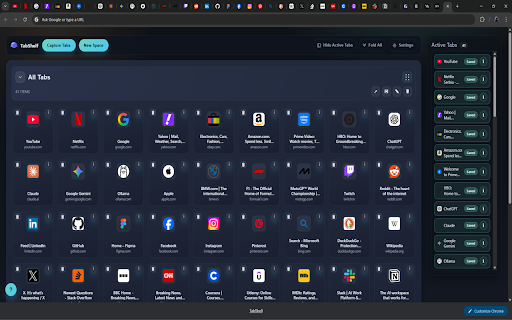
TabShelf is a lightweight Chrome extension designed to help you manage your tabs effortlessly. Save all your open tabs, organize them into groups, and restore them whenever you need, without the chaos.

Whether you're working across multiple projects or just browsing daily, TabShelf keeps everything structured and easy to access.

🚀 Key Features:

• Save all open tabs with a single click
• Organize tabs into meaningful groups (Work, Personal, Research)
• Restore your sessions instantly
• Clean and minimal interface
• No unnecessary complexity

💡 Why TabShelf?

Most tab managers try to do too much.

TabShelf focuses on simplicity, helping you quickly save and organize your tabs so you can stay productive without distractions.

🎯 Perfect for:

• Developers
• Researchers
• Students
• Anyone who works with many tabs daily

Privacy:
TabShelf stores data locally in your Chrome bookmarks and does not send your tab collections to a remote server.
Stop losing your tabs. Save, organize, and restore them in seconds.

TabShelf is a lightweight tab manager and session manager designed to help you stay focused without the chaos. Save all your open tabs, organize them into groups, and restore them anytime — quickly and effortlessly.

Whether you're working across multiple projects or just browsing daily, TabShelf keeps everything structured and easy to access.

🚀 Key Features:

• Save all open tabs with a single click
• Organize tabs into meaningful groups (Work, Personal, Research)
• Restore your sessions instantly
• Dynamic Save (optional auto-recovery for your tabs)
• Recover tabs after accidental close or crash
• Convert recovery snapshots into saved tab collections
• Built-in offline help and user manual
• Clean and minimal interface
• No unnecessary complexity

🧠 Dynamic Save (NEW)

TabShelf now includes an optional Dynamic Save mode that keeps a lightweight local recovery snapshot of your tabs.

• Automatically keeps your latest session safe
• Restore the most recent snapshot anytime
• Convert snapshots into permanent saved spaces
• Configurable safety checkpoints
• Full control with restore and history management

No sync, no cloud, no surprises — just reliable local recovery when you need it.

💡 Why TabShelf?

Most tab managers try to do too much.

TabShelf focuses on simplicity — helping you quickly save, organize, and recover your tabs so you can stay productive without distractions.

🎯 Perfect for:

• Developers
• Researchers
• Students
• Anyone working with many tabs daily

🔒 Privacy First

TabShelf stores your data locally in your browser bookmarks.

No remote servers.
No tracking.
No data collection.
- May 9, 2026permissions
tabs, storage, bookmarks
tabs, storage, bookmarks, alarms
- Apr 19, 2026description
TabShelf is a local-first new tab extension that helps you capture, organize, and revisit your open tabs without losing context.

Save current tabs into named spaces, keep related links grouped, and reopen everything in one click when you need it again. Drag tabs between spaces, reorder items, and keep your workspace clean while staying fast.

Key features:
- Capture open tabs into named spaces
- Create, rename, reorder, fold, and delete spaces
- Drag active tabs into spaces
- Open all links in a space with one click
- Import and export spaces as JSON
- Theme options: Dark, Light, and Auto
- Quick actions from the extension popup

Privacy:
TabShelf stores data locally in your Chrome bookmarks and does not send your tab collections to a remote server.
Stop losing your tabs. Stay focused and organized.

TabShelf is a lightweight Chrome extension designed to help you manage your tabs effortlessly. Save all your open tabs, organize them into groups, and restore them whenever you need, without the chaos.

Whether you're working across multiple projects or just browsing daily, TabShelf keeps everything structured and easy to access.

🚀 Key Features:

• Save all open tabs with a single click
• Organize tabs into meaningful groups (Work, Personal, Research)
• Restore your sessions instantly
• Clean and minimal interface
• No unnecessary complexity

💡 Why TabShelf?

Most tab managers try to do too much.

TabShelf focuses on simplicity, helping you quickly save and organize your tabs so you can stay productive without distractions.

🎯 Perfect for:

• Developers
• Researchers
• Students
• Anyone who works with many tabs daily

Privacy:
TabShelf stores data locally in your Chrome bookmarks and does not send your tab collections to a remote server.
Permissions & access
- Permissions
- tabsstoragebookmarksalarms
- Host access
- None declared
Screenshots



About
Stop losing your tabs. Save, organize, and restore them in seconds.

TabShelf is a lightweight tab manager and session manager designed to help you stay focused without the chaos. Save all your open tabs, organize them into groups, and restore them anytime — quickly and effortlessly.

Whether you're working across multiple projects or just browsing daily, TabShelf keeps everything structured and easy to access.

🚀 Key Features:

• Save all open tabs with a single click
• Organize tabs into meaningful groups (Work, Personal, Research)
• Restore your sessions instantly
• Dynamic Save (optional auto-recovery for your tabs)
• Recover tabs after accidental close or crash
• Convert recovery snapshots into saved tab collections
• Built-in offline help and user manual
• Clean and minimal interface
• No unnecessary complexity

🧠 Dynamic Save (NEW)

TabShelf now includes an optional Dynamic Save mode that keeps a lightweight local recovery snapshot of your tabs.

• Automatically keeps your latest session safe
• Restore the most recent snapshot anytime
• Convert snapshots into permanent saved spaces
• Configurable safety checkpoints
• Full control with restore and history management

No sync, no cloud, no surprises — just reliable local recovery when you need it.

💡 Why TabShelf?

Most tab managers try to do too much.

TabShelf focuses on simplicity — helping you quickly save, organize, and recover your tabs so you can stay productive without distractions.

🎯 Perfect for:

• Developers
• Researchers
• Students
• Anyone working with many tabs daily

🔒 Privacy First

TabShelf stores your data locally in your browser bookmarks.

No remote servers.
No tracking.
No data collection.
Technical
- Version
- 1.6.0
- Manifest
- V3
- Size
- 102KiB
- Min Chrome
- 88
- Languages
- 1
- Featured
- No
Metadata
- ID
- omgpocbcefnbgloechiijkddfkilabgn
- Developer ID
- uef43545811d40ab9d9f429e52e0c8815
- Developer Email
- [email protected]
- Created
- Mar 15, 2026
- Last Updated (Store)
- May 14, 2026
- Last Scraped
- Jun 9, 2026
- Website
- —
- Support URL
- https://github.com/TheDulli/tabshelf-support
Similar extensions
Alternatives to TabShelf, ranked by description similarity.

TabShab – Search Through 100+ Tabs Instantly
Easily Search and Organize Tabs, the best tool for Tab Management, enhancing your productivity and saving time.
52
★ 5.0

TabShelf
The minimal, privacy-focused tab manager. Organize tabs into categories, save RAM, and declutter your browser.
10
★ 5.0

Spaces
Spaces is a Chrome extension that helps you organize your browsing with multiple Spaces and folders. Save, manage, and restore your…
157
★ 5.0

STACKTABS
Save, organize and restore tabs and windows exactly where you left off. Local session manager with spaces, reminders and quick save.
5
★ 5.0

Shark Tabs
Save and restore tab sessions (sync across devices if Chrome Sync is enabled).
6
TitleTab - Speed Dial Dashboard
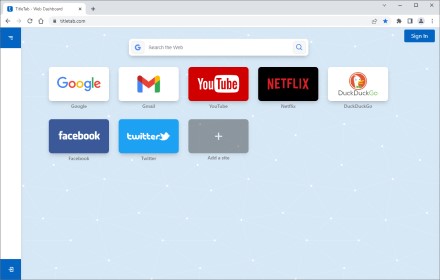
TitleTab Extension: speed dial dashboard, prevent accidental tab closure, and easy open tab saving.
1.0K
★ 4.4

TabSpace – Workspace Manager
Organize your browsing into workspaces. Launch predefined tab sets in one click with Drift Mode.
—

New Collections
Save and restore tabs
224
★ 3.0
Data sourced from the Chrome Web Store · last verified Jun 9, 2026.