
Design Mode - Page's Rich Text Editor
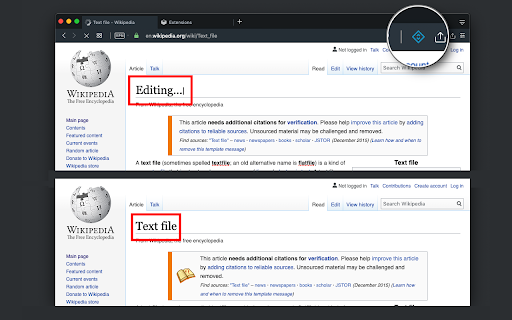
Edit any page's content by switching to design mode, where you can modify the content and drag images around like a Word Editor
As of May 2026, Design Mode - Page's Rich Text Editor has 3,000 users and a 4.73/5 rating from 15 reviews in the Developer Tools category.
Usersno change0%
3.0K
3,000
Ratingno change0%
4.73
15 reviews
Reviewsno change0%
15
Version
0.2.4
Manifest V3
Permissions & access
- Permissions
- storagenotificationsactiveTabscripting
- Host access
- None declared
Screenshots

About
This extension modifies the current page's attributes to act like a content edible document (Similar to MS Word, or Open Office). This allows the user to:
1. Edit the page content
2. Drag and drop assets
3. Remove elements that cause chaos on the page
4. Insert <div>, <pre>, <paragraph>, and heading elements.
5. Convert font styling to bold or italic.
6. Add a link to the selected text.
7. Insert bulleted and numbered lists.
8. Increase and decrease indentation.
9. Insert an image.
10. Convert selected text to a blockquote.
11. Turn spellcheck on and off.
12. Remove formatting.

With this extension, you can edit the entire document and when it is ready, toggle back to the read-only mode (normal operation mode). The modified document can be printed or saved like any page.

Usage Instruction:
1. To enable the extension, press the toolbar button once. When the document is editable, the toolbar button is blue, and you will get a desktop notification
2. To switch back to the normal mode, press the toolbar button one more time. In the normal mode, the toolbar color is gray.

Notes:
1. You can save the modified document in HTML or MHTML or print it. To save in MHTML you will need to install an extension.
2. To change the formatting of a text into bold, select the desired section, and press Ctrl + B or Command + B. For italics, press Ctrl + I or Command + I. Alternatively, the extension inserts a helper toolbar so that you can access the rich text editing tools from a floating panel.
Technical
- Version
- 0.2.4
- Manifest
- V3
- Size
- 64.37KiB
- Min Chrome
- 88
- Languages
- 14
- Featured
- No
Metadata
- ID
- omdilgkadhcoliihkpbgpkdcpogkbhah
- Developer ID
- ud5508f939bc9b6cceaeb493519261502
- Developer Email
- [email protected]
- Created
- Oct 1, 2019
- Last Updated (Store)
- Feb 19, 2025
- Last Scraped
- May 27, 2026
- Website
- —
- Support URL
- https://add0n.com/design-mode.html
- Privacy Policy
- —
Similar extensions
Alternatives to Design Mode - Page's Rich Text Editor, ranked by description similarity.

Page Edit
Make any webpage into a content editable document and modify it via toolbar popup!
30.0K
★ 4.6

Right-click contenteditable
Right click on an element and press "Add contenteditable" to add a contenteditable attribute to it. Click again to remove it.
165
★ 5.0

Edit Anything by Slash Mark
Instantly turn any webpage editable. Modify text directly on pages with a single click. Simple, fast, and lightweight.
106

QuickPageEdit
Edit any text on the page with one click (including Shadow DOM)
18
Web Edit
Easily edit websites temporarily with a click of a button.
6.0K
★ 3.5
Edit with Notepad++
Edit content of text area elements, or inner and outer HTML of node elements in Notepad++ text editor with real-time updates
20.0K
★ 3.5

Edit Any Website Live
Edit any website live in one click. Toggle Design Mode to edit text on any page, save and copy HTML, undo - no code needed.
95

Focus: The Elements - DOM Inspector & Editor
DOM Inspector & Editor, inspect and edit HTML element styles directly on any page.
63
★ 5.0
Data sourced from the Chrome Web Store · last verified May 27, 2026.