
Notion Syntax Highlighter
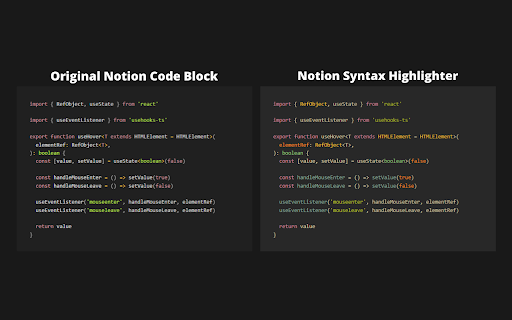
Improves Notion's code blocks syntax highlighting + adds tons of theme options
As of June 2026, Notion Syntax Highlighter has 903 users and a 5.00/5 rating from 6 reviews in the Workflow & Planning category.
Usersdown 0.9 percent−0.9%
903
903
Ratingno change0%
5.00
6 reviews
Reviewsno change0%
6
Version
0.0.11
Manifest V3
History
11 snapshotsTracking since Apr 1, 2026.
View as table
| Date | Users | Rating | Reviews | Version |
|---|---|---|---|---|
| Apr 1, 2026 | 911 | 5.00 | 6 | 0.0.11 |
| Apr 9, 2026 | 897 | 5.00 | 6 | 0.0.11 |
| Apr 19, 2026 | 925 | 5.00 | 6 | 0.0.11 |
| Apr 25, 2026 | 913 | 5.00 | 6 | 0.0.11 |
| May 2, 2026 | 887 | 5.00 | 6 | 0.0.11 |
| May 9, 2026 | 899 | 5.00 | 6 | 0.0.11 |
| May 13, 2026 | 892 | 5.00 | 6 | 0.0.11 |
| May 19, 2026 | 903 | 5.00 | 6 | 0.0.11 |
| May 25, 2026 | 912 | 5.00 | 6 | 0.0.11 |
| Jun 1, 2026 | 880 | 5.00 | 6 | 0.0.11 |
| Jun 8, 2026 | 876 | 5.00 | 6 | 0.0.11 |
| Now | 903 | 5.00 | 6 | 0.0.11 |
Permissions & access
- Permissions
- storage
- Host access
- None declared
Screenshots


About
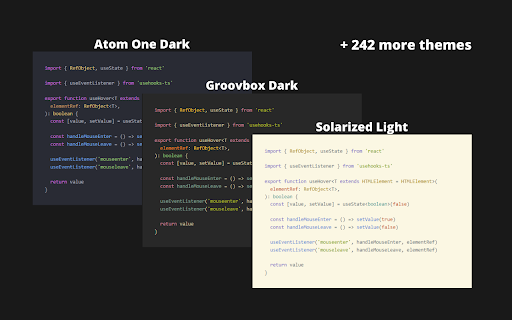
🖼️ 245 available themes
🔧 Improved syntax highlighting
🩹 Minor fixes for code blocks
🔓  Open source & free - you can find github repo here:
       https://github.com/JSerwatka/notion-syntax-highlighter
_________________________________________________________

                               🛠️ HOW DOES IT WORK
_________________________________________________________

1. Upon installing the extension, the default theme (Gruvbox dark) will be automatically selected.
2. To change the theme, simply click on the extension's icon and select a different theme.
3. For convenience, only a few themes are visible in the main theme dropdown. To add more, click below the dropdown or right-click on the extension's icon and choose the "Options" menu. On the options page, select the themes you want to appear in your default list.

_________________________________________________________

                                🦁 FOR BRAVE USERS
_________________________________________________________

To make this extension work on Brave browser, please follow this instruction: https://github.com/JSerwatka/notion-syntax-highlighter#for-brave-users

_________________________________________________________

                                    🔐 PRIVACY POLICY
_________________________________________________________

Notion Syntax Highlighter extension does not analyze or send any user data. All the essential data needed for the extension to function, such as your selected themes and color scheme preferences, are stored locally within your browser.


_________________________________________________________

                          🎁 SUPPORT & CONTRIBUTE
_________________________________________________________

This extension requires thorough testing, so if you encounter any issues, please report them as bugs here:
https://github.com/JSerwatka/notion-syntax-highlighter/issues

You can support this project by:
❤️ Rating it
🤗 Proposing changes and contributing to its development
🐛 Reporting any bugs you encounter


_________________________________________________________

                                    🐛 KNOWN ISSUES
_________________________________________________________

Up-to-date issue list can be found here:
https://github.com/JSerwatka/notion-syntax-highlighter#known-issues

_________________________________________________________

                                🚀 Future Improvements
_________________________________________________________

- Resolve performance issues related to editing large code blocks
- Add shadow and rounded borders (configurable in settings)
- Add line numbers (configurable in settings)
- Allow line height customization (configurable in settings)
- Support prettier and other code formatters
- Simplify the process of adding new themes
Technical
- Version
- 0.0.11
- Manifest
- V3
- Size
- 169KiB
- Min Chrome
- 88
- Languages
- 1
- Featured
- No
Metadata
- ID
- omapdeaklaaabcegmdikkciplbgignak
- Developer ID
- ub114b397d70ac4050b2be8344ed449d9
- Developer Email
- [email protected]
- Created
- Jul 8, 2023
- Last Updated (Store)
- Mar 5, 2026
- Last Scraped
- Jun 8, 2026
- Website
- —
Similar extensions
Alternatives to Notion Syntax Highlighter, ranked by description similarity.
Tailored Notion
Redesign Notion the way you want
10.0K
★ 4.7

Palette for Notion - Customize Colors, Fonts & Themes
Customize Notion colors & fonts with beautiful presets, smart themes, and live preview. Make your workspace feel like you.
148
★ 4.9

Highlight Magic
Enables user to highlight words
8.0K
★ 4.1

My Canned Notes
A Chrome extension for managing notes and canned responses with advanced customization.
136
★ 5.0

Quick Notes Pro
Take notes quickly from the browser with rich text, save images, videos, make lists or save your code with highlight functionality!
78
★ 5.0

Google Keep - Full Screen Edit
Makes note editing take up the full browser window
20.0K
★ 4.6

Leetcode Custom Themes
Allows you to change Leetcode Code Editor Themes
794
★ 4.7

NoteTab.app
NoteTab.app is a Privacy-First NotePad for Google Chrome with robust context search, themes, and export features.
35
Data sourced from the Chrome Web Store · last verified Jun 8, 2026.