
How I Spend My Time On The Internet
How I spend my time on the internet.
As of May 2026, How I Spend My Time On The Internet has 51 users in the Productivity category.
Usersdown 25.0 percent−25.0%
51
51
Ratingno change0%
—
— reviews
Reviewsno change0%
—
Version
0.0.2
Manifest V3
History
3 snapshotsTracking since Apr 1, 2026.
View as table
| Date | Users | Rating | Reviews | Version |
|---|---|---|---|---|
| Apr 1, 2026 | 68 | — | — | 0.0.2 |
| Apr 30, 2026 | 71 | — | — | 0.0.2 |
| May 27, 2026 | 52 | — | — | 0.0.2 |
| Now | 51 | — | — | 0.0.2 |
Permissions & access
- Permissions
- storage
- Host access
- None declared
Screenshots

About
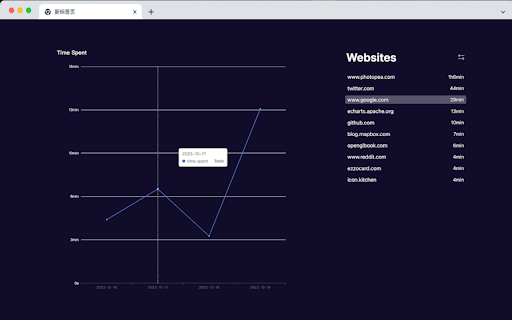
A plugin that helps you track how your time are spent on the internet.

**Note: Click the plugin icon to see visualized analytics of your time spent on the internet!**

Key Features:
    - Accurate Time Tracking: Accurately records the duration of your visit to every website.
    - Visualized Analytics: Enjoy visually appealing graphics and charts that present data in an easy-to-understand format.
    - User Privacy: The plugin is completely offline, so your data is 100% safe.
    - Export/Import Support: Your data can be exported to a json file, which you can do further analysis of. And you can import old time stats through uploading a json file.

How the plugin works?
- Every 5 seconds, the plugin will send a message to it's background page to collect the time spent on current tab.
- If current tab is hidden, which means you are in another tab, no data will be collected.
- If current tab is at front, but not focused and no activity was found in the last 30 seconds, the plugin will stop collecting.
Technical
- Version
- 0.0.2
- Manifest
- V3
- Size
- 350KiB
- Min Chrome
- 88
- Languages
- 1
- Featured
- Yes
Metadata
- ID
- olomobdblljkgdkbnklmfcihdhlpiekn
- Developer ID
- u983f351e41917c832265d85fb663b00a
- Developer Email
- [email protected]
- Created
- Oct 23, 2023
- Last Updated (Store)
- Oct 25, 2023
- Last Scraped
- May 27, 2026
- Website
- —
- Support URL
- —
Similar extensions
Alternatives to How I Spend My Time On The Internet, ranked by description similarity.

Tab Time Tracker
Track tab usage time by domain
2

TabTime – Time Spent on Tab
Track how long you spend on each tab or site.
8

Browselytics
Track how long sites stay open, active, or in background. View browsing analytics locally with no data leaving your device.
2

Smart Time Tracker
Track time spent on each website per day. Set daily limits and auto-block distracting sites after time is up.
10

Site Time Tracker
Track time spent on different websites
21

URL Time Tracker
Track time spent on different websites
16

Active Tab Time Tracker
Track Active Tab browser activity Time and save Notes.
11
★ 5.0

Tab Time Tracker
Track and analyze your time spent on active tabs. Monitor your browsing habits locally, without sending your data anywhere.
54
★ 5.0
Data sourced from the Chrome Web Store · last verified May 27, 2026.