
Overtab
Highlight, hover, or speak to get instant explanations: all on-device with Gemini Nano.
As of June 2026, Overtab has 10 users in the Productivity category.
Usersdown 9.1 percent−9.1%
10
10
Ratingno change0%
—
— reviews
Reviewsno change0%
—
Version
1.0.0
Manifest V3
History
6 snapshotsTracking since Apr 1, 2026.
View as table
| Date | Users | Rating | Reviews | Version |
|---|---|---|---|---|
| Apr 1, 2026 | 11 | — | — | 1.0.0 |
| Apr 18, 2026 | 10 | — | — | 1.0.0 |
| May 3, 2026 | 11 | — | — | 1.0.0 |
| May 12, 2026 | 11 | — | — | 1.0.0 |
| May 25, 2026 | 12 | — | — | 1.0.0 |
| Jun 6, 2026 | 9 | — | — | 1.0.0 |
| Now | 10 | — | — | 1.0.0 |
Permissions & access
- Permissions
- activeTabscriptingstoragecontextMenussidePanel
- Host access
- None declared
Screenshots


About
Welcome to Overtab: Your On-device AI Browsing Assistant!

Built for the 𝗚𝗼𝗼𝗴𝗹𝗲 𝗖𝗵𝗿𝗼𝗺𝗲 𝗕𝘂𝗶𝗹𝘁-𝗶𝗻 𝗔𝗜 𝗖𝗵𝗮𝗹𝗹𝗲𝗻𝗴𝗲 𝟮𝟬𝟮𝟱, Overtab transforms how you read and understand web content using Chrome’s on-device AI (Gemini Nano) - with complete privacy.

𝐖𝐇𝐀𝐓 𝐈𝐓 𝐃𝐎𝐄𝐒:

Overtab enhances your web experience with intelligent AI tools:

• Explain complex topics instantly
• Simplify technical jargon into plain English
• Translate content into 6 languages (Spanish, French, German, Italian, Japanese, Hindi)
• Proofread text and fix grammar
• Describe images using AI vision
• Chat with AI about page content
• Discover related articles and resources automatically
• Access your history anytime

𝐏𝐑𝐈𝐕𝐀𝐂𝐘-𝐅𝐈𝐑𝐒𝐓 𝐀𝐈:

PRIMARY: On-Device Processing.
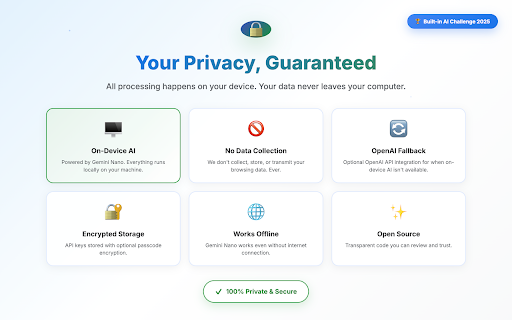
All processing stays local on your device: no tracking, no analytics, no data collection. Works offline once the model is downloaded.

OPTIONAL: OpenAI Fallback.
If on-device AI isn't available, you can optionally use your own OpenAI API key. You control your data, and API keys are encrypted locally.

𝐇𝐎𝐖 𝐈𝐓 𝐖𝐎𝐑𝐊𝐒:

𝐅𝐢𝐫𝐬𝐭-𝐭𝐢𝐦𝐞 𝐒𝐞𝐭𝐮𝐩:
1. Install Overtab from Chrome Web Store
2. Enable Gemini Nano in chrome://flags, or add your OpenAI API key in settings.
3. Restart Chrome if using Gemini Nano

𝐔𝐬𝐢𝐧𝐠 𝐎𝐯𝐞𝐫𝐭𝐚𝐛:
1. Highlight text on any page.
2. Choose your action (Explain, Simplify, Translate, or Proofread)
4. Results appear instantly in the sidebar
5. Continue the conversation with AI chat for follow-up questions

Additional Features:
- Right-click any image → "Describe with Overtab" for AI-generated descriptions
- Click "Similar Links" in the sidebar to discover related resources
- Access your history anytime by clicking the Overtab extension icon
- Toggle hover tooltips on/off in settings (when enabled, hover over text for quick explanations)

𝐂𝐇𝐑𝐎𝐌𝐄 𝐁𝐔𝐈𝐋𝐓-𝐈𝐍 𝐀𝐈 𝐀𝐏𝐈s:

Overtab showcases Chrome's revolutionary Built-in AI capabilities:
- 𝐋𝐚𝐧𝐠𝐮𝐚𝐠𝐞𝐌𝐨𝐝𝐞𝐥 𝐀𝐏𝐈 - for intelligent explanations and chat
- 𝐒𝐮𝐦𝐦𝐚𝐫𝐢𝐳𝐞𝐫 𝐀𝐏𝐈 - for quick content summaries
- 𝐓𝐫𝐚𝐧𝐬𝐥𝐚𝐭𝐨𝐫 𝐀𝐏𝐈 - for fast on-device translation (28x faster)
- 𝐑𝐞𝐰𝐫𝐢𝐭𝐞𝐫 𝐀𝐏𝐈 - for text simplification
- 𝐏𝐫𝐨𝐨𝐟𝐫𝐞𝐚𝐝𝐞𝐫 𝐀𝐏𝐈 - for grammar checking

This demonstrates the power of on-device AI for privacy-preserving, fast, and intelligent web experiences.

𝐏𝐄𝐑𝐅𝐄𝐂𝐓 𝐅𝐎𝐑:

Students · Researchers · Professionals · Non-native speakers · Anyone who reads a lot online

𝐑𝐄𝐐𝐔𝐈𝐑𝐄𝐌𝐄𝐍𝐓𝐒:

𝐅𝐨𝐫 𝐎𝐧-𝐃𝐞𝐯𝐢𝐜𝐞 𝐀𝐈 (𝐑𝐞𝐜𝐨𝐦𝐦𝐞𝐧𝐝𝐞𝐝):
- Chrome 129 or newer
- Enable "Prompt API for Gemini Nano" in chrome://flags
- Works completely offline after model download

𝐅𝐨𝐫 𝐎𝐩𝐞𝐧𝐀𝐈 𝐈𝐧𝐭𝐞𝐠𝐫𝐚𝐭𝐢𝐨𝐧 (𝐎𝐩𝐭𝐢𝐨𝐧𝐚𝐥):
- Any Chrome version
- Your own OpenAI API key
- Internet connection required

𝐊𝐄𝐘 𝐅𝐄𝐀𝐓𝐔𝐑𝐄𝐒

✓ 100% on-device AI with Gemini Nano
✓ Optional OpenAI API integration
✓ Explanations, summaries, translations
✓ Image descriptions & resource discovery
✓ Smart hover tooltips & history
✓ Privacy-first design · No data collection
✓ Open source & transparent

𝐎𝐏𝐄𝐍 𝐒𝐎𝐔𝐑𝐂𝐄:

Overtab is 100% open source. Review our code, contribute, or report issues:
Github: https://github.com/riyanshibohra/Overtab

𝐏𝐑𝐈𝐕𝐀𝐂𝐘 & 𝐒𝐔𝐏𝐏𝐎𝐑𝐓:

Privacy Policy: https://github.com/riyanshibohra/Overtab/blob/main/PRIVACY.md
Support: https://github.com/riyanshibohra/Overtab/issues
Email: [email protected]

Experience the future of web reading with AI that respects your privacy!
Technical
- Version
- 1.0.0
- Manifest
- V3
- Size
- 87.14KiB
- Min Chrome
- 88
- Languages
- 1
- Featured
- No
Metadata
- ID
- oloejollcmhnbacdkfgbdlgcgbeegcje
- Developer ID
- u5e2310c2403949660d4d224388e501f7
- Developer Email
- [email protected]
- Created
- Oct 15, 2025
- Last Updated (Store)
- Oct 17, 2025
- Last Scraped
- Jun 6, 2026
- Website
- —
Similar extensions
Alternatives to Overtab, ranked by description similarity.

Omni AI
All-in-One AI Assistant powered by AI Models - Writing enhancement, quick actions, and smart utilities
35
★ 5.0

ReadingBuddy
Your AI reading companion - highlight any text for instant explanations
2

Notabilia AI - Local AI Assistant
100% local AI assistant powered by Gemma 3n. Zero cost, runs entirely in your browser, maximum privacy.
15

Prompt Enhancer
Enhance and craft AI prompts with Gemini Nano — chat, edit, and copy on ChatGPT, Gemini, Claude, and Perplexity
32
★ 5.0

Quick-Insight
Get instant AI-powered insights for any text
7
★ 5.0

Dude - AI Browser Assistant
AI-powered browser assistant for summarizing, translating, and validating web content
12

Smart Sidebar: Chat GPT, Claude & DeepSeek
Supercharge Your Browser with the AI Sidebar powered by ChatGPT, Claude Sonnet & DeepSeek AI
400.0K
★ 4.6

Free Gemini AI Sidebar Assistant
Free AI sidebar assistant floating on every webpage, ready to summarize, translate, search, write and answer when you ask.
13
Data sourced from the Chrome Web Store · last verified Jun 6, 2026.