
Profilissimo
Open the current tab or any link in a different Chrome profile
As of June 2026, Profilissimo has 7 users and a 5.00/5 rating from 2 reviews in the Functionality & UI category.
Usersup 133.3 percent+133.3%
7
7
Ratingno change0%
5.00
2 reviews
Reviewsno change0%
2
Version
1.0.0
Manifest V3
History
9 snapshotsTracking since Apr 1, 2026.
View as table
| Date | Users | Rating | Reviews | Version |
|---|---|---|---|---|
| Apr 1, 2026 | 3 | 5.00 | 2 | 1.0.0 |
| Apr 17, 2026 | 3 | 5.00 | 2 | 1.0.0 |
| Apr 27, 2026 | 8 | 5.00 | 2 | 1.0.0 |
| May 5, 2026 | 9 | 5.00 | 2 | 1.0.0 |
| May 10, 2026 | 8 | 5.00 | 2 | 1.0.0 |
| May 16, 2026 | 23 | 5.00 | 2 | 1.0.0 |
| May 22, 2026 | 16 | 5.00 | 2 | 1.0.0 |
| Jun 4, 2026 | 7 | 5.00 | 2 | 1.0.0 |
| Jun 10, 2026 | 5 | 5.00 | 2 | 1.0.0 |
| Now | 7 | 5.00 | 2 | 1.0.0 |
Permissions & access
- Permissions
- contextMenusidentityidentity.emailnativeMessagingstoragetabs
- Host access
- None declared
Screenshots



About
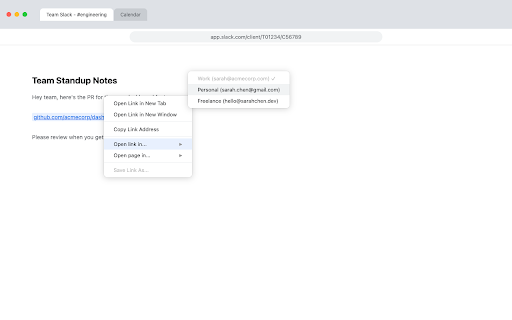
If you use multiple Chrome profiles — say one for work and one for personal — you've hit this: a link opens in the wrong profile. You click "Switch to [Other Profile]" but Chrome opens a blank tab instead of carrying the URL over. So you copy the URL, switch profiles, paste it, and close the old tab. Every. Single. Time.

Profilissimo lets you transfer any tab to another Chrome profile in one click. The URL opens in the right profile and the source tab closes automatically.

Three ways to transfer:
• Click the Profilissimo icon in your toolbar and pick a profile
• Right-click any link → "Open link in..." → pick a profile
• Right-click a page → "Open page in..." → pick a profile

Features:
• Set a default profile so your most common transfer is always one click away
• Current profile is clearly marked so you never accidentally transfer to the same profile
• Profiles are listed by their Chrome profile name and email for easy identification
• Settings sync across all your Chrome profiles — set it once, it works everywhere

Requirements:
Profilissimo uses a lightweight helper app to communicate with Chrome. A one-line install command is shown when you first install the extension. Currently supports macOS (Apple Silicon).

OPEN SOURCE
Profilissimo is fully open source. Browse the code, report issues, or build from source:
https://github.com/lectops/profilissimo
Technical
- Version
- 1.0.0
- Manifest
- V3
- Size
- 192KiB
- Min Chrome
- 88
- Languages
- 1
- Featured
- No
Metadata
- ID
- olhphbhieleagngagocedaildgefdmni
- Developer ID
- u4a88b7ed34eaff69bdef5b0f893baaf6
- Developer Email
- [email protected]
- Created
- Mar 24, 2026
- Last Updated (Store)
- Mar 24, 2026
- Last Scraped
- Jun 10, 2026
- Website
- —
- Support URL
- —
Data sourced from the Chrome Web Store · last verified Jun 10, 2026.