
VariabURL
Replace named variables in URLs before navigation. This is particularly useful for powerful, variable bookmarks.
As of May 2026, VariabURL has 11 users and a 5.00/5 rating from 2 reviews in the Functionality & UI category.
Usersno change0%
11
11
Ratingno change0%
5.00
2 reviews
Reviewsno change0%
2
Version
1.0.1
Manifest V3
History
2 snapshotsTracking since Apr 1, 2026.
View as table
| Date | Users | Rating | Reviews | Version |
|---|---|---|---|---|
| Apr 1, 2026 | 11 | 5.00 | 2 | 1.0.1 |
| May 27, 2026 | 12 | 5.00 | 2 | 1.0.1 |
| Now | 11 | 5.00 | 2 | 1.0.1 |
Permissions & access
- Permissions
- webNavigationstorage
- Host access
- None declared
Screenshots
About
# Variable URL

Do you have a set of links with a common, but variable, component? Consider the following table:

||one url|another url|
|--|--|--|
|1|someuniversity.edu/students/AdamApplegate/summary|someuniversity.edu/students/AdamApplegate/grades/1|
|2|someuniversity.edu/students/BarbaraBillings/summary|someuniversity.edu/students/BarbaraBillings/grades/1|

If you want to bookmark a link for the student summary, and another link for the student's grade on the first assignment, you will end up needing to duplicate those bookmarks for each student. This quickly becomes infeasible to the point that bookmarks are dismissed as not a useful approach to navigating these pages. However, if there is not an admin panel, some use cases may not have a better option either.

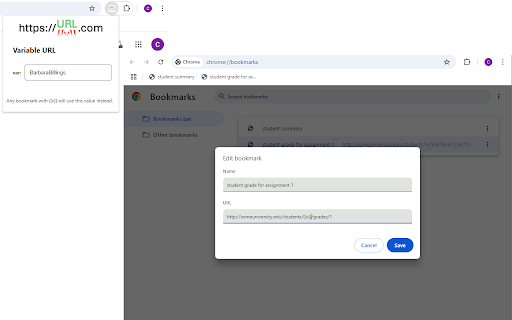
With Variable URL, you can bookmark the set of pages once, and define the variable component inside of a chrome extension.

## How To Use

First, go to `chrome://extensions`. Search for and add VariabURL.

In the (normal, existing) chrome bookmark manager, add or edit bookmarks to replace the variable component with `{{v}}`. Extending the example above, these bookmarks might be:

- `someuniversity.edu/students/{{v}}/summary`
- `someuniversity.edu/students/{{v}}/grades/1`

Using the extensions widget to the right of the address bar in chrome, select the VariabURL extension, and enter a value for the variable. Be sure to hit `Enter`, `Tab`, or otherwise click outside of the text box to confirm the value.

You're ready to go! Your links will now use the value defined in the VariabURL extension whenever navigating to a URL with `{{v}}` in it. From a practical perspective, this is mainly bookmarks, but any links or redirects constructed this way will use the variable value as well. If you are having unexpected behavior outside of the use of your bookmarks based on a URL including `{{v}}` in a literal sense, you may need to disable the extension.
Technical
- Version
- 1.0.1
- Manifest
- V3
- Size
- 40.89KiB
- Min Chrome
- 88
- Languages
- 1
- Featured
- No
Metadata
- ID
- olhldbnbedakpabbgoafpblligkfecia
- Developer ID
- u458c459d411a225dd03b49a0771eeeb9
- Developer Email
- [email protected]
- Created
- Oct 22, 2024
- Last Updated (Store)
- Oct 22, 2024
- Last Scraped
- May 27, 2026
- Website
- —
- Support URL
- —
Similar extensions
Alternatives to VariabURL, ranked by description similarity.

Sharp redirector for external links
Auto redirect for external links from youtube, telegram, facebook, linkedin... and what you added.
20

VisuaLinks – Visual Organizer for Chrome Bookmarks, Tabs, History & More
Visually organize links with icons,GIFs and backgrounds to boost clarity, usability and make your collection fun and easy to explore
11

Vintage Quick URL Copy
Copy the current tab URL instantly with a single click in a vintage-styled popup.
1

Quick Link Saver
Save and organize your frequently used links for quick access from the Chrome toolbar.
3

URL Aliases
URL Aliases is a Chrome extension that allows users to create aliases (short strings) for website URLs.
31
★ 5.0

URL Aliases
URL aliases with keyword 'aa'.
2

Slack it!
Instant Tab Bookmarking to Slack
39
★ 5.0

Vertical Bookmarks Side Panel
Vertical Bookmarks Side Panel
12
Data sourced from the Chrome Web Store · last verified May 27, 2026.