
Smart Email Validator
Validate your emails directly from your browser.
As of May 2026, Smart Email Validator has 27 users and a 5.00/5 rating from 1 reviews in the Communication category.
Usersup 12.5 percent+12.5%
27
27
Ratingno change0%
5.00
1 reviews
Reviewsno change0%
1
Version
2.0
Manifest V3
History
2 snapshotsTracking since Apr 1, 2026.
View as table
| Date | Users | Rating | Reviews | Version |
|---|---|---|---|---|
| Apr 1, 2026 | 24 | 5.00 | 1 | 2.0 |
| Apr 30, 2026 | 25 | 5.00 | 1 | 2.0 |
| Now | 27 | 5.00 | 1 | 2.0 |
Permissions & access
- Permissions
- storage
- Host access
- https://primebox.dixeam.com/api/*
Screenshots


About
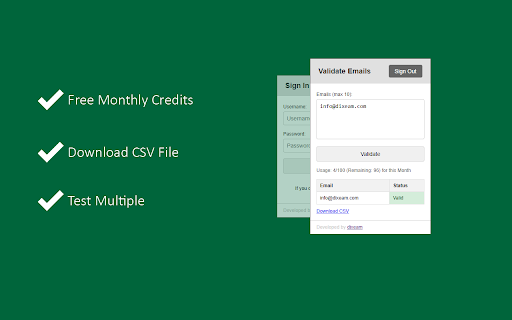
Smart Email Validator is a powerful Chrome extension designed to simplify email validation directly from your browser. Validate multiple email addresses quickly and get results on the go with enhanced API usage tracking and a user-friendly UI.

New Features and Updates:

1. API Usage Information Display:
Track your email validation API usage with real-time updates on API limits, usage count, and remaining validations. Usage details are displayed under the "Validate" button, providing you with insights on your available validations.

2. Enhanced User Experience:
Improved UI with distinct sections for account creation, activation, sign-in, and email validation. Users are guided seamlessly from sign-up to activation, ensuring a smooth onboarding process. Quick navigation between the validation results and usage information.

3. CSV Download for Validation Results:
Easily download your email validation results as a CSV file for further analysis or reporting.

4. Persistent API Usage Tracking:
API usage data is stored locally, ensuring your usage information is available even if you close and reopen the extension.

5. Account Activation Reminder:
Clear notification if your account is inactive, with instructions to complete the activation process.


How It Works:

1. Create an Account:
Sign up directly through the extension to start using Smart Email Validator.
Activate Your Account: Check your email for the activation key and enter it to activate your account.

2. Sign In:
Access the validation dashboard by signing in with your credentials.

3. Validate Emails:
Input emails (up to 10 at a time) and get instant validation results with color-coded status indicators.

4. Track Usage:
View your API usage limits and remaining validations after each validation request.

Version 2:
- For a better user experience, we removed the username from SignIn and SignUp. Now, users can register via Full name, Email and Password and can log in via Email and Password.
- Updated the UI added proper icon for better user experience
Technical
- Version
- 2.0
- Manifest
- V3
- Size
- 30.67KiB
- Min Chrome
- 88
- Languages
- 1
- Featured
- No
Metadata
- ID
- olhkpfjimofofnjanmdiafckhlmbnhen
- Developer ID
- u1f13a5865c1294614db29100b74521f5
- Developer Email
- [email protected]
- Created
- Nov 26, 2024
- Last Updated (Store)
- Dec 1, 2024
- Last Scraped
- May 27, 2026
- Website
- —
- Support URL
- —
- Privacy Policy
- https://dixeam.com/apps/email-validator/privacy-plicy
Similar extensions
Alternatives to Smart Email Validator, ranked by description similarity.

Smart Email Verifier
Verify email addresses on any webpage using NeverBounce, ZeroBounce, or MillionVerifier.
64
★ 5.0

Email checker - verify email address in 1-click
Is this email valid? Use our email checker tool to verify email addresses, ensuring correctness, existence, and deliverability
490
★ 3.0

Truelist.io Email Validation
Validate email addresses on any webpage instantly with the Truelist.io Chrome Extension. Save time and ensure accuracy.
67
★ 5.0

Number Verification Pro
Verify phone numbers with a PayPal subscription.
11

MailSnatcher Pro: Email Extractor
The best email extractor, 100% free! Quickly extract emails from text and download them as TXT, PDF, DOCX, or CSV files.
49

WA Filter & Number Checker: Check & Verify WhatsApp Numbers
A premium WA Filter to verify, check, and filter WhatsApp numbers for efficient marketing campaigns.
4.0K
★ 4.9

iCloud Mail Notifier - Email Alerts
Keep Tabs on your iCloud Emails
395
★ 5.0

Html2Email: HTML editor and Inserter for Gmail & Yahoo Mail
Easily insert, edit and send HTML emails in Gmail & Yahoo Mail with Html2Email: your ultimate HTML code editor.
2.0K
★ 5.0
Data sourced from the Chrome Web Store · last verified May 27, 2026.