
Melanto Calculator
One different scientific calculator...
As of June 2026, Melanto Calculator has 5,000 users and a 4.17/5 rating from 52 reviews in the Workflow & Planning category.
Usersdown 28.6 percent−28.6%
5.0K
5,000
Ratingno change0%
4.17
52 reviews
Reviewsno change0%
52
Version
4.1
Manifest V3
90-day change · In the last 90 days this extension lost 2.0K users.
History
8 snapshotsTracking since Apr 5, 2026.
View as table
| Date | Users | Rating | Reviews | Version |
|---|---|---|---|---|
| Apr 5, 2026 | 7.0K | 4.17 | 52 | 4.1 |
| Apr 16, 2026 | 6.0K | 4.17 | 52 | 4.1 |
| Apr 22, 2026 | 6.0K | 4.17 | 52 | 4.1 |
| Apr 26, 2026 | 7.0K | 4.17 | 52 | 4.1 |
| May 11, 2026 | 7.0K | 4.17 | 52 | 4.1 |
| May 18, 2026 | 6.0K | 4.17 | 52 | 4.1 |
| May 27, 2026 | 7.0K | 4.17 | 52 | 4.1 |
| Jun 5, 2026 | 6.0K | 4.17 | 52 | 4.1 |
| Now | 5.0K | 4.17 | 52 | 4.1 |
Permissions & access
- Permissions
- storageclipboardReadclipboardWrite
- Host access
- None declared
Screenshots

About
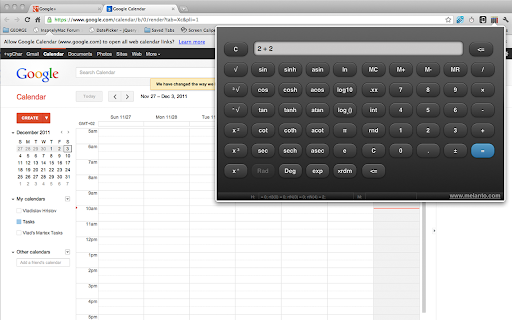
This is kinda unusual scientific calculator.

What makes it unusual is that you can see both sides of the current binary operation. For example -- if you type 2 + 2 you'll see exactly "2 + 2" until you press "=". The tool was made with touch-screen in mind and should be ready for touch-screen chromebooks.

On devices with keyboard you can use the obvious keys: number keys, dot (floating point), +, -, *, /, Enter (=), ESC (C) and Backspace. The advanced ("scientific") functions are not yet accessible with keyboard shortcuts (but better keyboard support is planned for the next releases).

The initial goal of this extension was to be a real-life example of  jQuery Mobile (and it worked as such) but somehow, with the time, more options were added and it became full-featured scientific calculator.  It is, however, still work in progress, so let me know if you find a bug, if something isn't working or if you want to see new feature added.

Options:

There are 3 different “themes” for you too choose from. You can change the theme from the options page. Select between black, white or the original “3d buttons”. (Just click the “options” link at the bottom-right of the extension's popup and select the respective theme from the list)

Other versions of Melanto Calculator

The same tool is available in 3 different versions: this one (extension added to the toolbar), as standalone chrome app (adding calculator icon to the apps page and opening the tool in its own browser tab) and as “desktop” app (pens the calculator in separate window, simulating desktop app). Here are the other two versions:

App version:
https://chrome.google.com/webstore/detail/melanto-calculator/nioffklpggjkmgpndbfklpnclpohpjid

“Desktop” version:
https://chrome.google.com/webstore/detail/calculator/inhhlmhdllknkepmabbkhnlbaddllabl

All the 3 versions come with the same underlying code but I couldn’t create one single tool to address all the 3 ways of use because Chrome doesn’t allow apps to add icon to the toolbar (so we need the extension), while extension can’t add icon to the apps page (so we need an app) and then, at some moment Chrome offered the “packaged apps” option and I made the “desktop” version for those who want it in separate window, acting as separate app…

DISCLAIMER OF WARRANTIES:
MELANTO CALCULATOR IS PROVIDED “AS IS” AND WITHOUT WARRANTY OF ANY KIND

www.melanto.com
Technical
- Version
- 4.1
- Manifest
- V3
- Size
- 633KiB
- Min Chrome
- 88
- Languages
- 1
- Featured
- No
Metadata
- ID
- olhcajgllkpacioibcjiniefblpmpech
- Developer ID
- u4d13077429030b693e0c627020f3524d
- Developer Email
- [email protected]
- Created
- Dec 3, 2011
- Last Updated (Store)
- Feb 23, 2026
- Last Scraped
- Jun 5, 2026
- Website
- vpchar.com
- Privacy Policy
- https://www.vpchar.com/privacy.html
Similar extensions
Alternatives to Melanto Calculator, ranked by description similarity.

Basic Calculator
Basic Calculator Chrome Extension to do simple calculation
161

Floating Scientific Calculator
A floating scientific calculator anywhere you need it
10.0K
★ 4.7

The Calculator
Calculator on the go, right in your browser
186

Calculator for Chrome
A quick & easy calculator right on your browser.
231
★ 5.0

Pocket Calc
A simple and clean calculator extension for your browser
68
★ 5.0

Day2Day Calculator
A no BS calculator for day-to-day use inside your Chrome
9

Quick Fast Calculator
Chrome browser quick calculator extension
4

Basic Calculator
A clean, modern popup calculator for your browser. Perform quick math without switching tabs via the Bluaz widget.
—
★ 5.0
Data sourced from the Chrome Web Store · last verified Jun 5, 2026.