
無邊框視窗
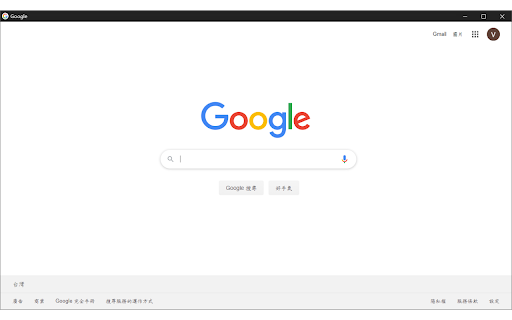
使用無邊框視窗開啟目前瀏覽的網頁
As of June 2026, 無邊框視窗 has 10,000 users and a 4.97/5 rating from 39 reviews in the Workflow & Planning category.
Usersno change0%
10.0K
10,000
Ratingno change0%
4.97
39 reviews
Reviewsup 8.3 percent+8.3%
39
Version
3.1.0
Manifest V3
90-day change · In the last 90 days this extension 2 version updates, changed permissions.
History
3 snapshotsTracking since Apr 30, 2026.
View as table
| Date | Users | Rating | Reviews | Version |
|---|---|---|---|---|
| Apr 30, 2026 | 10.0K | 4.97 | 36 | 2.0.1 |
| May 30, 2026 | 10.0K | 4.97 | 37 | 2.1.1 |
| Jun 4, 2026 | 10.0K | 4.97 | 37 | 3.1.0 |
| Now | 10.0K | 4.97 | 39 | 3.1.0 |
Changelog
- May 30, 2026description
Borderless Window 是一個簡單、輕量的 Chrome 擴充功能,由個人開發與維護。

它可以將目前分頁或指定連結,以無邊框視窗開啟,讓網頁看起來更像獨立 App。適合用於常駐工具、影音頁面、儀表板、文件頁面,或任何你想保持乾淨畫面的網頁。

主要功能

・點擊擴充功能圖示,開啟目前分頁
・在連結上按右鍵,以無邊框視窗開啟連結
・讓常用網頁更簡潔、更專注
・不需要複雜設定,安裝後即可使用

English

Borderless Window is a simple and lightweight Chrome extension, independently developed and maintained.

It lets you open the current tab or selected hyperlinks in a borderless window, giving web pages a cleaner, app-like appearance. It is useful for pinned tools, video pages, dashboards, documents, or any page you want to keep focused.

Features

・Open the current tab in a borderless window
・Open links in a borderless window from the right-click menu
・Keep frequently used web pages clean and focused
・Simple to use, with no complicated setup

Note

Due to Chrome security restrictions, this extension cannot open local files from your computer.

更新日誌

2026.04.24 — v2.1.1
我們修正了一些問題,並讓整體使用體驗更加順暢。
至於修了什麼問題?有些故事,留在程式碼裡就好。

2025.01.22 — v2.0.1
我們修正了部分情況下首次開啟無邊框視窗可能無效的問題。
現在它比較不會在第一次見面時裝作沒看到你。

2023.12.14 — v2.0.0
我們更新了內部架構,以支援 Google Manifest V3。
Google 說要搬家,我們就把家具重新擺了一次。
Borderless Window 是一個簡單、輕量的 Chrome 擴充功能,由個人開發與維護。

它可以將目前分頁或指定連結,以無邊框視窗開啟,讓網頁看起來更像獨立 App。適合用於常駐工具、影音頁面、儀表板、文件頁面,或任何你想保持乾淨畫面的網頁。

主要功能

・點擊擴充功能圖示,開啟目前分頁
・在連結上按右鍵,以無邊框視窗開啟連結
・讓常用網頁更簡潔、更專注
・不需要複雜設定,安裝後即可使用

English

Borderless Window is a simple and lightweight Chrome extension, independently developed and maintained.

It lets you open the current tab or selected hyperlinks in a borderless window, giving web pages a cleaner, app-like appearance. It is useful for pinned tools, video pages, dashboards, documents, or any page you want to keep focused.

Features

・Open the current tab in a borderless window
・Open links in a borderless window from the right-click menu
・Keep frequently used web pages clean and focused
・Simple to use, with no complicated setup

Note

Due to Chrome security restrictions, this extension cannot open local files from your computer.

更新日誌

2026.05.26 — v3.1.0
我們把無邊框視窗縮成了一張可以浮在桌面上的紙條。
新的「子母畫面」模式會把分頁丟進一個永遠置頂的小視窗,
還能調整透明度、切換黑底白底,方便你一邊看影片一邊假裝在工作。
不支援的瀏覽器、擋下來的頁面,我們會悄悄退回無邊框視窗,
盡量不讓你發現剛剛發生過什麼。
SPA 網站在 PiP 裡可能空白——那是 Chrome 的脾氣,不是我們的。

2026.05.26 — v3.0.0
我們讓無邊框視窗更聽話了:會記得你上次拖放的大小,
可以選擇開啟時要一般還是最大化,以及如何處置當下的分頁
(複製、搬移、或乾脆開張白紙)。
右鍵選單現在無論點在哪都會出現,還新增了「以無痕無邊框開啟」,
以及從無邊框視窗「搬回原視窗」的反向操作。
設定頁也重新畫了一次,這次比較像給人看的。
為什麼突然這麼貼心,可能是它長大了。

2026.04.24 — v2.1.1
我們修正了一些問題,並讓整體使用體驗更加順暢。
至於修了什麼問題?有些故事,留在程式碼裡就好。

2025.01.22 — v2.0.1
我們修正了部分情況下首次開啟無邊框視窗可能無效的問題。
現在它比較不會在第一次見面時裝作沒看到你。

2023.12.14 — v2.0.0
我們更新了內部架構,以支援 Google Manifest V3。
Google 說要搬家,我們就把家具重新擺了一次。
- May 30, 2026permissions
activeTab, storage, contextMenus, offscreen
activeTab, storage, contextMenus, notifications, scripting
- Apr 30, 2026description
1.點擊擴充插件圖示->以無邊框視窗開啟目前瀏覽的網頁
2.滑鼠對超連結右鍵->以無邊框視窗開啟
(1)Click the button of this extension to browse the current webpage with borderless window
(2)Right click the hyperlink what you want to browse and you will see a option to open the webpage with borderless window
※由於Google對於電腦檔案的存取因安全疑慮有嚴格規定, 目前無法透過此插件開啟電腦檔案!(說不定哪天發現新方法就會更新)

更新日誌(Update Log):
[2025/01/22, v2.0.1]修正開啟瀏覽器後,首次使用無邊框視窗開啟網頁時,總是無效的異常
[2023/12/14, v2.0.0]因為Google政策改變,調整程式以符合最新要求
Borderless Window 是一個簡單、輕量的 Chrome 擴充功能,由個人開發與維護。

它可以將目前分頁或指定連結,以無邊框視窗開啟,讓網頁看起來更像獨立 App。適合用於常駐工具、影音頁面、儀表板、文件頁面,或任何你想保持乾淨畫面的網頁。

主要功能

・點擊擴充功能圖示,開啟目前分頁
・在連結上按右鍵,以無邊框視窗開啟連結
・讓常用網頁更簡潔、更專注
・不需要複雜設定,安裝後即可使用

English

Borderless Window is a simple and lightweight Chrome extension, independently developed and maintained.

It lets you open the current tab or selected hyperlinks in a borderless window, giving web pages a cleaner, app-like appearance. It is useful for pinned tools, video pages, dashboards, documents, or any page you want to keep focused.

Features

・Open the current tab in a borderless window
・Open links in a borderless window from the right-click menu
・Keep frequently used web pages clean and focused
・Simple to use, with no complicated setup

Note

Due to Chrome security restrictions, this extension cannot open local files from your computer.

更新日誌

2026.04.24 — v2.1.1
我們修正了一些問題,並讓整體使用體驗更加順暢。
至於修了什麼問題?有些故事,留在程式碼裡就好。

2025.01.22 — v2.0.1
我們修正了部分情況下首次開啟無邊框視窗可能無效的問題。
現在它比較不會在第一次見面時裝作沒看到你。

2023.12.14 — v2.0.0
我們更新了內部架構,以支援 Google Manifest V3。
Google 說要搬家,我們就把家具重新擺了一次。
Permissions & access
- Permissions
- activeTabstoragecontextMenusnotificationsscripting
- Host access
- None declared
Screenshots


About
Borderless Window 是一個簡單、輕量的 Chrome 擴充功能,由個人開發與維護。

它可以將目前分頁或指定連結,以無邊框視窗開啟,讓網頁看起來更像獨立 App。適合用於常駐工具、影音頁面、儀表板、文件頁面,或任何你想保持乾淨畫面的網頁。

主要功能

・點擊擴充功能圖示,開啟目前分頁
・在連結上按右鍵,以無邊框視窗開啟連結
・讓常用網頁更簡潔、更專注
・不需要複雜設定,安裝後即可使用

English

Borderless Window is a simple and lightweight Chrome extension, independently developed and maintained.

It lets you open the current tab or selected hyperlinks in a borderless window, giving web pages a cleaner, app-like appearance. It is useful for pinned tools, video pages, dashboards, documents, or any page you want to keep focused.

Features

・Open the current tab in a borderless window
・Open links in a borderless window from the right-click menu
・Keep frequently used web pages clean and focused
・Simple to use, with no complicated setup

Note

Due to Chrome security restrictions, this extension cannot open local files from your computer.

更新日誌

2026.05.26 — v3.1.0
我們把無邊框視窗縮成了一張可以浮在桌面上的紙條。
新的「子母畫面」模式會把分頁丟進一個永遠置頂的小視窗,
還能調整透明度、切換黑底白底,方便你一邊看影片一邊假裝在工作。
不支援的瀏覽器、擋下來的頁面,我們會悄悄退回無邊框視窗,
盡量不讓你發現剛剛發生過什麼。
SPA 網站在 PiP 裡可能空白——那是 Chrome 的脾氣,不是我們的。

2026.05.26 — v3.0.0
我們讓無邊框視窗更聽話了:會記得你上次拖放的大小,
可以選擇開啟時要一般還是最大化,以及如何處置當下的分頁
(複製、搬移、或乾脆開張白紙)。
右鍵選單現在無論點在哪都會出現,還新增了「以無痕無邊框開啟」,
以及從無邊框視窗「搬回原視窗」的反向操作。
設定頁也重新畫了一次,這次比較像給人看的。
為什麼突然這麼貼心,可能是它長大了。

2026.04.24 — v2.1.1
我們修正了一些問題,並讓整體使用體驗更加順暢。
至於修了什麼問題?有些故事,留在程式碼裡就好。

2025.01.22 — v2.0.1
我們修正了部分情況下首次開啟無邊框視窗可能無效的問題。
現在它比較不會在第一次見面時裝作沒看到你。

2023.12.14 — v2.0.0
我們更新了內部架構,以支援 Google Manifest V3。
Google 說要搬家,我們就把家具重新擺了一次。
Technical
- Version
- 3.1.0
- Manifest
- V3
- Size
- 21.97KiB
- Min Chrome
- 88
- Languages
- 2
- Featured
- Yes
Metadata
- ID
- oldkbmmdbndonbiogadbbbmgdkdpjoae
- Developer ID
- u2e184ed1ae4f67c6e22824a604b0cb6c
- Developer Email
- [email protected]
- Created
- Sep 10, 2019
- Last Updated (Store)
- May 27, 2026
- Last Scraped
- Jun 15, 2026
- Website
- —
- Support URL
- —
- Privacy Policy
- —
Similar extensions
Alternatives to 無邊框視窗, ranked by description similarity.

Where is my tab ?
Search for tabs in the opened window, can also increase your speed of switching tabs.
57
★ 5.0

URL resolver
一款便捷的URL编辑插件,具备对各类复杂URL解析的处理能力。
209
★ 5.0

Undo Closed Tabs
A simple extension that restores closed tabs.
640
★ 4.0

Save My Tabs
Save your tabs for later.
108

Ghelper
专门为科研、外贸、跨境电商、海淘人员、开发人员服务的上网加速工具,chrome内核浏览器专用!可以解决chrome扩展无法自动更新的问题,同时可>以访问谷歌google搜索,gmail邮箱,google+等谷歌产品
200.0K
★ 4.2

Open Link In New Tab
Forces all standard links (<a> tags) on a webpage to open in a new browser tab.
65

外链直达 - 一键跳过微信、知乎、掘金、简书等网站外链重定向
外链直达是一款专为提升网络浏览效率而设计的Chrome浏览器插件。它能够智能识别并跳过微信、知乎、掘金、简书、少数派、CSDN等网站在点击外链时出现的中间确认页面,消除不必要的点击步骤,每次跳转至少节省30秒,让您的上网体验更加流畅,大幅提升工作效率。
1.0K
★ 4.7

TabFinder
Back to the previous or last visit tab easily!
3
Data sourced from the Chrome Web Store · last verified Jun 15, 2026.