
Thelix Vault
Enterprise password manager - saves and autofills credentials on all websites. Requires access to all sites to detect login forms.
As of June 2026, Thelix Vault has 8 users in the Privacy & Security category.
Usersdown 27.3 percent−27.3%
8
8
Ratingno change0%
—
— reviews
Reviewsno change0%
—
Version
1.0.2
Manifest V3
History
5 snapshotsTracking since Apr 9, 2026.
View as table
| Date | Users | Rating | Reviews | Version |
|---|---|---|---|---|
| Apr 9, 2026 | 11 | — | — | 1.0.2 |
| Apr 19, 2026 | 9 | — | — | 1.0.2 |
| Apr 25, 2026 | 9 | — | — | 1.0.2 |
| May 9, 2026 | 9 | — | — | 1.0.2 |
| Jun 10, 2026 | 7 | — | — | 1.0.2 |
| Now | 8 | — | — | 1.0.2 |
Permissions & access
- Permissions
- storageactiveTabtabscontextMenus
- Host access
- <all_urls>
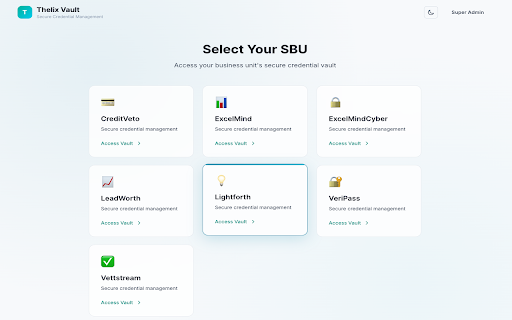
Screenshots



About
# Thelix Vault - Chrome Web Store Publishing Description

## Short Description (132 characters max)
```
Secure credential management for business units. Save, encrypt, and autofill passwords with military-grade security.
```

---

## Detailed Description (Full Listing)

**Thelix Vault** is a comprehensive enterprise credential management system designed for organizations with multiple business units. Securely store, manage, and autofill your business credentials with military-grade AES-256-GCM encryption.

### 🔐 **Key Features**

**Secure Credential Storage**
- Military-grade AES-256-GCM encryption for all passwords
- Each business unit has isolated, encrypted credential vaults
- Zero-knowledge architecture - your passwords are encrypted before storage
- Automatic secure backup with comprehensive audit logging

**Smart Credential Capture**
- Automatically detects login forms on any website
- One-click credential saving from web forms
- Captures username, password, and website URL automatically
- Optional MFA (Multi-Factor Authentication) information tracking

**Quick Autofill**
- Instant credential autofill on login pages
- Search and filter your credentials
- Copy passwords to clipboard (auto-clears after 30 seconds)
- Access credentials directly from the extension popup

**Enterprise-Grade Security**
- End-to-end encryption with per-business-unit encryption keys
- Re-authentication required to view passwords
- Complete audit trail of all credential access
- IP address and timestamp tracking for compliance
- Automatic session timeout for security

**Business Unit Management**
- Multi-tenant architecture for organizational structure
- Role-based access control (Admin and Business Unit levels)
- Bulk credential import via Excel for easy migration
- Centralized admin console for oversight

### 📋 **How It Works**

1. **Install the Extension** - Add Thelix Vault to your Chrome browser
2. **Select Your Business Unit** - Choose your organizational unit from the list
3. **Authenticate** - Log in with your secure business unit password
4. **Save Credentials** - Click login buttons on any site, and Thelix Vault will offer to save
5. **Autofill** - Click the extension icon to quickly fill saved credentials

### 🔒 **Privacy & Security**

Your security is our top priority:
- ✅ **AES-256-GCM Encryption** - Military-grade encryption for all passwords
- ✅ **Zero-Knowledge** - Passwords are encrypted before leaving your device
- ✅ **Audit Logging** - Complete history of all credential access
- ✅ **Re-Authentication** - Must re-enter password to view credentials
- ✅ **Automatic Timeout** - Sessions expire after 1 hour for security
- ✅ **No Third-Party Access** - Your credentials never leave your organization's infrastructure
- ✅ **Open Source Ready** - Transparent, auditable codebase

### 👥 **Perfect For**

- Organizations with multiple business units or departments
- Companies requiring credential isolation between teams
- Businesses needing comprehensive audit trails for compliance
- Teams migrating from shared password files or spreadsheets
- Enterprises requiring self-hosted credential management

### 🚀 **Getting Started**

1. **System Requirements**
   - Chrome browser (latest version recommended)
   - Connection to your organization's Thelix Vault server
   - Business unit credentials from your administrator

2. **First Time Setup**
   - Install the extension from Chrome Web Store
   - Click the Thelix Vault icon in your toolbar
   - Select your business unit
   - Enter your secure password
   - Start saving credentials!

3. **Daily Usage**
   - Navigate to any login page
   - Click the login button - Thelix Vault will offer to save
   - To autofill, click the extension icon and select a credential
   - Your password is securely copied to clipboard for 30 seconds

### 💡 **Tips for Best Experience**

- **Keep Your Password Secure** - Use a strong, unique password for your business unit
- **Regular Backups** - Your admin handles this, but verify credentials are backed up
- **Update Regularly** - Keep the extension updated for latest security features
- **Use MFA Fields** - Track which accounts require multi-factor authentication
- **Review Audit Logs** - Check access history periodically for security

### 📊 **What Gets Saved**

When you save a credential, we store:
- ✅ Account/Website name (e.g., "Company Gmail")
- ✅ Username or email address
- ✅ Password (encrypted with AES-256-GCM)
- ✅ Website URL for easy identification
- ✅ MFA status and type (optional)
- ✅ Notes and access information (optional)
- ✅ Creation and last updated timestamps

### ❌ **What We DON'T Store**

- ❌ Credit card information
- ❌ Browsing history
- ❌ Personal data beyond credentials
- ❌ Third-party analytics or tracking data
- ❌ Unencrypted passwords (all encrypted before storage)

### 🛡️ **Security Certifications**

- AES-256-GCM encryption (NSA-approved)
- bcrypt password hashing (12 rounds)
- JWT-based authentication
- HTTPS-only communication
- Secure cookie handling with HttpOnly and SameSite flags

### 🔄 **Version History**

**v1.0.0 - Initial Release**
- Secure credential storage with AES-256-GCM
- Automatic login form detection
- One-click credential saving
- Quick autofill from extension popup
- Multi-business-unit support
- Comprehensive audit logging
- Dark mode support
- Excel bulk import capability

### 📞 **Support & Contact**

**Need Help?**
- Documentation: See README.md in your organization's deployment
- Admin Support: Contact your organization's super administrator
- Technical Issues: Report via your organization's IT support

**For Organizations:**
- Self-hosted deployment documentation included
- REST API for integration with existing systems
- Comprehensive admin dashboard
- Audit log export capabilities

### ⚖️ **License & Terms**

Thelix Vault is proprietary software developed for Thelix Holdings and its strategic business units.

**Usage Rights:**
- Licensed for use by authorized Thelix Holdings business units
- Requires connection to organization's Thelix Vault server
- Credentials remain property of respective business units
- Subject to organization's security and usage policies

**Data Privacy:**
- All credentials encrypted end-to-end
- No data shared with third parties
- Self-hosted infrastructure (your data, your servers)
- GDPR and compliance-ready audit logging

### 🏢 **About Thelix Holdings**

Thelix Holdings is committed to providing secure, enterprise-grade solutions for its strategic business units. Thelix Vault represents our dedication to security, transparency, and organizational efficiency.

**Our Commitment:**
- 🔒 Security First - Military-grade encryption standard
- 🔍 Transparency - Auditable code and comprehensive logging
- 🚀 Innovation - Continuous improvement and feature updates
- 🤝 Support - Dedicated support for all business units
Technical
- Version
- 1.0.2
- Manifest
- V3
- Size
- 45.28KiB
- Min Chrome
- 88
- Languages
- 1
- Featured
- No
Metadata
- ID
- oldbfacpplmhflilbafhiahalobfneik
- Developer ID
- u617763d1a54b14e8e8d44a392e9e0e25
- Developer Email
- [email protected]
- Created
- Feb 14, 2026
- Last Updated (Store)
- Feb 26, 2026
- Last Scraped
- Jun 10, 2026
- Website
- —
- Support URL
- https://thelixholdings.com/
- Privacy Policy
- https://thelixvault.thelixholdings.com/privacy
Similar extensions
Alternatives to Thelix Vault, ranked by description similarity.

SecuraKey Pro – Secure Password Manager & 2FA Wallet
Zero-knowledge password manager with AES-256 encryption, smart autofill, and built-in 2FA for maximum security.
3

Smart Key Vault
A locally hosted password vault with secure, on-device encryption
4

Incognito Vault — Private Bookmarks by Avyris
Secure, encrypted bookmark manager designed exclusively for Incognito mode. Zero-knowledge architecture by Avyris.
31
★ 5.0

Cipher Vault: Secure Key Generator
Professional cryptographic tool with advanced entropy controls.
1

Tiimi Password Vault
Securely use shared credentials without seeing passwords.
21
★ 5.0

SecurePass Analytics - Smart Password Manager
Smart password manager with encryption, breach alerts, and health monitoring.
2
PassCypher HSM PGP
Generate and manage your passwords
89
★ 5.0

Personal password vault
Chrome extension to store and manage personal passwords
6
Data sourced from the Chrome Web Store · last verified Jun 10, 2026.