
Rename Tab
Rename your browser tabs with custom titles and emoji prefixes.
As of June 2026, Rename Tab has 8 users and a 5.00/5 rating from 1 reviews in the Productivity category.
Usersno change0%
8
8
Ratingno change0%
5.00
1 reviews
Reviewsno change0%
1
Version
1.0.0
Manifest V3
History
8 snapshotsTracking since Apr 17, 2026.
View as table
| Date | Users | Rating | Reviews | Version |
|---|---|---|---|---|
| Apr 17, 2026 | — | — | — | 1.0.0 |
| Apr 22, 2026 | — | — | — | 1.0.0 |
| May 7, 2026 | — | — | — | 1.0.0 |
| May 11, 2026 | 3 | 5.00 | 1 | 1.0.0 |
| May 17, 2026 | 2 | 5.00 | 1 | 1.0.0 |
| May 30, 2026 | 3 | 5.00 | 1 | 1.0.0 |
| Jun 5, 2026 | 6 | 5.00 | 1 | 1.0.0 |
| Jun 13, 2026 | 10 | 5.00 | 1 | 1.0.0 |
| Now | 8 | 5.00 | 1 | 1.0.0 |
Permissions & access
- Permissions
- tabsstorageactiveTabscripting
- Host access
- None declared
Screenshots



About
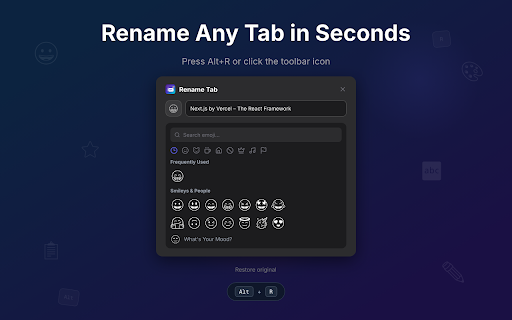
Rename Tab lets you give any browser tab a custom title and emoji prefix — instantly. Your renames persist across page
reloads and browser restarts, so your tabs stay organized exactly the way you set them up.

Key features:

• Custom tab titles — Replace any tab's title with your own text so you can tell similar tabs apart at a glance.
• Emoji prefixes — Add an emoji before the title for quick visual identification in a crowded tab bar.
• Keyboard shortcut — Press Alt+R on any page to open the rename dialog without touching the mouse.
• Exact or domain matching — Apply a rename to one specific URL, or to every page on an entire domain.
• Persistent storage — Renames are saved locally and reapplied automatically, even after reloads or restarts.
• Popup overview — See all your saved renames in one list and jump to any renamed tab with a single click.
• Light, dark, and system themes — The extension UI follows your preference or adapts to your OS setting.
• Works on any website — The rename dialog is injected as an overlay, so it works everywhere Chrome runs.

No account required. No data leaves your browser. Just simple, persistent tab renaming.
Technical
- Version
- 1.0.0
- Manifest
- V3
- Size
- 265KiB
- Min Chrome
- 88
- Languages
- 1
- Featured
- No
Metadata
- ID
- okokjjabafagclnpcjlfmdpjlehhlpjp
- Developer ID
- ufc2c327c1fedbcdbe2a88cdee5159a5e
- Developer Email
- [email protected]
- Created
- Apr 16, 2026
- Last Updated (Store)
- Apr 16, 2026
- Last Scraped
- Jun 13, 2026
- Website
- elyralabs.org
- Support URL
- —
- Privacy Policy
- —
Data sourced from the Chrome Web Store · last verified Jun 13, 2026.