
Invisible Character
Use Invisible Character to create invisible space or invis char anywhere. The blank space copy paste tool in your Chrome sidebar!
As of May 2026, Invisible Character has 156 users and a 5.00/5 rating from 1 reviews in the Productivity category.
Usersdown 4.9 percent−4.9%
156
156
Ratingno change0%
5.00
1 reviews
Reviewsno change0%
1
Version
1.0
Manifest V3
History
3 snapshotsTracking since Apr 1, 2026.
View as table
| Date | Users | Rating | Reviews | Version |
|---|---|---|---|---|
| Apr 1, 2026 | 164 | 5.00 | 1 | 1.0 |
| Apr 30, 2026 | 157 | 5.00 | 1 | 1.0 |
| May 27, 2026 | 155 | 5.00 | 1 | 1.0 |
| Now | 156 | 5.00 | 1 | 1.0 |
Permissions & access
- Permissions
- clipboardWritesidePanel
- Host access
- None declared
Screenshots
About
🕶 Invisible Character is the ultimate tool for creating blank spaces to copy and paste in places that usually don't allow spaces, like usernames, social media profiles, or online forms. With this extension, you can easily copy and paste it anywhere, achieving a clean, subtle effect without any visible symbols. Perfect for customizing nicknames, creating unique blank username, or adding hidden characters in text. Simply click to copy, then paste your blank space symbol wherever you need it!

💎 Advantages of Using Invisible Character
💠 Quick Access: Conveniently accessible in your sidebar for easy use.
💠 Flexible Usage: Ideal for invisible name copy and paste on platforms where spaces aren’t allowed.
💠 Clean Formatting: Add invisible symbol characters for an organized look in text fields.
💠 Unique Personalization: Stand out with invisible characters that add mystery and elegance to your text

🔍 Where Can You Use the Extension?
✨ Blank copy paste options are perfect for creating unique symbols in usernames or bios.
✨ Copy paste blank space to text fields for a seamless look in apps and games.
✨ Use invisible text copy and paste to create hidden characters in messaging platforms.
✨ Try blank character copy paste for innovative formatting in social media posts or comments.
✨ With our extension, you can add empty spaces that personalize your online presence without any visible markers.

📋 How to Use It
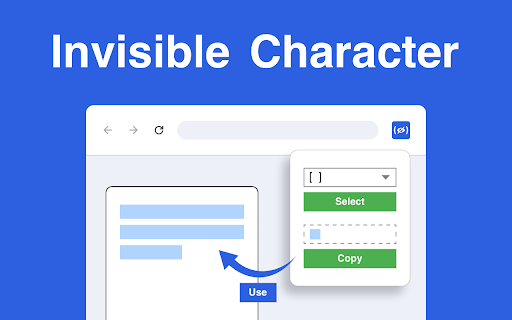
1️⃣ Open the Invisible Character from your Chrome sidebar.
2️⃣ Select an invisibility symbol from the dropdown menu, such as (U+0020) Space, Hair Space, or Figure Space.
3️⃣ Click Copy to add the selected invisible characters to your clipboard.
4️⃣ Easily preview your blank text in the dedicated window within the menu bar.
5️⃣ To start over, click Clear.

📌 Features That Make Invisible Character Essential
🔹 Create invisible letter or messages to ensure your text has a unique layout.
🔹 Use transparent text for subtle adjustments or hidden elements in social media profiles.
🔹 Need a hidden character? This tool offers blank text copy and paste options in various styles to fit any need.
🔹 Add blank space copy and paste characters to usernames, bios, and other fields that don’t support traditional spaces.

💡 Enhance Your Text with
Our extension makes it easy to add blank copy and paste options to your favorite platforms, allowing unique formatting that goes beyond standard text. Whether you're looking to include invisible character copy paste options in your bio or need an empty space copy paste for usernames, this tool is designed for flexibility. Simply copy and insert blank text copy paste wherever you need that subtle, invisible touch!

📂 Creative Ways to Use Invisible Character
✨ Blank space copy paste features allow you to create usernames or game names with hidden symbols, making your profile stand out.
✨ Add empty space copy and paste elements to your messages or comments for a unique, organized look.
✨ Use invisible copy and paste characters to leave subtle hints or hidden messages in text fields without drawing attention.
✨ With blank txt options, the extension gives you control over formatting across different platforms for endless creativity.

🔧 Customization and Flexibility
The extension offers extensive options to help you achieve perfect text alignment and spacing. You can experiment with blank symbol and copy and paste blank text choices to personalize your online interactions. From empty text copy and paste elements to copy and paste invisible character additions, every option is designed to provide seamless customization. Effortlessly insert these blank symbols into fields where they typically aren’t allowed, giving your usernames, posts, and messages an original twist.

💻 Frequently Asked Questions (FAQ)
❓Q1: Can I use invisible characters in different languages?
📌 A1: Yes! It can be used with various language settings, making texto invisible everywhere.

❓Q2: What is the best way to add blank symbols to messages?
📌 A2: Use the blank message or invis name feature for adding empty spaces in messaging platforms without any visible symbols.

❓Q3: Where can I use these blank spaces?
📌 A3: You can blank texting on social media, messaging apps, and online forms for personalized formatting without visible characters.

❓Q4: How to write empty space without causing errors?
📌 A4: Copy and paste invisible text from the dropdown and copy it directly into the text field. It’s as simple as selecting, copying, and pasting.

❓Q5: How do I use invis char to create unique usernames?
📌 A5: Select a character from the dropdown, copy it, and paste it into the username field. This allows for unique, spaced names in places where traditional spaces aren’t accepted.

🤩 Why Choose Invisible Character?
⭐ Empty char options give you flexibility in text formatting, perfect for online forms and usernames that don’t accept standard spaces.
⭐ The invis char function allows you to create clean, organized layouts in messages and bios.
⭐ Blank letter choices provide subtle ways to enhance the visual structure of your text.

🚀 Invisible Character empowers you to take full control of your online presence with hidden characters and formatting options, adding mystery and creativity without the need for visible symbols. With the extension, users can master the art of invisible text, easily applying blank space text to a wide variety of online platforms.
Technical
- Version
- 1.0
- Manifest
- V3
- Size
- 318KiB
- Min Chrome
- 88
- Languages
- 52
- Featured
- No
Metadata
- ID
- oknpjchmmppaaomcnfbchpflpcdmmhdk
- Developer ID
- u7898874c29a670dfbcb82b7370856a08
- Developer Email
- [email protected]
- Created
- Nov 17, 2024
- Last Updated (Store)
- Nov 17, 2024
- Last Scraped
- May 27, 2026
- Website
- https://hotpancake.com/
- Support URL
- https://hotpancake.com/contact_us.html
- Privacy Policy
- https://hotpancake.com/privacy-policy.html
Similar extensions
Alternatives to Invisible Character, ranked by description similarity.

Blank Space copy and paste
Use Blank Space copy and paste to access an invisible character instantly. Create an empty char, invisible letter, blank username.
174
★ 5.0

Invisible Text Generator
Quickly copy invisible Unicode characters for gaming, social media, and more
6
★ 5.0

Invisible Text Copy Paste
Invisible Text Copy Paste helps create invisible spaces with live preview. Generate quick custom spacing and copy it to clipboard.
35

Texto Invisible Generator
Generate invisible characters for Instagram, Free Fire, PUBG names. Quick copy invisible text for social media.
6

Espaço Invisível | Caractere Invisível copiar
Extensão para copiar caracteres de espaço invisível de diferentes tamanhos
—

Text Symbols
Use Text Symbols: Easily copy and paste text symbols & Unicode characters! Perfect for cool text, emojis and unique designs
106
★ 5.0

Espaço Invisível - Copiar Letra Invisível
Extensão para copiar letra de espaço invisível de diferentes tamanhos
2

Invisible Text Copy
Convert and copy text as invisible characters directly from your browser.
16
Data sourced from the Chrome Web Store · last verified May 27, 2026.