
TellyPrompt
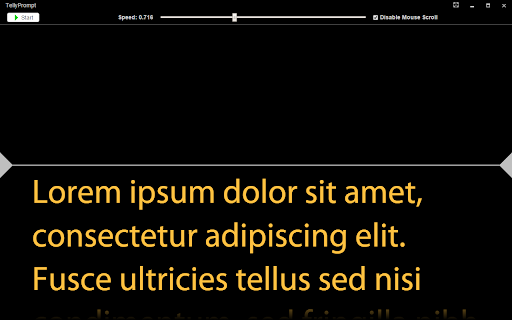
Simple, free teleprompter. Paste text into editor window, and click "Start Presenting".
As of May 2026, TellyPrompt has — users and a 4.31/5 rating from 52 reviews.
Usersno change0%
—
—
Ratingdown 0.2 percent−0.2%
4.31
52 reviews
Reviewsdown 1.9 percent−1.9%
52
Version
1.1.0
Manifest V2
History
3 snapshotsTracking since Apr 1, 2026.
View as table
| Date | Users | Rating | Reviews | Version |
|---|---|---|---|---|
| Apr 1, 2026 | 50.0K | 4.32 | 53 | 1.1.0 |
| Apr 30, 2026 | 40.0K | 4.32 | 53 | 1.1.0 |
| May 27, 2026 | 40.0K | 4.31 | 52 | 1.1.0 |
| Now | — | 4.31 | 52 | 1.1.0 |
Permissions & access
- Permissions
- app.window.fullscreen.overrideEscstoragesystem.displayalwaysOnTopWindows
- Host access
- None declared
Screenshots



About
If you find a bug or want to request a feature, please email me instead of posting feedback. The Chrome Web Store does not notify me if there are any comments, so it may be some time before I see problems. Thanks!

----What's New----
v1.1.0
- Added Chromecast support! Yay!
- Fixed a bug where the un-fullscreen button refused to show itself
- Improved previous auto-scroll bug fix

v1.0.9
- Fixed a bug preventing auto-scrolling from working on certain systems

v1.0.8
- Fixed a bug causing issues overwriting existing save files

v1.0.7
- Added ability to control presentation speed with arrow keys. Hold SHIFT for fine-grained adjustments or CTRL for coarse adjustments.
- Added options to adjust the center marker: show/hide, color, opacity, line thickness, and vertical position

v1.0.6
- Added the ability to save and load the presentations (as plain text files).
- Updated the app icon to be more visible on dark backgrounds.
- Added "Automatic" text direction in settings. Most of you will want this, but just in case, you can force it to RTL/LTR if you still need to.
- Detects when system display configuration changes, and updates settings accordingly. No more restarting app between changes!
- Minor bug fixes / improvements

v1.0.5
- Fixed a bug that prevented dual-display mode from being disabled if there were no longer multiple displays connected

v1.0.4
- Fixed a bug where mirroring didn't work when using single-monitor mode
- Fixed some minor display issues

v1.0.3
- Added presenter view with multi-monitor support
- Moved settings to their own dialog
------------------

Simple, free teleprompter. Paste text into editor window, and click "Start Presenting". Play/Pause starts automatic scroll, you can drag the slider to adjust scrolling speed, and mirror any way you need for your setup.

Features:
- Full-screen display for minimal distraction to talent
- Designed to work with LTR and RTL languages
- Adjust scroll speed in real-time
- Designed for single-monitor and dual-monitor setups
- Adjust font size, color, and direction (LTR/RTL)
- Change background color and horizontal text margins on display
- Block mouse wheel from accidentally scrolling text while running
- Mirror horizontal, vertical, both, or none
- Multi-monitor support with presedter view
Technical
- Version
- 1.1.0
- Manifest
- V2
- Size
- 405KiB
- Min Chrome
- 38
- Languages
- 1
- Featured
- No
Metadata
- ID
- okglebjjanfmfeifbdlapeanoidbkaif
- Developer ID
- u3465523ca855ed583bd634c345f05f71
- Developer Email
- [email protected]
- Created
- Jan 25, 2016
- Last Updated (Store)
- Sep 8, 2018
- Last Scraped
- May 27, 2026
- Website
- —
- Support URL
- —
- Privacy Policy
- —
Similar extensions
Alternatives to TellyPrompt, ranked by description similarity.

Teleprompter Pro
Professional teleprompter with voice control, customizable themes, and advanced features for content creators
162

TalkScroll | Master Your Meetings
Your personal teleprompter extension designed to boost your meetings.
697
★ 5.0

SnapScript — Browser Teleprompter
The browser-native teleprompter for content creators. Paste your script and record — no phone props, no app switching.
44
★ 5.0

Teleprompter Overlay
A floating teleprompter overlay for browser-based video meetings
491
★ 3.8

Focus Prompter - Presentation Window
Voice-activated teleprompter in your side panel.
4

AnyTab Laser Pointer
Adds a laser pointer to any browser tab, making it easier for your audience to follow along during video calls.
3.0K
★ 4.5

Auto-Scroll Screen Prompter
Auto-scrolls text for presentations and reading. Features adjustable speed, keyboard shortcuts, and dark mode support.
28
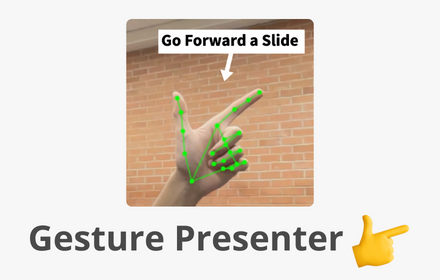
Gesture Presenter - Remote for Slides
Control Slides with just hand gestures!
256
★ 5.0
Data sourced from the Chrome Web Store · last verified May 27, 2026.