
TempoGrid
TempoGrid: Open, Flat, Snappy. Clarity and perspective for your tabs.
As of June 2026, TempoGrid has 684 users and a 4.39/5 rating from 18 reviews in the Workflow & Planning category.
Usersdown 6.0 percent−6.0%
684
684
Ratingno change0%
4.39
18 reviews
Reviewsno change0%
18
Version
0.27.4.4
Manifest V3
90-day change · In the last 90 days this extension 11 version updates.
History
14 snapshotsTracking since Apr 1, 2026.
View as table
| Date | Users | Rating | Reviews | Version |
|---|---|---|---|---|
| Apr 1, 2026 | 728 | 4.39 | 18 | 0.24.6 |
| Apr 9, 2026 | 713 | 4.39 | 18 | 0.24.6.1 |
| Apr 19, 2026 | 722 | 4.39 | 18 | 0.24.7 |
| Apr 25, 2026 | 717 | 4.39 | 18 | 0.26 |
| Apr 29, 2026 | 754 | 4.39 | 18 | 0.27.0.1 |
| May 5, 2026 | 741 | 4.39 | 18 | 0.27.1 |
| May 9, 2026 | 706 | 4.39 | 18 | 0.27.2 |
| May 16, 2026 | 692 | 4.39 | 18 | 0.27.2.2 |
| May 21, 2026 | 717 | 4.39 | 18 | 0.27.2.2 |
| May 25, 2026 | 710 | 4.39 | 18 | 0.27.3 |
| May 30, 2026 | 688 | 4.39 | 18 | 0.27.3.1 |
| Jun 4, 2026 | 691 | 4.39 | 18 | 0.27.3.2 |
| Jun 8, 2026 | 712 | 4.39 | 18 | 0.27.4.1 |
| Jun 14, 2026 | 697 | 4.39 | 18 | 0.27.4.2 |
| Now | 684 | 4.39 | 18 | 0.27.4.4 |
Changelog
- Jun 14, 2026description
Shape your browsing to reflect your rhythm, with defined pane layouts and color themes that feel right. Set your tempo. Your tabs, in tune.

CAUTION:
In Chrome 145, updates to tab groups are not applied immediately. This issue is scheduled for a fix in Chrome 146, and there is no workaround available. Please wait until then.
https://issues.chromium.org/issues/483537691

FEATURES:

- Cross-Search all your resources: bookmarks, open tabs, history, and recently closed tabs.
- Utilize window titles to simulate nested tab groups, providing superior hierarchical organization.
- Instantly find the matching tab upon opening a bookmark, using URL prefix or domain matching.
- Pin any window to the top or bottom of your screen.
- Move a window to the latest position/order.
- Multi-Select items via the main menu, long press item, or Ctrl+Shift shortcut.
- Toggle between List and Icon views for all open tabs.
- Bookmark flat-view: Flatten any folder to view all its nested bookmarks in a single, unified list.
- Supports multi-line display and language-specific hyphenation.
- Easily reorder and resize all resource panes.
- Smart-wider the pane width simply by mousing over it (Optional).
- Synchronize settings across all devices using Chrome Sync.
- Customize your workspace with your favorite color themes.

UPDATES:

v0.27.4 (May 30, 2026)
==================
Added “Add Tab” button and remove the “Add New Tab” option from the menu.
Fixed a bug where the history was not updating during searches.

v0.27.3 (May 19, 2026)
==================
Added text settings for base size and contrast.

v0.27.2 (May 4, 2026)
==================
Refined the color scheme and appearance of bookmark folders in Flat View.

v0.27.1 (Apr 30, 2026)
==================
Fixed a bug where bookmark features did not work correctly when the settings page was open.
Refined the appearance of the active tab in the dark theme.

v0.27.0 (Apr 20, 2026)
==================
Added a font family setting option.
Fixed a bug where “Recent Tabs” was not displayed in pop-up mode.
Fixed a bug where opening and closing “Tab Groups” was not reflected in pop-up mode.

v0.26 (Apr 19, 2026)
==================
Added display multi-column options to "Open Tab" list view.
Added a font size setting option to "Open tab" list view.
Added custom scrollbar options.

v0.25.1 (Apr 15, 2026)
==================
We identified an environment‑specific issue in the latest release v.0.25 and have rolled back the update.

v0.24.7 (Apr 4, 2026)
==================
Fixed an issue where the display refreshed immediately after deleting the history items.

v0.24.5.5 (Feb 6, 2026)
==================
Fixed a bug where the number of lines for multi-line could not be set independently.

v0.24.5.4 (Feb 2, 2026)
==================
Fixed an issue where drag-and-dropping a window to a new window would cause the tab group to disappear on Linux (KDE).

v0.24.5 (Jan 12, 2026)
==================
- Added an option to limit text display to 2–4 lines or show it in full for long strings.
- Added an option display language.
- Improved to display tooltips for open tabs in icon view mode up to a maximum of 3 lines.

v0.24.4 (Jan 10, 2026)
==================
Improved to enable Smart-Wider in bookmarks pane.

v0.24.3 (Jan 4, 2026)
==================
Fixed a bug that prevented all selected history items from being opened or bookmarked correctly.

v0.24.1 (Dec 27, 2025)
==================
- Added an option to show tabs in collapsed tab groups.
- Added a feature to toggle collapsing tab groups directly from Recent Tabs.

v0.24.0 (Dec 19, 2025)
==================
UI/UX improvements for bookmark management.
- Added bookmarks flat-view.
- Added a "New Folder" button with Drag & Drop functionality.
- Introduced a Trash folder to prevent accidental bookmark deletion.
- Enabled date and time placeholders (e.g., {yyyy}-{MM}) for automatic folder naming.

v0.23.11 (Nov 21, 2025)
==================
Fixed a bug with bulk deletion of history items when multiple items were selected.

v0.23.10 (Nov 9, 2025)
==================
Improved:
- Restored focus to the previously focused window after closing the active window.
- Prevented unnecessary screen refreshes when updating bookmark.

v0.23.0 (April 14, 2025)
==================
Added tab group manage function.

v0.22.0 (March 7, 2025)
==================
- Added window mode
- Added a recent-tabs pane
- Change app name and icon

v0.21.14 (Nov 8, 2023)
==================
Fixed a bug that the bookmark/folder menu display to cut off outside of screen.

v0.21.13 (Mar 2, 2023)
==================
Fixed a bug that broke the UI of new window button when window sort order was descending.

Fixed a bug that the UI of new window button was broken when window sort order was descending.

v0.21.11 (Feb 21, 2023)
==================
- Fixed a bug that drag-and-drop from history to window of tabs did not work.
- Fixed a bug in search that tabs are always searched for title and URL.

v0.21.7 (Feb 4, 2023)
==================
- Added a menu in main menu for bookmarking from link text.
- Modified the bookmark button[☆] works as drag and drop for current tab.

v0.21.6 (Feb 1, 2023)
==================
Fixed a bug that failed to move tabs including pinned tabs.

v0.21.5 (Jan 30, 2023)
==================
Fixed a bug that the submenu display to cut off outside of screen.

v0.21.4 (Jan 27, 2023)
==================
Fixed a bug in v0.21.0 that caused drag & drop of multiple selections to fail after opening the main menu.

v0.21.3 (Jan 26, 2023)
==================
- Added minimize all other windows button (optional).

v0.21.2 (Jan 24, 2023)
==================
Fixed a bug in the tab highlighting function on bookmark mouse-over where URL prefix matching was not performed when the URL contained characters that require escaping in HTML, such as "&".

v0.21.0 (Jan 22, 2023)
==================
- Added recently closed tabs/windows in history. Up to 25 tabs/windows are displayed. Please accept "sessions" permissions.
- Added pin a window to the top or bottom of open-tabs pane.
- Added save your favorite color themes. It can be rotated with the main menu or F2+shift key.

v0.20.0 (Dec 28, 2022)
==================
- Added mouse over a bookmark to highlight the tabs with the matching URL and select them with mouse wheel.
- Added search history. The value is stored when the popup is closed. To show, click on the search box or press the arrow down key.
- Added display of number of searches in tabs.
- Added a button to scroll the current tab and highlight it.

v0.19.7 (Dec 16, 2022)
==================
- Modified display style of tabs when searching.

v0.19.0 (Dec 06, 2022)
==================
- Added feature to select multiple items.

v0.18.4 (Nov 11, 2022)
==================
- Added bookmarks and folders panes are flippable.
- Added pane to always resizable.

v0.18.1 (Nov 3, 2022)
==================
Allow incognito window/tab drag-and-drop to new window.

v0.18.0 (Oct 28, 2022)
==================
Added a button/drag-and-drop area to open a new window. It can also change the order of chrome windows.

v0.17.0 (Sep 22, 2022)
===================
- Added memorize last search words.
- Migrated to Manifest V3 and now requires Chrome 105 or higher.

v0.16.2 (Jun 9, 2022)
===================
Added option to not exclusively open the bookmarks folder tree and to keep the state.

v0.16.0 (Jun 7, 2022)
===================
NEW: Added icon view in tab pane.

v0.15.2 (May 24, 2022)
===================
Added folder menu to open all bookmarks in the folder in a new window.

v0.15.1 (May 23, 2022)
===================
Faster display of font size changes, etc. using Customize CSS.

v0.15.0 (May 22, 2022)
===================
- NEW: Added a button to scroll to next/previous window in open tabs pane.
- Added a margin to the right of the scrollbar when in Xen mode that does not released it.

v0.14.0 (May 18, 2022)
===================
- NEW: Added panes reordering

v0.13.0 (May 4, 2022)
==================
- Added dark color schemes to handle dark frame color.

v0.12.0 (May 2, 2022)
==================
- Improved scrolling smoothness in history pane.

v0.11.0 (Apr 25, 2022)
==================
- NEW: Added Xen mode (formerly known as Zen mode).
- NEW: Collapse history by date.

v0.10.0 (Apr 16, 2022)
==================
- NEW: Delete history button (optional).

v0.9.0 (Apr 10, 2022)
=================
- NEW: Drag & drop functions for tabs and history pane.
- NEW: Color schema settings
- Modified faster history search using cache.

v0.8.0 (Apr 3, 2022)
================
Dial Bookmarks has been renewed.

NEW:
- History and open tabs panes.

DISCONTINUED:
- Chrome Extensions, Chrome Apps, and Google Bookmarks folders.
- Window mode.
Shape your browsing to reflect your rhythm, with defined pane layouts and color themes that feel right. Set your tempo. Your tabs, in tune. CAUTION: In Chrome 145, updates to tab groups are not applied immediately. This issue is scheduled for a fix in Chrome 146, and there is no workaround available. Please wait until then. https://issues.chromium.org/issues/483537691 FEATURES: - Cross-Search all your resources: bookmarks, open tabs, history, and recently closed tabs. - Utilize window titles to simulate nested tab groups, providing superior hierarchical organization. - Instantly find the matching tab upon opening a bookmark, using URL prefix or domain matching. - Pin any window to the top or bottom of your screen. - Move a window to the latest position/order. - Multi-Select items via the main menu, long press item, or Ctrl+Shift shortcut. - Toggle between List and Icon views for all open tabs. - Bookmark flat-view: Flatten any folder to view all its nested bookmarks in a single, unified list. - Supports multi-line display and language-specific hyphenation. - Easily reorder and resize all resource panes. - Smart-wider the pane width simply by mousing over it (Optional). - Synchronize settings across all devices using Chrome Sync. - Customize your workspace with your favorite color themes. UPDATES: v0.27.4.3 (Jun 11, 2026) ================== Change the date and time display to match the Display Language setting. v0.27.4 (May 30, 2026) ================== Added “Add Tab” button and remove the “Add New Tab” option from the menu. Fixed a bug where the history was not updating during searches. v0.27.3 (May 19, 2026) ================== Added text settings for base size and contrast. v0.27.2 (May 4, 2026) ================== Refined the color scheme and appearance of bookmark folders in Flat View. v0.27.1 (Apr 30, 2026) ================== Fixed a bug where bookmark features did not work correctly when the settings page was open. Refined the appearance of the active tab in the dark theme. v0.27.0 (Apr 20, 2026) ================== Added a font family setting option. Fixed a bug where “Recent Tabs” was not displayed in pop-up mode. Fixed a bug where opening and closing “Tab Groups” was not reflected in pop-up mode. v0.26 (Apr 19, 2026) ================== Added display multi-column options to "Open Tab" list view. Added a font size setting option to "Open tab" list view. Added custom scrollbar options. v0.25.1 (Apr 15, 2026) ================== We identified an environment‑specific issue in the latest release v.0.25 and have rolled back the update. v0.24.7 (Apr 4, 2026) ================== Fixed an issue where the display refreshed immediately after deleting the history items. v0.24.5.5 (Feb 6, 2026) ================== Fixed a bug where the number of lines for multi-line could not be set independently. v0.24.5.4 (Feb 2, 2026) ================== Fixed an issue where drag-and-dropping a window to a new window would cause the tab group to disappear on Linux (KDE). v0.24.5 (Jan 12, 2026) ================== - Added an option to limit text display to 2–4 lines or show it in full for long strings. - Added an option display language. - Improved to display tooltips for open tabs in icon view mode up to a maximum of 3 lines. v0.24.4 (Jan 10, 2026) ================== Improved to enable Smart-Wider in bookmarks pane. v0.24.3 (Jan 4, 2026) ================== Fixed a bug that prevented all selected history items from being opened or bookmarked correctly. v0.24.1 (Dec 27, 2025) ================== - Added an option to show tabs in collapsed tab groups. - Added a feature to toggle collapsing tab groups directly from Recent Tabs. v0.24.0 (Dec 19, 2025) ================== UI/UX improvements for bookmark management. - Added bookmarks flat-view. - Added a "New Folder" button with Drag & Drop functionality. - Introduced a Trash folder to prevent accidental bookmark deletion. - Enabled date and time placeholders (e.g., {yyyy}-{MM}) for automatic folder naming. v0.23.11 (Nov 21, 2025) ================== Fixed a bug with bulk deletion of history items when multiple items were selected. v0.23.10 (Nov 9, 2025) ================== Improved: - Restored focus to the previously focused window after closing the active window. - Prevented unnecessary screen refreshes when updating bookmark. v0.23.0 (April 14, 2025) ================== Added tab group manage function. v0.22.0 (March 7, 2025) ================== - Added window mode - Added a recent-tabs pane - Change app name and icon v0.21.14 (Nov 8, 2023) ================== Fixed a bug that the bookmark/folder menu display to cut off outside of screen. v0.21.13 (Mar 2, 2023) ================== Fixed a bug that broke the UI of new window button when window sort order was descending. Fixed a bug that the UI of new window button was broken when window sort order was descending. v0.21.11 (Feb 21, 2023) ================== - Fixed a bug that drag-and-drop from history to window of tabs did not work. - Fixed a bug in search that tabs are always searched for title and URL. v0.21.7 (Feb 4, 2023) ================== - Added a menu in main menu for bookmarking from link text. - Modified the bookmark button[☆] works as drag and drop for current tab. v0.21.6 (Feb 1, 2023) ================== Fixed a bug that failed to move tabs including pinned tabs. v0.21.5 (Jan 30, 2023) ================== Fixed a bug that the submenu display to cut off outside of screen. v0.21.4 (Jan 27, 2023) ================== Fixed a bug in v0.21.0 that caused drag & drop of multiple selections to fail after opening the main menu. v0.21.3 (Jan 26, 2023) ================== - Added minimize all other windows button (optional). v0.21.2 (Jan 24, 2023) ================== Fixed a bug in the tab highlighting function on bookmark mouse-over where URL prefix matching was not performed when the URL contained characters that require escaping in HTML, such as "&". v0.21.0 (Jan 22, 2023) ================== - Added recently closed tabs/windows in history. Up to 25 tabs/windows are displayed. Please accept "sessions" permissions. - Added pin a window to the top or bottom of open-tabs pane. - Added save your favorite color themes. It can be rotated with the main menu or F2+shift key. v0.20.0 (Dec 28, 2022) ================== - Added mouse over a bookmark to highlight the tabs with the matching URL and select them with mouse wheel. - Added search history. The value is stored when the popup is closed. To show, click on the search box or press the arrow down key. - Added display of number of searches in tabs. - Added a button to scroll the current tab and highlight it. v0.19.7 (Dec 16, 2022) ================== - Modified display style of tabs when searching. v0.19.0 (Dec 06, 2022) ================== - Added feature to select multiple items. v0.18.4 (Nov 11, 2022) ================== - Added bookmarks and folders panes are flippable. - Added pane to always resizable. v0.18.1 (Nov 3, 2022) ================== Allow incognito window/tab drag-and-drop to new window. v0.18.0 (Oct 28, 2022) ================== Added a button/drag-and-drop area to open a new window. It can also change the order of chrome windows. v0.17.0 (Sep 22, 2022) =================== - Added memorize last search words. - Migrated to Manifest V3 and now requires Chrome 105 or higher. v0.16.2 (Jun 9, 2022) =================== Added option to not exclusively open the bookmarks folder tree and to keep the state. v0.16.0 (Jun 7, 2022) =================== NEW: Added icon view in tab pane. v0.15.2 (May 24, 2022) =================== Added folder menu to open all bookmarks in the folder in a new window. v0.15.1 (May 23, 2022) =================== Faster display of font size changes, etc. using Customize CSS. v0.15.0 (May 22, 2022) =================== - NEW: Added a button to scroll to next/previous window in open tabs pane. - Added a margin to the right of the scrollbar when in Xen mode that does not released it. v0.14.0 (May 18, 2022) =================== - NEW: Added panes reordering v0.13.0 (May 4, 2022) ================== - Added dark color schemes to handle dark frame color. v0.12.0 (May 2, 2022) ================== - Improved scrolling smoothness in history pane. v0.11.0 (Apr 25, 2022) ================== - NEW: Added Xen mode (formerly known as Zen mode). - NEW: Collapse history by date. v0.10.0 (Apr 16, 2022) ================== - NEW: Delete history button (optional). v0.9.0 (Apr 10, 2022) ================= - NEW: Drag & drop functions for tabs and history pane. - NEW: Color schema settings - Modified faster history search using cache. v0.8.0 (Apr 3, 2022) ================ Dial Bookmarks has been renewed. NEW: - History and open tabs panes. DISCONTINUED: - Chrome Extensions, Chrome Apps, and Google Bookmarks folders. - Window mode. - Jun 4, 2026description
Shape your browsing to reflect your rhythm, with defined pane layouts and color themes that feel right. Set your tempo. Your tabs, in tune. CAUTION: In Chrome 145, updates to tab groups are not applied immediately. This issue is scheduled for a fix in Chrome 146, and there is no workaround available. Please wait until then. https://issues.chromium.org/issues/483537691 FEATURES: - Cross-Search all your resources: bookmarks, open tabs, history, and recently closed tabs. - Utilize window titles to simulate nested tab groups, providing superior hierarchical organization. - Instantly find the matching tab upon opening a bookmark, using URL prefix or domain matching. - Pin any window to the top or bottom of your screen. - Move a window to the latest position/order. - Multi-Select items via the main menu, long press item, or Ctrl+Shift shortcut. - Toggle between List and Icon views for all open tabs. - Bookmark flat-view: Flatten any folder to view all its nested bookmarks in a single, unified list. - Supports multi-line display and language-specific hyphenation. - Easily reorder and resize all resource panes. - Smart-wider the pane width simply by mousing over it (Optional). - Synchronize settings across all devices using Chrome Sync. - Customize your workspace with your favorite color themes. UPDATES: v0.27.3 (May 19, 2026) ================== Added text settings for base size and contrast. v0.27.2 (May 4, 2026) ================== Refined the color scheme and appearance of bookmark folders in Flat View. v0.27.1 (Apr 30, 2026) ================== Fixed a bug where bookmark features did not work correctly when the settings page was open. Refined the appearance of the active tab in the dark theme. v0.27.0 (Apr 20, 2026) ================== Added a font family setting option. Fixed a bug where “Recent Tabs” was not displayed in pop-up mode. Fixed a bug where opening and closing “Tab Groups” was not reflected in pop-up mode. v0.26 (Apr 19, 2026) ================== Added display multi-column options to "Open Tab" list view. Added a font size setting option to "Open tab" list view. Added custom scrollbar options. v0.25.1 (Apr 15, 2026) ================== We identified an environment‑specific issue in the latest release v.0.25 and have rolled back the update. v0.24.7 (Apr 4, 2026) ================== Fixed an issue where the display refreshed immediately after deleting the history items. v0.24.5.5 (Feb 6, 2026) ================== Fixed a bug where the number of lines for multi-line could not be set independently. v0.24.5.4 (Feb 2, 2026) ================== Fixed an issue where drag-and-dropping a window to a new window would cause the tab group to disappear on Linux (KDE). v0.24.5 (Jan 12, 2026) ================== - Added an option to limit text display to 2–4 lines or show it in full for long strings. - Added an option display language. - Improved to display tooltips for open tabs in icon view mode up to a maximum of 3 lines. v0.24.4 (Jan 10, 2026) ================== Improved to enable Smart-Wider in bookmarks pane. v0.24.3 (Jan 4, 2026) ================== Fixed a bug that prevented all selected history items from being opened or bookmarked correctly. v0.24.1 (Dec 27, 2025) ================== - Added an option to show tabs in collapsed tab groups. - Added a feature to toggle collapsing tab groups directly from Recent Tabs. v0.24.0 (Dec 19, 2025) ================== UI/UX improvements for bookmark management. - Added bookmarks flat-view. - Added a "New Folder" button with Drag & Drop functionality. - Introduced a Trash folder to prevent accidental bookmark deletion. - Enabled date and time placeholders (e.g., {yyyy}-{MM}) for automatic folder naming. v0.23.11 (Nov 21, 2025) ================== Fixed a bug with bulk deletion of history items when multiple items were selected. v0.23.10 (Nov 9, 2025) ================== Improved: - Restored focus to the previously focused window after closing the active window. - Prevented unnecessary screen refreshes when updating bookmark. v0.23.0 (April 14, 2025) ================== Added tab group manage function. v0.22.0 (March 7, 2025) ================== - Added window mode - Added a recent-tabs pane - Change app name and icon v0.21.14 (Nov 8, 2023) ================== Fixed a bug that the bookmark/folder menu display to cut off outside of screen. v0.21.13 (Mar 2, 2023) ================== Fixed a bug that broke the UI of new window button when window sort order was descending. Fixed a bug that the UI of new window button was broken when window sort order was descending. v0.21.11 (Feb 21, 2023) ================== - Fixed a bug that drag-and-drop from history to window of tabs did not work. - Fixed a bug in search that tabs are always searched for title and URL. v0.21.7 (Feb 4, 2023) ================== - Added a menu in main menu for bookmarking from link text. - Modified the bookmark button[☆] works as drag and drop for current tab. v0.21.6 (Feb 1, 2023) ================== Fixed a bug that failed to move tabs including pinned tabs. v0.21.5 (Jan 30, 2023) ================== Fixed a bug that the submenu display to cut off outside of screen. v0.21.4 (Jan 27, 2023) ================== Fixed a bug in v0.21.0 that caused drag & drop of multiple selections to fail after opening the main menu. v0.21.3 (Jan 26, 2023) ================== - Added minimize all other windows button (optional). v0.21.2 (Jan 24, 2023) ================== Fixed a bug in the tab highlighting function on bookmark mouse-over where URL prefix matching was not performed when the URL contained characters that require escaping in HTML, such as "&". v0.21.0 (Jan 22, 2023) ================== - Added recently closed tabs/windows in history. Up to 25 tabs/windows are displayed. Please accept "sessions" permissions. - Added pin a window to the top or bottom of open-tabs pane. - Added save your favorite color themes. It can be rotated with the main menu or F2+shift key. v0.20.0 (Dec 28, 2022) ================== - Added mouse over a bookmark to highlight the tabs with the matching URL and select them with mouse wheel. - Added search history. The value is stored when the popup is closed. To show, click on the search box or press the arrow down key. - Added display of number of searches in tabs. - Added a button to scroll the current tab and highlight it. v0.19.7 (Dec 16, 2022) ================== - Modified display style of tabs when searching. v0.19.0 (Dec 06, 2022) ================== - Added feature to select multiple items. v0.18.4 (Nov 11, 2022) ================== - Added bookmarks and folders panes are flippable. - Added pane to always resizable. v0.18.1 (Nov 3, 2022) ================== Allow incognito window/tab drag-and-drop to new window. v0.18.0 (Oct 28, 2022) ================== Added a button/drag-and-drop area to open a new window. It can also change the order of chrome windows. v0.17.0 (Sep 22, 2022) =================== - Added memorize last search words. - Migrated to Manifest V3 and now requires Chrome 105 or higher. v0.16.2 (Jun 9, 2022) =================== Added option to not exclusively open the bookmarks folder tree and to keep the state. v0.16.0 (Jun 7, 2022) =================== NEW: Added icon view in tab pane. v0.15.2 (May 24, 2022) =================== Added folder menu to open all bookmarks in the folder in a new window. v0.15.1 (May 23, 2022) =================== Faster display of font size changes, etc. using Customize CSS. v0.15.0 (May 22, 2022) =================== - NEW: Added a button to scroll to next/previous window in open tabs pane. - Added a margin to the right of the scrollbar when in Xen mode that does not released it. v0.14.0 (May 18, 2022) =================== - NEW: Added panes reordering v0.13.0 (May 4, 2022) ================== - Added dark color schemes to handle dark frame color. v0.12.0 (May 2, 2022) ================== - Improved scrolling smoothness in history pane. v0.11.0 (Apr 25, 2022) ================== - NEW: Added Xen mode (formerly known as Zen mode). - NEW: Collapse history by date. v0.10.0 (Apr 16, 2022) ================== - NEW: Delete history button (optional). v0.9.0 (Apr 10, 2022) ================= - NEW: Drag & drop functions for tabs and history pane. - NEW: Color schema settings - Modified faster history search using cache. v0.8.0 (Apr 3, 2022) ================ Dial Bookmarks has been renewed. NEW: - History and open tabs panes. DISCONTINUED: - Chrome Extensions, Chrome Apps, and Google Bookmarks folders. - Window mode.Shape your browsing to reflect your rhythm, with defined pane layouts and color themes that feel right. Set your tempo. Your tabs, in tune. CAUTION: In Chrome 145, updates to tab groups are not applied immediately. This issue is scheduled for a fix in Chrome 146, and there is no workaround available. Please wait until then. https://issues.chromium.org/issues/483537691 FEATURES: - Cross-Search all your resources: bookmarks, open tabs, history, and recently closed tabs. - Utilize window titles to simulate nested tab groups, providing superior hierarchical organization. - Instantly find the matching tab upon opening a bookmark, using URL prefix or domain matching. - Pin any window to the top or bottom of your screen. - Move a window to the latest position/order. - Multi-Select items via the main menu, long press item, or Ctrl+Shift shortcut. - Toggle between List and Icon views for all open tabs. - Bookmark flat-view: Flatten any folder to view all its nested bookmarks in a single, unified list. - Supports multi-line display and language-specific hyphenation. - Easily reorder and resize all resource panes. - Smart-wider the pane width simply by mousing over it (Optional). - Synchronize settings across all devices using Chrome Sync. - Customize your workspace with your favorite color themes. UPDATES: v0.27.4 (May 30, 2026) ================== Added “Add Tab” button and remove the “Add New Tab” option from the menu. Fixed a bug where the history was not updating during searches. v0.27.3 (May 19, 2026) ================== Added text settings for base size and contrast. v0.27.2 (May 4, 2026) ================== Refined the color scheme and appearance of bookmark folders in Flat View. v0.27.1 (Apr 30, 2026) ================== Fixed a bug where bookmark features did not work correctly when the settings page was open. Refined the appearance of the active tab in the dark theme. v0.27.0 (Apr 20, 2026) ================== Added a font family setting option. Fixed a bug where “Recent Tabs” was not displayed in pop-up mode. Fixed a bug where opening and closing “Tab Groups” was not reflected in pop-up mode. v0.26 (Apr 19, 2026) ================== Added display multi-column options to "Open Tab" list view. Added a font size setting option to "Open tab" list view. Added custom scrollbar options. v0.25.1 (Apr 15, 2026) ================== We identified an environment‑specific issue in the latest release v.0.25 and have rolled back the update. v0.24.7 (Apr 4, 2026) ================== Fixed an issue where the display refreshed immediately after deleting the history items. v0.24.5.5 (Feb 6, 2026) ================== Fixed a bug where the number of lines for multi-line could not be set independently. v0.24.5.4 (Feb 2, 2026) ================== Fixed an issue where drag-and-dropping a window to a new window would cause the tab group to disappear on Linux (KDE). v0.24.5 (Jan 12, 2026) ================== - Added an option to limit text display to 2–4 lines or show it in full for long strings. - Added an option display language. - Improved to display tooltips for open tabs in icon view mode up to a maximum of 3 lines. v0.24.4 (Jan 10, 2026) ================== Improved to enable Smart-Wider in bookmarks pane. v0.24.3 (Jan 4, 2026) ================== Fixed a bug that prevented all selected history items from being opened or bookmarked correctly. v0.24.1 (Dec 27, 2025) ================== - Added an option to show tabs in collapsed tab groups. - Added a feature to toggle collapsing tab groups directly from Recent Tabs. v0.24.0 (Dec 19, 2025) ================== UI/UX improvements for bookmark management. - Added bookmarks flat-view. - Added a "New Folder" button with Drag & Drop functionality. - Introduced a Trash folder to prevent accidental bookmark deletion. - Enabled date and time placeholders (e.g., {yyyy}-{MM}) for automatic folder naming. v0.23.11 (Nov 21, 2025) ================== Fixed a bug with bulk deletion of history items when multiple items were selected. v0.23.10 (Nov 9, 2025) ================== Improved: - Restored focus to the previously focused window after closing the active window. - Prevented unnecessary screen refreshes when updating bookmark. v0.23.0 (April 14, 2025) ================== Added tab group manage function. v0.22.0 (March 7, 2025) ================== - Added window mode - Added a recent-tabs pane - Change app name and icon v0.21.14 (Nov 8, 2023) ================== Fixed a bug that the bookmark/folder menu display to cut off outside of screen. v0.21.13 (Mar 2, 2023) ================== Fixed a bug that broke the UI of new window button when window sort order was descending. Fixed a bug that the UI of new window button was broken when window sort order was descending. v0.21.11 (Feb 21, 2023) ================== - Fixed a bug that drag-and-drop from history to window of tabs did not work. - Fixed a bug in search that tabs are always searched for title and URL. v0.21.7 (Feb 4, 2023) ================== - Added a menu in main menu for bookmarking from link text. - Modified the bookmark button[☆] works as drag and drop for current tab. v0.21.6 (Feb 1, 2023) ================== Fixed a bug that failed to move tabs including pinned tabs. v0.21.5 (Jan 30, 2023) ================== Fixed a bug that the submenu display to cut off outside of screen. v0.21.4 (Jan 27, 2023) ================== Fixed a bug in v0.21.0 that caused drag & drop of multiple selections to fail after opening the main menu. v0.21.3 (Jan 26, 2023) ================== - Added minimize all other windows button (optional). v0.21.2 (Jan 24, 2023) ================== Fixed a bug in the tab highlighting function on bookmark mouse-over where URL prefix matching was not performed when the URL contained characters that require escaping in HTML, such as "&". v0.21.0 (Jan 22, 2023) ================== - Added recently closed tabs/windows in history. Up to 25 tabs/windows are displayed. Please accept "sessions" permissions. - Added pin a window to the top or bottom of open-tabs pane. - Added save your favorite color themes. It can be rotated with the main menu or F2+shift key. v0.20.0 (Dec 28, 2022) ================== - Added mouse over a bookmark to highlight the tabs with the matching URL and select them with mouse wheel. - Added search history. The value is stored when the popup is closed. To show, click on the search box or press the arrow down key. - Added display of number of searches in tabs. - Added a button to scroll the current tab and highlight it. v0.19.7 (Dec 16, 2022) ================== - Modified display style of tabs when searching. v0.19.0 (Dec 06, 2022) ================== - Added feature to select multiple items. v0.18.4 (Nov 11, 2022) ================== - Added bookmarks and folders panes are flippable. - Added pane to always resizable. v0.18.1 (Nov 3, 2022) ================== Allow incognito window/tab drag-and-drop to new window. v0.18.0 (Oct 28, 2022) ================== Added a button/drag-and-drop area to open a new window. It can also change the order of chrome windows. v0.17.0 (Sep 22, 2022) =================== - Added memorize last search words. - Migrated to Manifest V3 and now requires Chrome 105 or higher. v0.16.2 (Jun 9, 2022) =================== Added option to not exclusively open the bookmarks folder tree and to keep the state. v0.16.0 (Jun 7, 2022) =================== NEW: Added icon view in tab pane. v0.15.2 (May 24, 2022) =================== Added folder menu to open all bookmarks in the folder in a new window. v0.15.1 (May 23, 2022) =================== Faster display of font size changes, etc. using Customize CSS. v0.15.0 (May 22, 2022) =================== - NEW: Added a button to scroll to next/previous window in open tabs pane. - Added a margin to the right of the scrollbar when in Xen mode that does not released it. v0.14.0 (May 18, 2022) =================== - NEW: Added panes reordering v0.13.0 (May 4, 2022) ================== - Added dark color schemes to handle dark frame color. v0.12.0 (May 2, 2022) ================== - Improved scrolling smoothness in history pane. v0.11.0 (Apr 25, 2022) ================== - NEW: Added Xen mode (formerly known as Zen mode). - NEW: Collapse history by date. v0.10.0 (Apr 16, 2022) ================== - NEW: Delete history button (optional). v0.9.0 (Apr 10, 2022) ================= - NEW: Drag & drop functions for tabs and history pane. - NEW: Color schema settings - Modified faster history search using cache. v0.8.0 (Apr 3, 2022) ================ Dial Bookmarks has been renewed. NEW: - History and open tabs panes. DISCONTINUED: - Chrome Extensions, Chrome Apps, and Google Bookmarks folders. - Window mode. - May 21, 2026description
Shape your browsing to reflect your rhythm, with defined pane layouts and color themes that feel right. Set your tempo. Your tabs, in tune. CAUTION: In Chrome 145, updates to tab groups are not applied immediately. This issue is scheduled for a fix in Chrome 146, and there is no workaround available. Please wait until then. https://issues.chromium.org/issues/483537691 FEATURES: - Cross-Search all your resources: bookmarks, open tabs, history, and recently closed tabs. - Utilize window titles to simulate nested tab groups, providing superior hierarchical organization. - Instantly find the matching tab upon opening a bookmark, using URL prefix or domain matching. - Pin any window to the top or bottom of your screen. - Move a window to the latest position/order. - Multi-Select items via the main menu, long press item, or Ctrl+Shift shortcut. - Toggle between List and Icon views for all open tabs. - Bookmark flat-view: Flatten any folder to view all its nested bookmarks in a single, unified list. - Supports multi-line display and language-specific hyphenation. - Easily reorder and resize all resource panes. - Smart-wider the pane width simply by mousing over it (Optional). - Synchronize settings across all devices using Chrome Sync. - Customize your workspace with your favorite color themes. UPDATES: v0.27.2 (May 4, 2026) ================== Refined the color scheme and appearance of bookmark folders in Flat View. v0.27.1 (Apr 30, 2026) ================== Fixed a bug where bookmark features did not work correctly when the settings page was open. Refined the appearance of the active tab in the dark theme. v0.27.0 (Apr 20, 2026) ================== Added a font family setting option. Fixed a bug where “Recent Tabs” was not displayed in pop-up mode. Fixed a bug where opening and closing “Tab Groups” was not reflected in pop-up mode. v0.26 (Apr 19, 2026) ================== Added display multi-column options to "Open Tab" list view. Added a font size setting option to "Open tab" list view. Added custom scrollbar options. v0.25.1 (Apr 15, 2026) ================== We identified an environment‑specific issue in the latest release v.0.25 and have rolled back the update. v0.24.7 (Apr 4, 2026) ================== Fixed an issue where the display refreshed immediately after deleting the history items. v0.24.5.5 (Feb 6, 2026) ================== Fixed a bug where the number of lines for multi-line could not be set independently. v0.24.5.4 (Feb 2, 2026) ================== Fixed an issue where drag-and-dropping a window to a new window would cause the tab group to disappear on Linux (KDE). v0.24.5 (Jan 12, 2026) ================== - Added an option to limit text display to 2–4 lines or show it in full for long strings. - Added an option display language. - Improved to display tooltips for open tabs in icon view mode up to a maximum of 3 lines. v0.24.4 (Jan 10, 2026) ================== Improved to enable Smart-Wider in bookmarks pane. v0.24.3 (Jan 4, 2026) ================== Fixed a bug that prevented all selected history items from being opened or bookmarked correctly. v0.24.1 (Dec 27, 2025) ================== - Added an option to show tabs in collapsed tab groups. - Added a feature to toggle collapsing tab groups directly from Recent Tabs. v0.24.0 (Dec 19, 2025) ================== UI/UX improvements for bookmark management. - Added bookmarks flat-view. - Added a "New Folder" button with Drag & Drop functionality. - Introduced a Trash folder to prevent accidental bookmark deletion. - Enabled date and time placeholders (e.g., {yyyy}-{MM}) for automatic folder naming. v0.23.11 (Nov 21, 2025) ================== Fixed a bug with bulk deletion of history items when multiple items were selected. v0.23.10 (Nov 9, 2025) ================== Improved: - Restored focus to the previously focused window after closing the active window. - Prevented unnecessary screen refreshes when updating bookmark. v0.23.0 (April 14, 2025) ================== Added tab group manage function. v0.22.0 (March 7, 2025) ================== - Added window mode - Added a recent-tabs pane - Change app name and icon v0.21.14 (Nov 8, 2023) ================== Fixed a bug that the bookmark/folder menu display to cut off outside of screen. v0.21.13 (Mar 2, 2023) ================== Fixed a bug that broke the UI of new window button when window sort order was descending. Fixed a bug that the UI of new window button was broken when window sort order was descending. v0.21.11 (Feb 21, 2023) ================== - Fixed a bug that drag-and-drop from history to window of tabs did not work. - Fixed a bug in search that tabs are always searched for title and URL. v0.21.7 (Feb 4, 2023) ================== - Added a menu in main menu for bookmarking from link text. - Modified the bookmark button[☆] works as drag and drop for current tab. v0.21.6 (Feb 1, 2023) ================== Fixed a bug that failed to move tabs including pinned tabs. v0.21.5 (Jan 30, 2023) ================== Fixed a bug that the submenu display to cut off outside of screen. v0.21.4 (Jan 27, 2023) ================== Fixed a bug in v0.21.0 that caused drag & drop of multiple selections to fail after opening the main menu. v0.21.3 (Jan 26, 2023) ================== - Added minimize all other windows button (optional). v0.21.2 (Jan 24, 2023) ================== Fixed a bug in the tab highlighting function on bookmark mouse-over where URL prefix matching was not performed when the URL contained characters that require escaping in HTML, such as "&". v0.21.0 (Jan 22, 2023) ================== - Added recently closed tabs/windows in history. Up to 25 tabs/windows are displayed. Please accept "sessions" permissions. - Added pin a window to the top or bottom of open-tabs pane. - Added save your favorite color themes. It can be rotated with the main menu or F2+shift key. v0.20.0 (Dec 28, 2022) ================== - Added mouse over a bookmark to highlight the tabs with the matching URL and select them with mouse wheel. - Added search history. The value is stored when the popup is closed. To show, click on the search box or press the arrow down key. - Added display of number of searches in tabs. - Added a button to scroll the current tab and highlight it. v0.19.7 (Dec 16, 2022) ================== - Modified display style of tabs when searching. v0.19.0 (Dec 06, 2022) ================== - Added feature to select multiple items. v0.18.4 (Nov 11, 2022) ================== - Added bookmarks and folders panes are flippable. - Added pane to always resizable. v0.18.1 (Nov 3, 2022) ================== Allow incognito window/tab drag-and-drop to new window. v0.18.0 (Oct 28, 2022) ================== Added a button/drag-and-drop area to open a new window. It can also change the order of chrome windows. v0.17.0 (Sep 22, 2022) =================== - Added memorize last search words. - Migrated to Manifest V3 and now requires Chrome 105 or higher. v0.16.2 (Jun 9, 2022) =================== Added option to not exclusively open the bookmarks folder tree and to keep the state. v0.16.0 (Jun 7, 2022) =================== NEW: Added icon view in tab pane. v0.15.2 (May 24, 2022) =================== Added folder menu to open all bookmarks in the folder in a new window. v0.15.1 (May 23, 2022) =================== Faster display of font size changes, etc. using Customize CSS. v0.15.0 (May 22, 2022) =================== - NEW: Added a button to scroll to next/previous window in open tabs pane. - Added a margin to the right of the scrollbar when in Xen mode that does not released it. v0.14.0 (May 18, 2022) =================== - NEW: Added panes reordering v0.13.0 (May 4, 2022) ================== - Added dark color schemes to handle dark frame color. v0.12.0 (May 2, 2022) ================== - Improved scrolling smoothness in history pane. v0.11.0 (Apr 25, 2022) ================== - NEW: Added Xen mode (formerly known as Zen mode). - NEW: Collapse history by date. v0.10.0 (Apr 16, 2022) ================== - NEW: Delete history button (optional). v0.9.0 (Apr 10, 2022) ================= - NEW: Drag & drop functions for tabs and history pane. - NEW: Color schema settings - Modified faster history search using cache. v0.8.0 (Apr 3, 2022) ================ Dial Bookmarks has been renewed. NEW: - History and open tabs panes. DISCONTINUED: - Chrome Extensions, Chrome Apps, and Google Bookmarks folders. - Window mode.Shape your browsing to reflect your rhythm, with defined pane layouts and color themes that feel right. Set your tempo. Your tabs, in tune. CAUTION: In Chrome 145, updates to tab groups are not applied immediately. This issue is scheduled for a fix in Chrome 146, and there is no workaround available. Please wait until then. https://issues.chromium.org/issues/483537691 FEATURES: - Cross-Search all your resources: bookmarks, open tabs, history, and recently closed tabs. - Utilize window titles to simulate nested tab groups, providing superior hierarchical organization. - Instantly find the matching tab upon opening a bookmark, using URL prefix or domain matching. - Pin any window to the top or bottom of your screen. - Move a window to the latest position/order. - Multi-Select items via the main menu, long press item, or Ctrl+Shift shortcut. - Toggle between List and Icon views for all open tabs. - Bookmark flat-view: Flatten any folder to view all its nested bookmarks in a single, unified list. - Supports multi-line display and language-specific hyphenation. - Easily reorder and resize all resource panes. - Smart-wider the pane width simply by mousing over it (Optional). - Synchronize settings across all devices using Chrome Sync. - Customize your workspace with your favorite color themes. UPDATES: v0.27.3 (May 19, 2026) ================== Added text settings for base size and contrast. v0.27.2 (May 4, 2026) ================== Refined the color scheme and appearance of bookmark folders in Flat View. v0.27.1 (Apr 30, 2026) ================== Fixed a bug where bookmark features did not work correctly when the settings page was open. Refined the appearance of the active tab in the dark theme. v0.27.0 (Apr 20, 2026) ================== Added a font family setting option. Fixed a bug where “Recent Tabs” was not displayed in pop-up mode. Fixed a bug where opening and closing “Tab Groups” was not reflected in pop-up mode. v0.26 (Apr 19, 2026) ================== Added display multi-column options to "Open Tab" list view. Added a font size setting option to "Open tab" list view. Added custom scrollbar options. v0.25.1 (Apr 15, 2026) ================== We identified an environment‑specific issue in the latest release v.0.25 and have rolled back the update. v0.24.7 (Apr 4, 2026) ================== Fixed an issue where the display refreshed immediately after deleting the history items. v0.24.5.5 (Feb 6, 2026) ================== Fixed a bug where the number of lines for multi-line could not be set independently. v0.24.5.4 (Feb 2, 2026) ================== Fixed an issue where drag-and-dropping a window to a new window would cause the tab group to disappear on Linux (KDE). v0.24.5 (Jan 12, 2026) ================== - Added an option to limit text display to 2–4 lines or show it in full for long strings. - Added an option display language. - Improved to display tooltips for open tabs in icon view mode up to a maximum of 3 lines. v0.24.4 (Jan 10, 2026) ================== Improved to enable Smart-Wider in bookmarks pane. v0.24.3 (Jan 4, 2026) ================== Fixed a bug that prevented all selected history items from being opened or bookmarked correctly. v0.24.1 (Dec 27, 2025) ================== - Added an option to show tabs in collapsed tab groups. - Added a feature to toggle collapsing tab groups directly from Recent Tabs. v0.24.0 (Dec 19, 2025) ================== UI/UX improvements for bookmark management. - Added bookmarks flat-view. - Added a "New Folder" button with Drag & Drop functionality. - Introduced a Trash folder to prevent accidental bookmark deletion. - Enabled date and time placeholders (e.g., {yyyy}-{MM}) for automatic folder naming. v0.23.11 (Nov 21, 2025) ================== Fixed a bug with bulk deletion of history items when multiple items were selected. v0.23.10 (Nov 9, 2025) ================== Improved: - Restored focus to the previously focused window after closing the active window. - Prevented unnecessary screen refreshes when updating bookmark. v0.23.0 (April 14, 2025) ================== Added tab group manage function. v0.22.0 (March 7, 2025) ================== - Added window mode - Added a recent-tabs pane - Change app name and icon v0.21.14 (Nov 8, 2023) ================== Fixed a bug that the bookmark/folder menu display to cut off outside of screen. v0.21.13 (Mar 2, 2023) ================== Fixed a bug that broke the UI of new window button when window sort order was descending. Fixed a bug that the UI of new window button was broken when window sort order was descending. v0.21.11 (Feb 21, 2023) ================== - Fixed a bug that drag-and-drop from history to window of tabs did not work. - Fixed a bug in search that tabs are always searched for title and URL. v0.21.7 (Feb 4, 2023) ================== - Added a menu in main menu for bookmarking from link text. - Modified the bookmark button[☆] works as drag and drop for current tab. v0.21.6 (Feb 1, 2023) ================== Fixed a bug that failed to move tabs including pinned tabs. v0.21.5 (Jan 30, 2023) ================== Fixed a bug that the submenu display to cut off outside of screen. v0.21.4 (Jan 27, 2023) ================== Fixed a bug in v0.21.0 that caused drag & drop of multiple selections to fail after opening the main menu. v0.21.3 (Jan 26, 2023) ================== - Added minimize all other windows button (optional). v0.21.2 (Jan 24, 2023) ================== Fixed a bug in the tab highlighting function on bookmark mouse-over where URL prefix matching was not performed when the URL contained characters that require escaping in HTML, such as "&". v0.21.0 (Jan 22, 2023) ================== - Added recently closed tabs/windows in history. Up to 25 tabs/windows are displayed. Please accept "sessions" permissions. - Added pin a window to the top or bottom of open-tabs pane. - Added save your favorite color themes. It can be rotated with the main menu or F2+shift key. v0.20.0 (Dec 28, 2022) ================== - Added mouse over a bookmark to highlight the tabs with the matching URL and select them with mouse wheel. - Added search history. The value is stored when the popup is closed. To show, click on the search box or press the arrow down key. - Added display of number of searches in tabs. - Added a button to scroll the current tab and highlight it. v0.19.7 (Dec 16, 2022) ================== - Modified display style of tabs when searching. v0.19.0 (Dec 06, 2022) ================== - Added feature to select multiple items. v0.18.4 (Nov 11, 2022) ================== - Added bookmarks and folders panes are flippable. - Added pane to always resizable. v0.18.1 (Nov 3, 2022) ================== Allow incognito window/tab drag-and-drop to new window. v0.18.0 (Oct 28, 2022) ================== Added a button/drag-and-drop area to open a new window. It can also change the order of chrome windows. v0.17.0 (Sep 22, 2022) =================== - Added memorize last search words. - Migrated to Manifest V3 and now requires Chrome 105 or higher. v0.16.2 (Jun 9, 2022) =================== Added option to not exclusively open the bookmarks folder tree and to keep the state. v0.16.0 (Jun 7, 2022) =================== NEW: Added icon view in tab pane. v0.15.2 (May 24, 2022) =================== Added folder menu to open all bookmarks in the folder in a new window. v0.15.1 (May 23, 2022) =================== Faster display of font size changes, etc. using Customize CSS. v0.15.0 (May 22, 2022) =================== - NEW: Added a button to scroll to next/previous window in open tabs pane. - Added a margin to the right of the scrollbar when in Xen mode that does not released it. v0.14.0 (May 18, 2022) =================== - NEW: Added panes reordering v0.13.0 (May 4, 2022) ================== - Added dark color schemes to handle dark frame color. v0.12.0 (May 2, 2022) ================== - Improved scrolling smoothness in history pane. v0.11.0 (Apr 25, 2022) ================== - NEW: Added Xen mode (formerly known as Zen mode). - NEW: Collapse history by date. v0.10.0 (Apr 16, 2022) ================== - NEW: Delete history button (optional). v0.9.0 (Apr 10, 2022) ================= - NEW: Drag & drop functions for tabs and history pane. - NEW: Color schema settings - Modified faster history search using cache. v0.8.0 (Apr 3, 2022) ================ Dial Bookmarks has been renewed. NEW: - History and open tabs panes. DISCONTINUED: - Chrome Extensions, Chrome Apps, and Google Bookmarks folders. - Window mode. - May 5, 2026description
Shape your browsing to reflect your rhythm, with defined pane layouts and color themes that feel right. Set your tempo. Your tabs, in tune. CAUTION: In Chrome 145, updates to tab groups are not applied immediately. This issue is scheduled for a fix in Chrome 146, and there is no workaround available. Please wait until then. https://issues.chromium.org/issues/483537691 FEATURES: - Cross-Search all your resources: bookmarks, open tabs, history, and recently closed tabs. - Utilize window titles to simulate nested tab groups, providing superior hierarchical organization. - Instantly find the matching tab upon opening a bookmark, using URL prefix or domain matching. - Pin any window to the top or bottom of your screen. - Move a window to the latest position/order. - Multi-Select items via the main menu, long press item, or Ctrl+Shift shortcut. - Toggle between List and Icon views for all open tabs. - Bookmark flat-view: Flatten any folder to view all its nested bookmarks in a single, unified list. - Supports multi-line display and language-specific hyphenation. - Easily reorder and resize all resource panes. - Smart-wider the pane width simply by mousing over it (Optional). - Synchronize settings across all devices using Chrome Sync. - Customize your workspace with your favorite color themes. UPDATES: v0.27.1 (Apr 27, 2026) ================== Fixed a bug where bookmark features did not work correctly when the settings page was open. Refined the appearance of the active tab in the dark theme. v0.27.0 (Apr 20, 2026) ================== Added a font family setting option. Fixed a bug where “Recent Tabs” was not displayed in pop-up mode. Fixed a bug where opening and closing “Tab Groups” was not reflected in pop-up mode. v0.26 (Apr 19, 2026) ================== Added display multi-column options to "Open Tab" list view. Added a font size setting option to "Open tab" list view. Added custom scrollbar options. v0.25.1 (Apr 15, 2026) ================== We identified an environment‑specific issue in the latest release v.0.25 and have rolled back the update. v0.24.7 (Apr 4, 2026) ================== Fixed an issue where the display refreshed immediately after deleting the history items. v0.24.5.5 (Feb 6, 2026) ================== Fixed a bug where the number of lines for multi-line could not be set independently. v0.24.5.4 (Feb 2, 2026) ================== Fixed an issue where drag-and-dropping a window to a new window would cause the tab group to disappear on Linux (KDE). v0.24.5 (Jan 12, 2026) ================== - Added an option to limit text display to 2–4 lines or show it in full for long strings. - Added an option display language. - Improved to display tooltips for open tabs in icon view mode up to a maximum of 3 lines. v0.24.4 (Jan 10, 2026) ================== Improved to enable Smart-Wider in bookmarks pane. v0.24.3 (Jan 4, 2026) ================== Fixed a bug that prevented all selected history items from being opened or bookmarked correctly. v0.24.1 (Dec 27, 2025) ================== - Added an option to show tabs in collapsed tab groups. - Added a feature to toggle collapsing tab groups directly from Recent Tabs. v0.24.0 (Dec 19, 2025) ================== UI/UX improvements for bookmark management. - Added bookmarks flat-view. - Added a "New Folder" button with Drag & Drop functionality. - Introduced a Trash folder to prevent accidental bookmark deletion. - Enabled date and time placeholders (e.g., {yyyy}-{MM}) for automatic folder naming. v0.23.11 (Nov 21, 2025) ================== Fixed a bug with bulk deletion of history items when multiple items were selected. v0.23.10 (Nov 9, 2025) ================== Improved: - Restored focus to the previously focused window after closing the active window. - Prevented unnecessary screen refreshes when updating bookmark. v0.23.0 (April 14, 2025) ================== Added tab group manage function. v0.22.0 (March 7, 2025) ================== - Added window mode - Added a recent-tabs pane - Change app name and icon v0.21.14 (Nov 8, 2023) ================== Fixed a bug that the bookmark/folder menu display to cut off outside of screen. v0.21.13 (Mar 2, 2023) ================== Fixed a bug that broke the UI of new window button when window sort order was descending. Fixed a bug that the UI of new window button was broken when window sort order was descending. v0.21.11 (Feb 21, 2023) ================== - Fixed a bug that drag-and-drop from history to window of tabs did not work. - Fixed a bug in search that tabs are always searched for title and URL. v0.21.7 (Feb 4, 2023) ================== - Added a menu in main menu for bookmarking from link text. - Modified the bookmark button[☆] works as drag and drop for current tab. v0.21.6 (Feb 1, 2023) ================== Fixed a bug that failed to move tabs including pinned tabs. v0.21.5 (Jan 30, 2023) ================== Fixed a bug that the submenu display to cut off outside of screen. v0.21.4 (Jan 27, 2023) ================== Fixed a bug in v0.21.0 that caused drag & drop of multiple selections to fail after opening the main menu. v0.21.3 (Jan 26, 2023) ================== - Added minimize all other windows button (optional). v0.21.2 (Jan 24, 2023) ================== Fixed a bug in the tab highlighting function on bookmark mouse-over where URL prefix matching was not performed when the URL contained characters that require escaping in HTML, such as "&". v0.21.0 (Jan 22, 2023) ================== - Added recently closed tabs/windows in history. Up to 25 tabs/windows are displayed. Please accept "sessions" permissions. - Added pin a window to the top or bottom of open-tabs pane. - Added save your favorite color themes. It can be rotated with the main menu or F2+shift key. v0.20.0 (Dec 28, 2022) ================== - Added mouse over a bookmark to highlight the tabs with the matching URL and select them with mouse wheel. - Added search history. The value is stored when the popup is closed. To show, click on the search box or press the arrow down key. - Added display of number of searches in tabs. - Added a button to scroll the current tab and highlight it. v0.19.7 (Dec 16, 2022) ================== - Modified display style of tabs when searching. v0.19.0 (Dec 06, 2022) ================== - Added feature to select multiple items. v0.18.4 (Nov 11, 2022) ================== - Added bookmarks and folders panes are flippable. - Added pane to always resizable. v0.18.1 (Nov 3, 2022) ================== Allow incognito window/tab drag-and-drop to new window. v0.18.0 (Oct 28, 2022) ================== Added a button/drag-and-drop area to open a new window. It can also change the order of chrome windows. v0.17.0 (Sep 22, 2022) =================== - Added memorize last search words. - Migrated to Manifest V3 and now requires Chrome 105 or higher. v0.16.2 (Jun 9, 2022) =================== Added option to not exclusively open the bookmarks folder tree and to keep the state. v0.16.0 (Jun 7, 2022) =================== NEW: Added icon view in tab pane. v0.15.2 (May 24, 2022) =================== Added folder menu to open all bookmarks in the folder in a new window. v0.15.1 (May 23, 2022) =================== Faster display of font size changes, etc. using Customize CSS. v0.15.0 (May 22, 2022) =================== - NEW: Added a button to scroll to next/previous window in open tabs pane. - Added a margin to the right of the scrollbar when in Xen mode that does not released it. v0.14.0 (May 18, 2022) =================== - NEW: Added panes reordering v0.13.0 (May 4, 2022) ================== - Added dark color schemes to handle dark frame color. v0.12.0 (May 2, 2022) ================== - Improved scrolling smoothness in history pane. v0.11.0 (Apr 25, 2022) ================== - NEW: Added Xen mode (formerly known as Zen mode). - NEW: Collapse history by date. v0.10.0 (Apr 16, 2022) ================== - NEW: Delete history button (optional). v0.9.0 (Apr 10, 2022) ================= - NEW: Drag & drop functions for tabs and history pane. - NEW: Color schema settings - Modified faster history search using cache. v0.8.0 (Apr 3, 2022) ================ Dial Bookmarks has been renewed. NEW: - History and open tabs panes. DISCONTINUED: - Chrome Extensions, Chrome Apps, and Google Bookmarks folders. - Window mode.Shape your browsing to reflect your rhythm, with defined pane layouts and color themes that feel right. Set your tempo. Your tabs, in tune. CAUTION: In Chrome 145, updates to tab groups are not applied immediately. This issue is scheduled for a fix in Chrome 146, and there is no workaround available. Please wait until then. https://issues.chromium.org/issues/483537691 FEATURES: - Cross-Search all your resources: bookmarks, open tabs, history, and recently closed tabs. - Utilize window titles to simulate nested tab groups, providing superior hierarchical organization. - Instantly find the matching tab upon opening a bookmark, using URL prefix or domain matching. - Pin any window to the top or bottom of your screen. - Move a window to the latest position/order. - Multi-Select items via the main menu, long press item, or Ctrl+Shift shortcut. - Toggle between List and Icon views for all open tabs. - Bookmark flat-view: Flatten any folder to view all its nested bookmarks in a single, unified list. - Supports multi-line display and language-specific hyphenation. - Easily reorder and resize all resource panes. - Smart-wider the pane width simply by mousing over it (Optional). - Synchronize settings across all devices using Chrome Sync. - Customize your workspace with your favorite color themes. UPDATES: v0.27.2 (May 4, 2026) ================== Refined the color scheme and appearance of bookmark folders in Flat View. v0.27.1 (Apr 30, 2026) ================== Fixed a bug where bookmark features did not work correctly when the settings page was open. Refined the appearance of the active tab in the dark theme. v0.27.0 (Apr 20, 2026) ================== Added a font family setting option. Fixed a bug where “Recent Tabs” was not displayed in pop-up mode. Fixed a bug where opening and closing “Tab Groups” was not reflected in pop-up mode. v0.26 (Apr 19, 2026) ================== Added display multi-column options to "Open Tab" list view. Added a font size setting option to "Open tab" list view. Added custom scrollbar options. v0.25.1 (Apr 15, 2026) ================== We identified an environment‑specific issue in the latest release v.0.25 and have rolled back the update. v0.24.7 (Apr 4, 2026) ================== Fixed an issue where the display refreshed immediately after deleting the history items. v0.24.5.5 (Feb 6, 2026) ================== Fixed a bug where the number of lines for multi-line could not be set independently. v0.24.5.4 (Feb 2, 2026) ================== Fixed an issue where drag-and-dropping a window to a new window would cause the tab group to disappear on Linux (KDE). v0.24.5 (Jan 12, 2026) ================== - Added an option to limit text display to 2–4 lines or show it in full for long strings. - Added an option display language. - Improved to display tooltips for open tabs in icon view mode up to a maximum of 3 lines. v0.24.4 (Jan 10, 2026) ================== Improved to enable Smart-Wider in bookmarks pane. v0.24.3 (Jan 4, 2026) ================== Fixed a bug that prevented all selected history items from being opened or bookmarked correctly. v0.24.1 (Dec 27, 2025) ================== - Added an option to show tabs in collapsed tab groups. - Added a feature to toggle collapsing tab groups directly from Recent Tabs. v0.24.0 (Dec 19, 2025) ================== UI/UX improvements for bookmark management. - Added bookmarks flat-view. - Added a "New Folder" button with Drag & Drop functionality. - Introduced a Trash folder to prevent accidental bookmark deletion. - Enabled date and time placeholders (e.g., {yyyy}-{MM}) for automatic folder naming. v0.23.11 (Nov 21, 2025) ================== Fixed a bug with bulk deletion of history items when multiple items were selected. v0.23.10 (Nov 9, 2025) ================== Improved: - Restored focus to the previously focused window after closing the active window. - Prevented unnecessary screen refreshes when updating bookmark. v0.23.0 (April 14, 2025) ================== Added tab group manage function. v0.22.0 (March 7, 2025) ================== - Added window mode - Added a recent-tabs pane - Change app name and icon v0.21.14 (Nov 8, 2023) ================== Fixed a bug that the bookmark/folder menu display to cut off outside of screen. v0.21.13 (Mar 2, 2023) ================== Fixed a bug that broke the UI of new window button when window sort order was descending. Fixed a bug that the UI of new window button was broken when window sort order was descending. v0.21.11 (Feb 21, 2023) ================== - Fixed a bug that drag-and-drop from history to window of tabs did not work. - Fixed a bug in search that tabs are always searched for title and URL. v0.21.7 (Feb 4, 2023) ================== - Added a menu in main menu for bookmarking from link text. - Modified the bookmark button[☆] works as drag and drop for current tab. v0.21.6 (Feb 1, 2023) ================== Fixed a bug that failed to move tabs including pinned tabs. v0.21.5 (Jan 30, 2023) ================== Fixed a bug that the submenu display to cut off outside of screen. v0.21.4 (Jan 27, 2023) ================== Fixed a bug in v0.21.0 that caused drag & drop of multiple selections to fail after opening the main menu. v0.21.3 (Jan 26, 2023) ================== - Added minimize all other windows button (optional). v0.21.2 (Jan 24, 2023) ================== Fixed a bug in the tab highlighting function on bookmark mouse-over where URL prefix matching was not performed when the URL contained characters that require escaping in HTML, such as "&". v0.21.0 (Jan 22, 2023) ================== - Added recently closed tabs/windows in history. Up to 25 tabs/windows are displayed. Please accept "sessions" permissions. - Added pin a window to the top or bottom of open-tabs pane. - Added save your favorite color themes. It can be rotated with the main menu or F2+shift key. v0.20.0 (Dec 28, 2022) ================== - Added mouse over a bookmark to highlight the tabs with the matching URL and select them with mouse wheel. - Added search history. The value is stored when the popup is closed. To show, click on the search box or press the arrow down key. - Added display of number of searches in tabs. - Added a button to scroll the current tab and highlight it. v0.19.7 (Dec 16, 2022) ================== - Modified display style of tabs when searching. v0.19.0 (Dec 06, 2022) ================== - Added feature to select multiple items. v0.18.4 (Nov 11, 2022) ================== - Added bookmarks and folders panes are flippable. - Added pane to always resizable. v0.18.1 (Nov 3, 2022) ================== Allow incognito window/tab drag-and-drop to new window. v0.18.0 (Oct 28, 2022) ================== Added a button/drag-and-drop area to open a new window. It can also change the order of chrome windows. v0.17.0 (Sep 22, 2022) =================== - Added memorize last search words. - Migrated to Manifest V3 and now requires Chrome 105 or higher. v0.16.2 (Jun 9, 2022) =================== Added option to not exclusively open the bookmarks folder tree and to keep the state. v0.16.0 (Jun 7, 2022) =================== NEW: Added icon view in tab pane. v0.15.2 (May 24, 2022) =================== Added folder menu to open all bookmarks in the folder in a new window. v0.15.1 (May 23, 2022) =================== Faster display of font size changes, etc. using Customize CSS. v0.15.0 (May 22, 2022) =================== - NEW: Added a button to scroll to next/previous window in open tabs pane. - Added a margin to the right of the scrollbar when in Xen mode that does not released it. v0.14.0 (May 18, 2022) =================== - NEW: Added panes reordering v0.13.0 (May 4, 2022) ================== - Added dark color schemes to handle dark frame color. v0.12.0 (May 2, 2022) ================== - Improved scrolling smoothness in history pane. v0.11.0 (Apr 25, 2022) ================== - NEW: Added Xen mode (formerly known as Zen mode). - NEW: Collapse history by date. v0.10.0 (Apr 16, 2022) ================== - NEW: Delete history button (optional). v0.9.0 (Apr 10, 2022) ================= - NEW: Drag & drop functions for tabs and history pane. - NEW: Color schema settings - Modified faster history search using cache. v0.8.0 (Apr 3, 2022) ================ Dial Bookmarks has been renewed. NEW: - History and open tabs panes. DISCONTINUED: - Chrome Extensions, Chrome Apps, and Google Bookmarks folders. - Window mode. - Apr 29, 2026description
Shape your browsing to reflect your rhythm, with defined pane layouts and color themes that feel right. Set your tempo. Your tabs, in tune. CAUTION: In Chrome 145, updates to tab groups are not applied immediately. This issue is scheduled for a fix in Chrome 146, and there is no workaround available. Please wait until then. https://issues.chromium.org/issues/483537691 FEATURES: - Cross-Search all your resources: bookmarks, open tabs, history, and recently closed tabs. - Utilize window titles to simulate nested tab groups, providing superior hierarchical organization. - Instantly find the matching tab upon opening a bookmark, using URL prefix or domain matching. - Pin any window to the top or bottom of your screen. - Move a window to the latest position/order. - Multi-Select items via the main menu, long press item, or Ctrl+Shift shortcut. - Toggle between List and Icon views for all open tabs. - Bookmark flat-view: Flatten any folder to view all its nested bookmarks in a single, unified list. - Supports multi-line display and language-specific hyphenation. - Easily reorder and resize all resource panes. - Smart-wider the pane width simply by mousing over it (Optional). - Synchronize settings across all devices using Chrome Sync. - Customize your workspace with your favorite color themes. UPDATES: v0.27 (Apr 20, 2026) ================== Added a font family setting option. Fixed a bug where “Recent Tabs” was not displayed in pop-up mode. Fixed a bug where opening and closing “Tab Groups” was not reflected in pop-up mode. v0.26 (Apr 19, 2026) ================== Added display multi-column options to "Open Tab" list view. Added a font size setting option to "Open tab" list view. Added custom scrollbar options. v0.25.1 (Apr 15, 2026) ================== We identified an environment‑specific issue in the latest release v.0.25 and have rolled back the update. v0.24.7 (Apr 4, 2026) ================== Fixed an issue where the display refreshed immediately after deleting the history items. v0.24.5.5 (Feb 6, 2026) ================== Fixed a bug where the number of lines for multi-line could not be set independently. v0.24.5.4 (Feb 2, 2026) ================== Fixed an issue where drag-and-dropping a window to a new window would cause the tab group to disappear on Linux (KDE). v0.24.5 (Jan 12, 2026) ================== - Added an option to limit text display to 2–4 lines or show it in full for long strings. - Added an option display language. - Improved to display tooltips for open tabs in icon view mode up to a maximum of 3 lines. v0.24.4 (Jan 10, 2026) ================== Improved to enable Smart-Wider in bookmarks pane. v0.24.3 (Jan 4, 2026) ================== Fixed a bug that prevented all selected history items from being opened or bookmarked correctly. v0.24.1 (Dec 27, 2025) ================== - Added an option to show tabs in collapsed tab groups. - Added a feature to toggle collapsing tab groups directly from Recent Tabs. v0.24.0 (Dec 19, 2025) ================== UI/UX improvements for bookmark management. - Added bookmarks flat-view. - Added a "New Folder" button with Drag & Drop functionality. - Introduced a Trash folder to prevent accidental bookmark deletion. - Enabled date and time placeholders (e.g., {yyyy}-{MM}) for automatic folder naming. v0.23.11 (Nov 21, 2025) ================== Fixed a bug with bulk deletion of history items when multiple items were selected. v0.23.10 (Nov 9, 2025) ================== Improved: - Restored focus to the previously focused window after closing the active window. - Prevented unnecessary screen refreshes when updating bookmark. v0.23.0 (April 14, 2025) ================== Added tab group manage function. v0.22.0 (March 7, 2025) ================== - Added window mode - Added a recent-tabs pane - Change app name and icon v0.21.14 (Nov 8, 2023) ================== Fixed a bug that the bookmark/folder menu display to cut off outside of screen. v0.21.13 (Mar 2, 2023) ================== Fixed a bug that broke the UI of new window button when window sort order was descending. Fixed a bug that the UI of new window button was broken when window sort order was descending. v0.21.11 (Feb 21, 2023) ================== - Fixed a bug that drag-and-drop from history to window of tabs did not work. - Fixed a bug in search that tabs are always searched for title and URL. v0.21.7 (Feb 4, 2023) ================== - Added a menu in main menu for bookmarking from link text. - Modified the bookmark button[☆] works as drag and drop for current tab. v0.21.6 (Feb 1, 2023) ================== Fixed a bug that failed to move tabs including pinned tabs. v0.21.5 (Jan 30, 2023) ================== Fixed a bug that the submenu display to cut off outside of screen. v0.21.4 (Jan 27, 2023) ================== Fixed a bug in v0.21.0 that caused drag & drop of multiple selections to fail after opening the main menu. v0.21.3 (Jan 26, 2023) ================== - Added minimize all other windows button (optional). v0.21.2 (Jan 24, 2023) ================== Fixed a bug in the tab highlighting function on bookmark mouse-over where URL prefix matching was not performed when the URL contained characters that require escaping in HTML, such as "&". v0.21.0 (Jan 22, 2023) ================== - Added recently closed tabs/windows in history. Up to 25 tabs/windows are displayed. Please accept "sessions" permissions. - Added pin a window to the top or bottom of open-tabs pane. - Added save your favorite color themes. It can be rotated with the main menu or F2+shift key. v0.20.0 (Dec 28, 2022) ================== - Added mouse over a bookmark to highlight the tabs with the matching URL and select them with mouse wheel. - Added search history. The value is stored when the popup is closed. To show, click on the search box or press the arrow down key. - Added display of number of searches in tabs. - Added a button to scroll the current tab and highlight it. v0.19.7 (Dec 16, 2022) ================== - Modified display style of tabs when searching. v0.19.0 (Dec 06, 2022) ================== - Added feature to select multiple items. v0.18.4 (Nov 11, 2022) ================== - Added bookmarks and folders panes are flippable. - Added pane to always resizable. v0.18.1 (Nov 3, 2022) ================== Allow incognito window/tab drag-and-drop to new window. v0.18.0 (Oct 28, 2022) ================== Added a button/drag-and-drop area to open a new window. It can also change the order of chrome windows. v0.17.0 (Sep 22, 2022) =================== - Added memorize last search words. - Migrated to Manifest V3 and now requires Chrome 105 or higher. v0.16.2 (Jun 9, 2022) =================== Added option to not exclusively open the bookmarks folder tree and to keep the state. v0.16.0 (Jun 7, 2022) =================== NEW: Added icon view in tab pane. v0.15.2 (May 24, 2022) =================== Added folder menu to open all bookmarks in the folder in a new window. v0.15.1 (May 23, 2022) =================== Faster display of font size changes, etc. using Customize CSS. v0.15.0 (May 22, 2022) =================== - NEW: Added a button to scroll to next/previous window in open tabs pane. - Added a margin to the right of the scrollbar when in Xen mode that does not released it. v0.14.0 (May 18, 2022) =================== - NEW: Added panes reordering v0.13.0 (May 4, 2022) ================== - Added dark color schemes to handle dark frame color. v0.12.0 (May 2, 2022) ================== - Improved scrolling smoothness in history pane. v0.11.0 (Apr 25, 2022) ================== - NEW: Added Xen mode (formerly known as Zen mode). - NEW: Collapse history by date. v0.10.0 (Apr 16, 2022) ================== - NEW: Delete history button (optional). v0.9.0 (Apr 10, 2022) ================= - NEW: Drag & drop functions for tabs and history pane. - NEW: Color schema settings - Modified faster history search using cache. v0.8.0 (Apr 3, 2022) ================ Dial Bookmarks has been renewed. NEW: - History and open tabs panes. DISCONTINUED: - Chrome Extensions, Chrome Apps, and Google Bookmarks folders. - Window mode.Shape your browsing to reflect your rhythm, with defined pane layouts and color themes that feel right. Set your tempo. Your tabs, in tune. CAUTION: In Chrome 145, updates to tab groups are not applied immediately. This issue is scheduled for a fix in Chrome 146, and there is no workaround available. Please wait until then. https://issues.chromium.org/issues/483537691 FEATURES: - Cross-Search all your resources: bookmarks, open tabs, history, and recently closed tabs. - Utilize window titles to simulate nested tab groups, providing superior hierarchical organization. - Instantly find the matching tab upon opening a bookmark, using URL prefix or domain matching. - Pin any window to the top or bottom of your screen. - Move a window to the latest position/order. - Multi-Select items via the main menu, long press item, or Ctrl+Shift shortcut. - Toggle between List and Icon views for all open tabs. - Bookmark flat-view: Flatten any folder to view all its nested bookmarks in a single, unified list. - Supports multi-line display and language-specific hyphenation. - Easily reorder and resize all resource panes. - Smart-wider the pane width simply by mousing over it (Optional). - Synchronize settings across all devices using Chrome Sync. - Customize your workspace with your favorite color themes. UPDATES: v0.27.1 (Apr 27, 2026) ================== Fixed a bug where bookmark features did not work correctly when the settings page was open. Refined the appearance of the active tab in the dark theme. v0.27.0 (Apr 20, 2026) ================== Added a font family setting option. Fixed a bug where “Recent Tabs” was not displayed in pop-up mode. Fixed a bug where opening and closing “Tab Groups” was not reflected in pop-up mode. v0.26 (Apr 19, 2026) ================== Added display multi-column options to "Open Tab" list view. Added a font size setting option to "Open tab" list view. Added custom scrollbar options. v0.25.1 (Apr 15, 2026) ================== We identified an environment‑specific issue in the latest release v.0.25 and have rolled back the update. v0.24.7 (Apr 4, 2026) ================== Fixed an issue where the display refreshed immediately after deleting the history items. v0.24.5.5 (Feb 6, 2026) ================== Fixed a bug where the number of lines for multi-line could not be set independently. v0.24.5.4 (Feb 2, 2026) ================== Fixed an issue where drag-and-dropping a window to a new window would cause the tab group to disappear on Linux (KDE). v0.24.5 (Jan 12, 2026) ================== - Added an option to limit text display to 2–4 lines or show it in full for long strings. - Added an option display language. - Improved to display tooltips for open tabs in icon view mode up to a maximum of 3 lines. v0.24.4 (Jan 10, 2026) ================== Improved to enable Smart-Wider in bookmarks pane. v0.24.3 (Jan 4, 2026) ================== Fixed a bug that prevented all selected history items from being opened or bookmarked correctly. v0.24.1 (Dec 27, 2025) ================== - Added an option to show tabs in collapsed tab groups. - Added a feature to toggle collapsing tab groups directly from Recent Tabs. v0.24.0 (Dec 19, 2025) ================== UI/UX improvements for bookmark management. - Added bookmarks flat-view. - Added a "New Folder" button with Drag & Drop functionality. - Introduced a Trash folder to prevent accidental bookmark deletion. - Enabled date and time placeholders (e.g., {yyyy}-{MM}) for automatic folder naming. v0.23.11 (Nov 21, 2025) ================== Fixed a bug with bulk deletion of history items when multiple items were selected. v0.23.10 (Nov 9, 2025) ================== Improved: - Restored focus to the previously focused window after closing the active window. - Prevented unnecessary screen refreshes when updating bookmark. v0.23.0 (April 14, 2025) ================== Added tab group manage function. v0.22.0 (March 7, 2025) ================== - Added window mode - Added a recent-tabs pane - Change app name and icon v0.21.14 (Nov 8, 2023) ================== Fixed a bug that the bookmark/folder menu display to cut off outside of screen. v0.21.13 (Mar 2, 2023) ================== Fixed a bug that broke the UI of new window button when window sort order was descending. Fixed a bug that the UI of new window button was broken when window sort order was descending. v0.21.11 (Feb 21, 2023) ================== - Fixed a bug that drag-and-drop from history to window of tabs did not work. - Fixed a bug in search that tabs are always searched for title and URL. v0.21.7 (Feb 4, 2023) ================== - Added a menu in main menu for bookmarking from link text. - Modified the bookmark button[☆] works as drag and drop for current tab. v0.21.6 (Feb 1, 2023) ================== Fixed a bug that failed to move tabs including pinned tabs. v0.21.5 (Jan 30, 2023) ================== Fixed a bug that the submenu display to cut off outside of screen. v0.21.4 (Jan 27, 2023) ================== Fixed a bug in v0.21.0 that caused drag & drop of multiple selections to fail after opening the main menu. v0.21.3 (Jan 26, 2023) ================== - Added minimize all other windows button (optional). v0.21.2 (Jan 24, 2023) ================== Fixed a bug in the tab highlighting function on bookmark mouse-over where URL prefix matching was not performed when the URL contained characters that require escaping in HTML, such as "&". v0.21.0 (Jan 22, 2023) ================== - Added recently closed tabs/windows in history. Up to 25 tabs/windows are displayed. Please accept "sessions" permissions. - Added pin a window to the top or bottom of open-tabs pane. - Added save your favorite color themes. It can be rotated with the main menu or F2+shift key. v0.20.0 (Dec 28, 2022) ================== - Added mouse over a bookmark to highlight the tabs with the matching URL and select them with mouse wheel. - Added search history. The value is stored when the popup is closed. To show, click on the search box or press the arrow down key. - Added display of number of searches in tabs. - Added a button to scroll the current tab and highlight it. v0.19.7 (Dec 16, 2022) ================== - Modified display style of tabs when searching. v0.19.0 (Dec 06, 2022) ================== - Added feature to select multiple items. v0.18.4 (Nov 11, 2022) ================== - Added bookmarks and folders panes are flippable. - Added pane to always resizable. v0.18.1 (Nov 3, 2022) ================== Allow incognito window/tab drag-and-drop to new window. v0.18.0 (Oct 28, 2022) ================== Added a button/drag-and-drop area to open a new window. It can also change the order of chrome windows. v0.17.0 (Sep 22, 2022) =================== - Added memorize last search words. - Migrated to Manifest V3 and now requires Chrome 105 or higher. v0.16.2 (Jun 9, 2022) =================== Added option to not exclusively open the bookmarks folder tree and to keep the state. v0.16.0 (Jun 7, 2022) =================== NEW: Added icon view in tab pane. v0.15.2 (May 24, 2022) =================== Added folder menu to open all bookmarks in the folder in a new window. v0.15.1 (May 23, 2022) =================== Faster display of font size changes, etc. using Customize CSS. v0.15.0 (May 22, 2022) =================== - NEW: Added a button to scroll to next/previous window in open tabs pane. - Added a margin to the right of the scrollbar when in Xen mode that does not released it. v0.14.0 (May 18, 2022) =================== - NEW: Added panes reordering v0.13.0 (May 4, 2022) ================== - Added dark color schemes to handle dark frame color. v0.12.0 (May 2, 2022) ================== - Improved scrolling smoothness in history pane. v0.11.0 (Apr 25, 2022) ================== - NEW: Added Xen mode (formerly known as Zen mode). - NEW: Collapse history by date. v0.10.0 (Apr 16, 2022) ================== - NEW: Delete history button (optional). v0.9.0 (Apr 10, 2022) ================= - NEW: Drag & drop functions for tabs and history pane. - NEW: Color schema settings - Modified faster history search using cache. v0.8.0 (Apr 3, 2022) ================ Dial Bookmarks has been renewed. NEW: - History and open tabs panes. DISCONTINUED: - Chrome Extensions, Chrome Apps, and Google Bookmarks folders. - Window mode. - Apr 25, 2026description
Shape your browsing to reflect your rhythm, with defined pane layouts and color themes that feel right. Set your tempo. Your tabs, in tune. CAUTION: In Chrome 145, updates to tab groups are not applied immediately. This issue is scheduled for a fix in Chrome 146, and there is no workaround available. Please wait until then. https://issues.chromium.org/issues/483537691 FEATURES: - Cross-Search all your resources: bookmarks, open tabs, history, and recently closed tabs. - Utilize window titles to simulate nested tab groups, providing superior hierarchical organization. - Instantly find the matching tab upon opening a bookmark, using URL prefix or domain matching. - Pin any window to the top or bottom of your screen. - Move a window to the latest position/order. - Multi-Select items via the main menu, long press item, or Ctrl+Shift shortcut. - Toggle between List and Icon views for all open tabs. - Bookmark flat-view: Flatten any folder to view all its nested bookmarks in a single, unified list. - Supports multi-line display and language-specific hyphenation. - Easily reorder and resize all resource panes. - Smart-wider the pane width simply by mousing over it (Optional). - Synchronize settings across all devices using Chrome Sync. - Customize your workspace with your favorite color themes. UPDATES: v0.26 (Apr 19, 2026) ================== Added display multi-column options to open-tab list view. Added a font size setting option to open-tab list view. Added custom scrollbar options. v0.25.1 (Apr 15, 2026) ================== We identified an environment‑specific issue in the latest release v.0.25 and have rolled back the update. v0.24.7 (Apr 4, 2026) ================== Fixed an issue where the display refreshed immediately after deleting the history items. v0.24.5.5 (Feb 6, 2026) ================== Fixed a bug where the number of lines for multi-line could not be set independently. v0.24.5.4 (Feb 2, 2026) ================== Fixed an issue where drag-and-dropping a window to a new window would cause the tab group to disappear on Linux (KDE). v0.24.5 (Jan 12, 2026) ================== - Added an option to limit text display to 2–4 lines or show it in full for long strings. - Added an option display language. - Improved to display tooltips for open tabs in icon view mode up to a maximum of 3 lines. v0.24.4 (Jan 10, 2026) ================== Improved to enable Smart-Wider in bookmarks pane. v0.24.3 (Jan 4, 2026) ================== Fixed a bug that prevented all selected history items from being opened or bookmarked correctly. v0.24.1 (Dec 27, 2025) ================== - Added an option to show tabs in collapsed tab groups. - Added a feature to toggle collapsing tab groups directly from Recent Tabs. v0.24.0 (Dec 19, 2025) ================== UI/UX improvements for bookmark management. - Added bookmarks flat-view. - Added a "New Folder" button with Drag & Drop functionality. - Introduced a Trash folder to prevent accidental bookmark deletion. - Enabled date and time placeholders (e.g., {yyyy}-{MM}) for automatic folder naming. v0.23.11 (Nov 21, 2025) ================== Fixed a bug with bulk deletion of history items when multiple items were selected. v0.23.10 (Nov 9, 2025) ================== Improved: - Restored focus to the previously focused window after closing the active window. - Prevented unnecessary screen refreshes when updating bookmark. v0.23.0 (April 14, 2025) ================== Added tab group manage function. v0.22.0 (March 7, 2025) ================== - Added window mode - Added a recent-tabs pane - Change app name and icon v0.21.14 (Nov 8, 2023) ================== Fixed a bug that the bookmark/folder menu display to cut off outside of screen. v0.21.13 (Mar 2, 2023) ================== Fixed a bug that broke the UI of new window button when window sort order was descending. Fixed a bug that the UI of new window button was broken when window sort order was descending. v0.21.11 (Feb 21, 2023) ================== - Fixed a bug that drag-and-drop from history to window of tabs did not work. - Fixed a bug in search that tabs are always searched for title and URL. v0.21.7 (Feb 4, 2023) ================== - Added a menu in main menu for bookmarking from link text. - Modified the bookmark button[☆] works as drag and drop for current tab. v0.21.6 (Feb 1, 2023) ================== Fixed a bug that failed to move tabs including pinned tabs. v0.21.5 (Jan 30, 2023) ================== Fixed a bug that the submenu display to cut off outside of screen. v0.21.4 (Jan 27, 2023) ================== Fixed a bug in v0.21.0 that caused drag & drop of multiple selections to fail after opening the main menu. v0.21.3 (Jan 26, 2023) ================== - Added minimize all other windows button (optional). v0.21.2 (Jan 24, 2023) ================== Fixed a bug in the tab highlighting function on bookmark mouse-over where URL prefix matching was not performed when the URL contained characters that require escaping in HTML, such as "&". v0.21.0 (Jan 22, 2023) ================== - Added recently closed tabs/windows in history. Up to 25 tabs/windows are displayed. Please accept "sessions" permissions. - Added pin a window to the top or bottom of open-tabs pane. - Added save your favorite color themes. It can be rotated with the main menu or F2+shift key. v0.20.0 (Dec 28, 2022) ================== - Added mouse over a bookmark to highlight the tabs with the matching URL and select them with mouse wheel. - Added search history. The value is stored when the popup is closed. To show, click on the search box or press the arrow down key. - Added display of number of searches in tabs. - Added a button to scroll the current tab and highlight it. v0.19.7 (Dec 16, 2022) ================== - Modified display style of tabs when searching. v0.19.0 (Dec 06, 2022) ================== - Added feature to select multiple items. v0.18.4 (Nov 11, 2022) ================== - Added bookmarks and folders panes are flippable. - Added pane to always resizable. v0.18.1 (Nov 3, 2022) ================== Allow incognito window/tab drag-and-drop to new window. v0.18.0 (Oct 28, 2022) ================== Added a button/drag-and-drop area to open a new window. It can also change the order of chrome windows. v0.17.0 (Sep 22, 2022) =================== - Added memorize last search words. - Migrated to Manifest V3 and now requires Chrome 105 or higher. v0.16.2 (Jun 9, 2022) =================== Added option to not exclusively open the bookmarks folder tree and to keep the state. v0.16.0 (Jun 7, 2022) =================== NEW: Added icon view in tab pane. v0.15.2 (May 24, 2022) =================== Added folder menu to open all bookmarks in the folder in a new window. v0.15.1 (May 23, 2022) =================== Faster display of font size changes, etc. using Customize CSS. v0.15.0 (May 22, 2022) =================== - NEW: Added a button to scroll to next/previous window in open tabs pane. - Added a margin to the right of the scrollbar when in Xen mode that does not released it. v0.14.0 (May 18, 2022) =================== - NEW: Added panes reordering v0.13.0 (May 4, 2022) ================== - Added dark color schemes to handle dark frame color. v0.12.0 (May 2, 2022) ================== - Improved scrolling smoothness in history pane. v0.11.0 (Apr 25, 2022) ================== - NEW: Added Xen mode (formerly known as Zen mode). - NEW: Collapse history by date. v0.10.0 (Apr 16, 2022) ================== - NEW: Delete history button (optional). v0.9.0 (Apr 10, 2022) ================= - NEW: Drag & drop functions for tabs and history pane. - NEW: Color schema settings - Modified faster history search using cache. v0.8.0 (Apr 3, 2022) ================ Dial Bookmarks has been renewed. NEW: - History and open tabs panes. DISCONTINUED: - Chrome Extensions, Chrome Apps, and Google Bookmarks folders. - Window mode.Shape your browsing to reflect your rhythm, with defined pane layouts and color themes that feel right. Set your tempo. Your tabs, in tune. CAUTION: In Chrome 145, updates to tab groups are not applied immediately. This issue is scheduled for a fix in Chrome 146, and there is no workaround available. Please wait until then. https://issues.chromium.org/issues/483537691 FEATURES: - Cross-Search all your resources: bookmarks, open tabs, history, and recently closed tabs. - Utilize window titles to simulate nested tab groups, providing superior hierarchical organization. - Instantly find the matching tab upon opening a bookmark, using URL prefix or domain matching. - Pin any window to the top or bottom of your screen. - Move a window to the latest position/order. - Multi-Select items via the main menu, long press item, or Ctrl+Shift shortcut. - Toggle between List and Icon views for all open tabs. - Bookmark flat-view: Flatten any folder to view all its nested bookmarks in a single, unified list. - Supports multi-line display and language-specific hyphenation. - Easily reorder and resize all resource panes. - Smart-wider the pane width simply by mousing over it (Optional). - Synchronize settings across all devices using Chrome Sync. - Customize your workspace with your favorite color themes. UPDATES: v0.27 (Apr 20, 2026) ================== Added a font family setting option. Fixed a bug where “Recent Tabs” was not displayed in pop-up mode. Fixed a bug where opening and closing “Tab Groups” was not reflected in pop-up mode. v0.26 (Apr 19, 2026) ================== Added display multi-column options to "Open Tab" list view. Added a font size setting option to "Open tab" list view. Added custom scrollbar options. v0.25.1 (Apr 15, 2026) ================== We identified an environment‑specific issue in the latest release v.0.25 and have rolled back the update. v0.24.7 (Apr 4, 2026) ================== Fixed an issue where the display refreshed immediately after deleting the history items. v0.24.5.5 (Feb 6, 2026) ================== Fixed a bug where the number of lines for multi-line could not be set independently. v0.24.5.4 (Feb 2, 2026) ================== Fixed an issue where drag-and-dropping a window to a new window would cause the tab group to disappear on Linux (KDE). v0.24.5 (Jan 12, 2026) ================== - Added an option to limit text display to 2–4 lines or show it in full for long strings. - Added an option display language. - Improved to display tooltips for open tabs in icon view mode up to a maximum of 3 lines. v0.24.4 (Jan 10, 2026) ================== Improved to enable Smart-Wider in bookmarks pane. v0.24.3 (Jan 4, 2026) ================== Fixed a bug that prevented all selected history items from being opened or bookmarked correctly. v0.24.1 (Dec 27, 2025) ================== - Added an option to show tabs in collapsed tab groups. - Added a feature to toggle collapsing tab groups directly from Recent Tabs. v0.24.0 (Dec 19, 2025) ================== UI/UX improvements for bookmark management. - Added bookmarks flat-view. - Added a "New Folder" button with Drag & Drop functionality. - Introduced a Trash folder to prevent accidental bookmark deletion. - Enabled date and time placeholders (e.g., {yyyy}-{MM}) for automatic folder naming. v0.23.11 (Nov 21, 2025) ================== Fixed a bug with bulk deletion of history items when multiple items were selected. v0.23.10 (Nov 9, 2025) ================== Improved: - Restored focus to the previously focused window after closing the active window. - Prevented unnecessary screen refreshes when updating bookmark. v0.23.0 (April 14, 2025) ================== Added tab group manage function. v0.22.0 (March 7, 2025) ================== - Added window mode - Added a recent-tabs pane - Change app name and icon v0.21.14 (Nov 8, 2023) ================== Fixed a bug that the bookmark/folder menu display to cut off outside of screen. v0.21.13 (Mar 2, 2023) ================== Fixed a bug that broke the UI of new window button when window sort order was descending. Fixed a bug that the UI of new window button was broken when window sort order was descending. v0.21.11 (Feb 21, 2023) ================== - Fixed a bug that drag-and-drop from history to window of tabs did not work. - Fixed a bug in search that tabs are always searched for title and URL. v0.21.7 (Feb 4, 2023) ================== - Added a menu in main menu for bookmarking from link text. - Modified the bookmark button[☆] works as drag and drop for current tab. v0.21.6 (Feb 1, 2023) ================== Fixed a bug that failed to move tabs including pinned tabs. v0.21.5 (Jan 30, 2023) ================== Fixed a bug that the submenu display to cut off outside of screen. v0.21.4 (Jan 27, 2023) ================== Fixed a bug in v0.21.0 that caused drag & drop of multiple selections to fail after opening the main menu. v0.21.3 (Jan 26, 2023) ================== - Added minimize all other windows button (optional). v0.21.2 (Jan 24, 2023) ================== Fixed a bug in the tab highlighting function on bookmark mouse-over where URL prefix matching was not performed when the URL contained characters that require escaping in HTML, such as "&". v0.21.0 (Jan 22, 2023) ================== - Added recently closed tabs/windows in history. Up to 25 tabs/windows are displayed. Please accept "sessions" permissions. - Added pin a window to the top or bottom of open-tabs pane. - Added save your favorite color themes. It can be rotated with the main menu or F2+shift key. v0.20.0 (Dec 28, 2022) ================== - Added mouse over a bookmark to highlight the tabs with the matching URL and select them with mouse wheel. - Added search history. The value is stored when the popup is closed. To show, click on the search box or press the arrow down key. - Added display of number of searches in tabs. - Added a button to scroll the current tab and highlight it. v0.19.7 (Dec 16, 2022) ================== - Modified display style of tabs when searching. v0.19.0 (Dec 06, 2022) ================== - Added feature to select multiple items. v0.18.4 (Nov 11, 2022) ================== - Added bookmarks and folders panes are flippable. - Added pane to always resizable. v0.18.1 (Nov 3, 2022) ================== Allow incognito window/tab drag-and-drop to new window. v0.18.0 (Oct 28, 2022) ================== Added a button/drag-and-drop area to open a new window. It can also change the order of chrome windows. v0.17.0 (Sep 22, 2022) =================== - Added memorize last search words. - Migrated to Manifest V3 and now requires Chrome 105 or higher. v0.16.2 (Jun 9, 2022) =================== Added option to not exclusively open the bookmarks folder tree and to keep the state. v0.16.0 (Jun 7, 2022) =================== NEW: Added icon view in tab pane. v0.15.2 (May 24, 2022) =================== Added folder menu to open all bookmarks in the folder in a new window. v0.15.1 (May 23, 2022) =================== Faster display of font size changes, etc. using Customize CSS. v0.15.0 (May 22, 2022) =================== - NEW: Added a button to scroll to next/previous window in open tabs pane. - Added a margin to the right of the scrollbar when in Xen mode that does not released it. v0.14.0 (May 18, 2022) =================== - NEW: Added panes reordering v0.13.0 (May 4, 2022) ================== - Added dark color schemes to handle dark frame color. v0.12.0 (May 2, 2022) ================== - Improved scrolling smoothness in history pane. v0.11.0 (Apr 25, 2022) ================== - NEW: Added Xen mode (formerly known as Zen mode). - NEW: Collapse history by date. v0.10.0 (Apr 16, 2022) ================== - NEW: Delete history button (optional). v0.9.0 (Apr 10, 2022) ================= - NEW: Drag & drop functions for tabs and history pane. - NEW: Color schema settings - Modified faster history search using cache. v0.8.0 (Apr 3, 2022) ================ Dial Bookmarks has been renewed. NEW: - History and open tabs panes. DISCONTINUED: - Chrome Extensions, Chrome Apps, and Google Bookmarks folders. - Window mode. - Apr 19, 2026description
Shape your browsing to reflect your rhythm, with defined pane layouts and color themes that feel right. Set your tempo. Your tabs, in tune. CAUTION: In Chrome 145, updates to tab groups are not applied immediately. This issue is scheduled for a fix in Chrome 146, and there is no workaround available. Please wait until then. https://issues.chromium.org/issues/483537691 FEATURES: - Cross-Search all your resources: bookmarks, open tabs, history, and recently closed tabs. - Utilize window titles to simulate nested tab groups, providing superior hierarchical organization. - Instantly find the matching tab upon opening a bookmark, using URL prefix or domain matching. - Pin any window to the top or bottom of your screen. - Move a window to the latest position/order. - Multi-Select items via the main menu, long press item, or Ctrl+Shift shortcut. - Toggle between List and Icon views for all open tabs. - Bookmark flat-view: Flatten any folder to view all its nested bookmarks in a single, unified list. - Supports multi-line display and language-specific hyphenation. - Easily reorder and resize all resource panes. - Smart-wider the pane width simply by mousing over it (Optional). - Synchronize settings across all devices using Chrome Sync. - Customize your workspace with your favorite color themes. UPDATES: v0.24.7 (Apr 4, 2026) ================== Fixed an issue where the display refreshed immediately after deleting the history items. v0.24.5.5 (Feb 6, 2026) ================== Fixed a bug where the number of lines for multi-line could not be set independently. v0.24.5.4 (Feb 2, 2026) ================== Fixed an issue where drag-and-dropping a window to a new window would cause the tab group to disappear on Linux (KDE). v0.24.5 (Jan 12, 2026) ================== - Added an option to limit text display to 2–4 lines or show it in full for long strings. - Added an option display language. - Improved to display tooltips for open tabs in icon view mode up to a maximum of 3 lines. v0.24.4 (Jan 10, 2026) ================== Improved to enable Smart-Wider in bookmarks pane. v0.24.3 (Jan 4, 2026) ================== Fixed a bug that prevented all selected history items from being opened or bookmarked correctly. v0.24.1 (Dec 27, 2025) ================== - Added an option to show tabs in collapsed tab groups. - Added a feature to toggle collapsing tab groups directly from Recent Tabs. v0.24.0 (Dec 19, 2025) ================== UI/UX improvements for bookmark management. - Added bookmarks flat-view. - Added a "New Folder" button with Drag & Drop functionality. - Introduced a Trash folder to prevent accidental bookmark deletion. - Enabled date and time placeholders (e.g., {yyyy}-{MM}) for automatic folder naming. v0.23.11 (Nov 21, 2025) ================== Fixed a bug with bulk deletion of history items when multiple items were selected. v0.23.10 (Nov 9, 2025) ================== Improved: - Restored focus to the previously focused window after closing the active window. - Prevented unnecessary screen refreshes when updating bookmark. v0.23.0 (April 14, 2025) ================== Added tab group manage function. v0.22.0 (March 7, 2025) ================== - Added window mode - Added a recent-tabs pane - Change app name and icon v0.21.14 (Nov 8, 2023) ================== Fixed a bug that the bookmark/folder menu display to cut off outside of screen. v0.21.13 (Mar 2, 2023) ================== Fixed a bug that broke the UI of new window button when window sort order was descending. Fixed a bug that the UI of new window button was broken when window sort order was descending. v0.21.11 (Feb 21, 2023) ================== - Fixed a bug that drag-and-drop from history to window of tabs did not work. - Fixed a bug in search that tabs are always searched for title and URL. v0.21.7 (Feb 4, 2023) ================== - Added a menu in main menu for bookmarking from link text. - Modified the bookmark button[☆] works as drag and drop for current tab. v0.21.6 (Feb 1, 2023) ================== Fixed a bug that failed to move tabs including pinned tabs. v0.21.5 (Jan 30, 2023) ================== Fixed a bug that the submenu display to cut off outside of screen. v0.21.4 (Jan 27, 2023) ================== Fixed a bug in v0.21.0 that caused drag & drop of multiple selections to fail after opening the main menu. v0.21.3 (Jan 26, 2023) ================== - Added minimize all other windows button (optional). v0.21.2 (Jan 24, 2023) ================== Fixed a bug in the tab highlighting function on bookmark mouse-over where URL prefix matching was not performed when the URL contained characters that require escaping in HTML, such as "&". v0.21.0 (Jan 22, 2023) ================== - Added recently closed tabs/windows in history. Up to 25 tabs/windows are displayed. Please accept "sessions" permissions. - Added pin a window to the top or bottom of open-tabs pane. - Added save your favorite color themes. It can be rotated with the main menu or F2+shift key. v0.20.0 (Dec 28, 2022) ================== - Added mouse over a bookmark to highlight the tabs with the matching URL and select them with mouse wheel. - Added search history. The value is stored when the popup is closed. To show, click on the search box or press the arrow down key. - Added display of number of searches in tabs. - Added a button to scroll the current tab and highlight it. v0.19.7 (Dec 16, 2022) ================== - Modified display style of tabs when searching. v0.19.0 (Dec 06, 2022) ================== - Added feature to select multiple items. v0.18.4 (Nov 11, 2022) ================== - Added bookmarks and folders panes are flippable. - Added pane to always resizable. v0.18.1 (Nov 3, 2022) ================== Allow incognito window/tab drag-and-drop to new window. v0.18.0 (Oct 28, 2022) ================== Added a button/drag-and-drop area to open a new window. It can also change the order of chrome windows. v0.17.0 (Sep 22, 2022) =================== - Added memorize last search words. - Migrated to Manifest V3 and now requires Chrome 105 or higher. v0.16.2 (Jun 9, 2022) =================== Added option to not exclusively open the bookmarks folder tree and to keep the state. v0.16.0 (Jun 7, 2022) =================== NEW: Added icon view in tab pane. v0.15.2 (May 24, 2022) =================== Added folder menu to open all bookmarks in the folder in a new window. v0.15.1 (May 23, 2022) =================== Faster display of font size changes, etc. using Customize CSS. v0.15.0 (May 22, 2022) =================== - NEW: Added a button to scroll to next/previous window in open tabs pane. - Added a margin to the right of the scrollbar when in Xen mode that does not released it. v0.14.0 (May 18, 2022) =================== - NEW: Added panes reordering v0.13.0 (May 4, 2022) ================== - Added dark color schemes to handle dark frame color. v0.12.0 (May 2, 2022) ================== - Improved scrolling smoothness in history pane. v0.11.0 (Apr 25, 2022) ================== - NEW: Added Xen mode (formerly known as Zen mode). - NEW: Collapse history by date. v0.10.0 (Apr 16, 2022) ================== - NEW: Delete history button (optional). v0.9.0 (Apr 10, 2022) ================= - NEW: Drag & drop functions for tabs and history pane. - NEW: Color schema settings - Modified faster history search using cache. v0.8.0 (Apr 3, 2022) ================ Dial Bookmarks has been renewed. NEW: - History and open tabs panes. DISCONTINUED: - Chrome Extensions, Chrome Apps, and Google Bookmarks folders. - Window mode.Shape your browsing to reflect your rhythm, with defined pane layouts and color themes that feel right. Set your tempo. Your tabs, in tune. CAUTION: In Chrome 145, updates to tab groups are not applied immediately. This issue is scheduled for a fix in Chrome 146, and there is no workaround available. Please wait until then. https://issues.chromium.org/issues/483537691 FEATURES: - Cross-Search all your resources: bookmarks, open tabs, history, and recently closed tabs. - Utilize window titles to simulate nested tab groups, providing superior hierarchical organization. - Instantly find the matching tab upon opening a bookmark, using URL prefix or domain matching. - Pin any window to the top or bottom of your screen. - Move a window to the latest position/order. - Multi-Select items via the main menu, long press item, or Ctrl+Shift shortcut. - Toggle between List and Icon views for all open tabs. - Bookmark flat-view: Flatten any folder to view all its nested bookmarks in a single, unified list. - Supports multi-line display and language-specific hyphenation. - Easily reorder and resize all resource panes. - Smart-wider the pane width simply by mousing over it (Optional). - Synchronize settings across all devices using Chrome Sync. - Customize your workspace with your favorite color themes. UPDATES: v0.26 (Apr 19, 2026) ================== Added display multi-column options to open-tab list view. Added a font size setting option to open-tab list view. Added custom scrollbar options. v0.25.1 (Apr 15, 2026) ================== We identified an environment‑specific issue in the latest release v.0.25 and have rolled back the update. v0.24.7 (Apr 4, 2026) ================== Fixed an issue where the display refreshed immediately after deleting the history items. v0.24.5.5 (Feb 6, 2026) ================== Fixed a bug where the number of lines for multi-line could not be set independently. v0.24.5.4 (Feb 2, 2026) ================== Fixed an issue where drag-and-dropping a window to a new window would cause the tab group to disappear on Linux (KDE). v0.24.5 (Jan 12, 2026) ================== - Added an option to limit text display to 2–4 lines or show it in full for long strings. - Added an option display language. - Improved to display tooltips for open tabs in icon view mode up to a maximum of 3 lines. v0.24.4 (Jan 10, 2026) ================== Improved to enable Smart-Wider in bookmarks pane. v0.24.3 (Jan 4, 2026) ================== Fixed a bug that prevented all selected history items from being opened or bookmarked correctly. v0.24.1 (Dec 27, 2025) ================== - Added an option to show tabs in collapsed tab groups. - Added a feature to toggle collapsing tab groups directly from Recent Tabs. v0.24.0 (Dec 19, 2025) ================== UI/UX improvements for bookmark management. - Added bookmarks flat-view. - Added a "New Folder" button with Drag & Drop functionality. - Introduced a Trash folder to prevent accidental bookmark deletion. - Enabled date and time placeholders (e.g., {yyyy}-{MM}) for automatic folder naming. v0.23.11 (Nov 21, 2025) ================== Fixed a bug with bulk deletion of history items when multiple items were selected. v0.23.10 (Nov 9, 2025) ================== Improved: - Restored focus to the previously focused window after closing the active window. - Prevented unnecessary screen refreshes when updating bookmark. v0.23.0 (April 14, 2025) ================== Added tab group manage function. v0.22.0 (March 7, 2025) ================== - Added window mode - Added a recent-tabs pane - Change app name and icon v0.21.14 (Nov 8, 2023) ================== Fixed a bug that the bookmark/folder menu display to cut off outside of screen. v0.21.13 (Mar 2, 2023) ================== Fixed a bug that broke the UI of new window button when window sort order was descending. Fixed a bug that the UI of new window button was broken when window sort order was descending. v0.21.11 (Feb 21, 2023) ================== - Fixed a bug that drag-and-drop from history to window of tabs did not work. - Fixed a bug in search that tabs are always searched for title and URL. v0.21.7 (Feb 4, 2023) ================== - Added a menu in main menu for bookmarking from link text. - Modified the bookmark button[☆] works as drag and drop for current tab. v0.21.6 (Feb 1, 2023) ================== Fixed a bug that failed to move tabs including pinned tabs. v0.21.5 (Jan 30, 2023) ================== Fixed a bug that the submenu display to cut off outside of screen. v0.21.4 (Jan 27, 2023) ================== Fixed a bug in v0.21.0 that caused drag & drop of multiple selections to fail after opening the main menu. v0.21.3 (Jan 26, 2023) ================== - Added minimize all other windows button (optional). v0.21.2 (Jan 24, 2023) ================== Fixed a bug in the tab highlighting function on bookmark mouse-over where URL prefix matching was not performed when the URL contained characters that require escaping in HTML, such as "&". v0.21.0 (Jan 22, 2023) ================== - Added recently closed tabs/windows in history. Up to 25 tabs/windows are displayed. Please accept "sessions" permissions. - Added pin a window to the top or bottom of open-tabs pane. - Added save your favorite color themes. It can be rotated with the main menu or F2+shift key. v0.20.0 (Dec 28, 2022) ================== - Added mouse over a bookmark to highlight the tabs with the matching URL and select them with mouse wheel. - Added search history. The value is stored when the popup is closed. To show, click on the search box or press the arrow down key. - Added display of number of searches in tabs. - Added a button to scroll the current tab and highlight it. v0.19.7 (Dec 16, 2022) ================== - Modified display style of tabs when searching. v0.19.0 (Dec 06, 2022) ================== - Added feature to select multiple items. v0.18.4 (Nov 11, 2022) ================== - Added bookmarks and folders panes are flippable. - Added pane to always resizable. v0.18.1 (Nov 3, 2022) ================== Allow incognito window/tab drag-and-drop to new window. v0.18.0 (Oct 28, 2022) ================== Added a button/drag-and-drop area to open a new window. It can also change the order of chrome windows. v0.17.0 (Sep 22, 2022) =================== - Added memorize last search words. - Migrated to Manifest V3 and now requires Chrome 105 or higher. v0.16.2 (Jun 9, 2022) =================== Added option to not exclusively open the bookmarks folder tree and to keep the state. v0.16.0 (Jun 7, 2022) =================== NEW: Added icon view in tab pane. v0.15.2 (May 24, 2022) =================== Added folder menu to open all bookmarks in the folder in a new window. v0.15.1 (May 23, 2022) =================== Faster display of font size changes, etc. using Customize CSS. v0.15.0 (May 22, 2022) =================== - NEW: Added a button to scroll to next/previous window in open tabs pane. - Added a margin to the right of the scrollbar when in Xen mode that does not released it. v0.14.0 (May 18, 2022) =================== - NEW: Added panes reordering v0.13.0 (May 4, 2022) ================== - Added dark color schemes to handle dark frame color. v0.12.0 (May 2, 2022) ================== - Improved scrolling smoothness in history pane. v0.11.0 (Apr 25, 2022) ================== - NEW: Added Xen mode (formerly known as Zen mode). - NEW: Collapse history by date. v0.10.0 (Apr 16, 2022) ================== - NEW: Delete history button (optional). v0.9.0 (Apr 10, 2022) ================= - NEW: Drag & drop functions for tabs and history pane. - NEW: Color schema settings - Modified faster history search using cache. v0.8.0 (Apr 3, 2022) ================ Dial Bookmarks has been renewed. NEW: - History and open tabs panes. DISCONTINUED: - Chrome Extensions, Chrome Apps, and Google Bookmarks folders. - Window mode. - Apr 9, 2026description
Shape your browsing to reflect your rhythm, with defined pane layouts and color themes that feel right. Set your tempo. Your tabs, in tune. CAUTION: In Chrome 145, updates to tab groups are not applied immediately. This issue is scheduled for a fix in Chrome 146, and there is no workaround available. Please wait until then. https://issues.chromium.org/issues/483537691 FEATURES: - Cross-Search all your resources: bookmarks, open tabs, history, and recently closed tabs. - Utilize window titles to simulate nested tab groups, providing superior hierarchical organization. - Instantly find the matching tab upon opening a bookmark, using URL prefix or domain matching. - Pin any window to the top or bottom of your screen. - Move a window to the latest position/order. - Multi-Select items via the main menu, long press item, or Ctrl+Shift shortcut. - Toggle between List and Icon views for all open tabs. - Bookmark flat-view: Flatten any folder to view all its nested bookmarks in a single, unified list. - Supports multi-line display and language-specific hyphenation. - Easily reorder and resize all resource panes. - Smart-wider the pane width simply by mousing over it (Optional). - Synchronize settings across all devices using Chrome Sync. - Customize your workspace with your favorite color themes. UPDATES: v0.24.5.5 (Feb 6, 2026) ================== Fixed a bug where the number of lines for multi-line could not be set independently. v0.24.5.4 (Feb 2, 2026) ================== Fixed an issue where drag-and-dropping a window to a new window would cause the tab group to disappear on Linux (KDE). v0.24.5 (Jan 12, 2026) ================== - Added an option to limit text display to 2–4 lines or show it in full for long strings. - Added an option display language. - Improved to display tooltips for open tabs in icon view mode up to a maximum of 3 lines. v0.24.4 (Jan 10, 2026) ================== Improved to enable Smart-Wider in bookmarks pane. v0.24.3 (Jan 4, 2026) ================== Fixed a bug that prevented all selected history items from being opened or bookmarked correctly. v0.24.1 (Dec 27, 2025) ================== - Added an option to show tabs in collapsed tab groups. - Added a feature to toggle collapsing tab groups directly from Recent Tabs. v0.24.0 (Dec 19, 2025) ================== UI/UX improvements for bookmark management. - Added bookmarks flat-view. - Added a "New Folder" button with Drag & Drop functionality. - Introduced a Trash folder to prevent accidental bookmark deletion. - Enabled date and time placeholders (e.g., {yyyy}-{MM}) for automatic folder naming. v0.23.11 (Nov 21, 2025) ================== Fixed a bug with bulk deletion of history items when multiple items were selected. v0.23.10 (Nov 9, 2025) ================== Improved: - Restored focus to the previously focused window after closing the active window. - Prevented unnecessary screen refreshes when updating bookmark. v0.23.0 (April 14, 2025) ================== Added tab group manage function. v0.22.0 (March 7, 2025) ================== - Added window mode - Added a recent-tabs pane - Change app name and icon v0.21.14 (Nov 8, 2023) ================== Fixed a bug that the bookmark/folder menu display to cut off outside of screen. v0.21.13 (Mar 2, 2023) ================== Fixed a bug that broke the UI of new window button when window sort order was descending. Fixed a bug that the UI of new window button was broken when window sort order was descending. v0.21.11 (Feb 21, 2023) ================== - Fixed a bug that drag-and-drop from history to window of tabs did not work. - Fixed a bug in search that tabs are always searched for title and URL. v0.21.7 (Feb 4, 2023) ================== - Added a menu in main menu for bookmarking from link text. - Modified the bookmark button[☆] works as drag and drop for current tab. v0.21.6 (Feb 1, 2023) ================== Fixed a bug that failed to move tabs including pinned tabs. v0.21.5 (Jan 30, 2023) ================== Fixed a bug that the submenu display to cut off outside of screen. v0.21.4 (Jan 27, 2023) ================== Fixed a bug in v0.21.0 that caused drag & drop of multiple selections to fail after opening the main menu. v0.21.3 (Jan 26, 2023) ================== - Added minimize all other windows button (optional). v0.21.2 (Jan 24, 2023) ================== Fixed a bug in the tab highlighting function on bookmark mouse-over where URL prefix matching was not performed when the URL contained characters that require escaping in HTML, such as "&". v0.21.0 (Jan 22, 2023) ================== - Added recently closed tabs/windows in history. Up to 25 tabs/windows are displayed. Please accept "sessions" permissions. - Added pin a window to the top or bottom of open-tabs pane. - Added save your favorite color themes. It can be rotated with the main menu or F2+shift key. v0.20.0 (Dec 28, 2022) ================== - Added mouse over a bookmark to highlight the tabs with the matching URL and select them with mouse wheel. - Added search history. The value is stored when the popup is closed. To show, click on the search box or press the arrow down key. - Added display of number of searches in tabs. - Added a button to scroll the current tab and highlight it. v0.19.7 (Dec 16, 2022) ================== - Modified display style of tabs when searching. v0.19.0 (Dec 06, 2022) ================== - Added feature to select multiple items. v0.18.4 (Nov 11, 2022) ================== - Added bookmarks and folders panes are flippable. - Added pane to always resizable. v0.18.1 (Nov 3, 2022) ================== Allow incognito window/tab drag-and-drop to new window. v0.18.0 (Oct 28, 2022) ================== Added a button/drag-and-drop area to open a new window. It can also change the order of chrome windows. v0.17.0 (Sep 22, 2022) =================== - Added memorize last search words. - Migrated to Manifest V3 and now requires Chrome 105 or higher. v0.16.2 (Jun 9, 2022) =================== Added option to not exclusively open the bookmarks folder tree and to keep the state. v0.16.0 (Jun 7, 2022) =================== NEW: Added icon view in tab pane. v0.15.2 (May 24, 2022) =================== Added folder menu to open all bookmarks in the folder in a new window. v0.15.1 (May 23, 2022) =================== Faster display of font size changes, etc. using Customize CSS. v0.15.0 (May 22, 2022) =================== - NEW: Added a button to scroll to next/previous window in open tabs pane. - Added a margin to the right of the scrollbar when in Xen mode that does not released it. v0.14.0 (May 18, 2022) =================== - NEW: Added panes reordering v0.13.0 (May 4, 2022) ================== - Added dark color schemes to handle dark frame color. v0.12.0 (May 2, 2022) ================== - Improved scrolling smoothness in history pane. v0.11.0 (Apr 25, 2022) ================== - NEW: Added Xen mode (formerly known as Zen mode). - NEW: Collapse history by date. v0.10.0 (Apr 16, 2022) ================== - NEW: Delete history button (optional). v0.9.0 (Apr 10, 2022) ================= - NEW: Drag & drop functions for tabs and history pane. - NEW: Color schema settings - Modified faster history search using cache. v0.8.0 (Apr 3, 2022) ================ Dial Bookmarks has been renewed. NEW: - History and open tabs panes. DISCONTINUED: - Chrome Extensions, Chrome Apps, and Google Bookmarks folders. - Window mode.Shape your browsing to reflect your rhythm, with defined pane layouts and color themes that feel right. Set your tempo. Your tabs, in tune. CAUTION: In Chrome 145, updates to tab groups are not applied immediately. This issue is scheduled for a fix in Chrome 146, and there is no workaround available. Please wait until then. https://issues.chromium.org/issues/483537691 FEATURES: - Cross-Search all your resources: bookmarks, open tabs, history, and recently closed tabs. - Utilize window titles to simulate nested tab groups, providing superior hierarchical organization. - Instantly find the matching tab upon opening a bookmark, using URL prefix or domain matching. - Pin any window to the top or bottom of your screen. - Move a window to the latest position/order. - Multi-Select items via the main menu, long press item, or Ctrl+Shift shortcut. - Toggle between List and Icon views for all open tabs. - Bookmark flat-view: Flatten any folder to view all its nested bookmarks in a single, unified list. - Supports multi-line display and language-specific hyphenation. - Easily reorder and resize all resource panes. - Smart-wider the pane width simply by mousing over it (Optional). - Synchronize settings across all devices using Chrome Sync. - Customize your workspace with your favorite color themes. UPDATES: v0.24.7 (Apr 4, 2026) ================== Fixed an issue where the display refreshed immediately after deleting the history items. v0.24.5.5 (Feb 6, 2026) ================== Fixed a bug where the number of lines for multi-line could not be set independently. v0.24.5.4 (Feb 2, 2026) ================== Fixed an issue where drag-and-dropping a window to a new window would cause the tab group to disappear on Linux (KDE). v0.24.5 (Jan 12, 2026) ================== - Added an option to limit text display to 2–4 lines or show it in full for long strings. - Added an option display language. - Improved to display tooltips for open tabs in icon view mode up to a maximum of 3 lines. v0.24.4 (Jan 10, 2026) ================== Improved to enable Smart-Wider in bookmarks pane. v0.24.3 (Jan 4, 2026) ================== Fixed a bug that prevented all selected history items from being opened or bookmarked correctly. v0.24.1 (Dec 27, 2025) ================== - Added an option to show tabs in collapsed tab groups. - Added a feature to toggle collapsing tab groups directly from Recent Tabs. v0.24.0 (Dec 19, 2025) ================== UI/UX improvements for bookmark management. - Added bookmarks flat-view. - Added a "New Folder" button with Drag & Drop functionality. - Introduced a Trash folder to prevent accidental bookmark deletion. - Enabled date and time placeholders (e.g., {yyyy}-{MM}) for automatic folder naming. v0.23.11 (Nov 21, 2025) ================== Fixed a bug with bulk deletion of history items when multiple items were selected. v0.23.10 (Nov 9, 2025) ================== Improved: - Restored focus to the previously focused window after closing the active window. - Prevented unnecessary screen refreshes when updating bookmark. v0.23.0 (April 14, 2025) ================== Added tab group manage function. v0.22.0 (March 7, 2025) ================== - Added window mode - Added a recent-tabs pane - Change app name and icon v0.21.14 (Nov 8, 2023) ================== Fixed a bug that the bookmark/folder menu display to cut off outside of screen. v0.21.13 (Mar 2, 2023) ================== Fixed a bug that broke the UI of new window button when window sort order was descending. Fixed a bug that the UI of new window button was broken when window sort order was descending. v0.21.11 (Feb 21, 2023) ================== - Fixed a bug that drag-and-drop from history to window of tabs did not work. - Fixed a bug in search that tabs are always searched for title and URL. v0.21.7 (Feb 4, 2023) ================== - Added a menu in main menu for bookmarking from link text. - Modified the bookmark button[☆] works as drag and drop for current tab. v0.21.6 (Feb 1, 2023) ================== Fixed a bug that failed to move tabs including pinned tabs. v0.21.5 (Jan 30, 2023) ================== Fixed a bug that the submenu display to cut off outside of screen. v0.21.4 (Jan 27, 2023) ================== Fixed a bug in v0.21.0 that caused drag & drop of multiple selections to fail after opening the main menu. v0.21.3 (Jan 26, 2023) ================== - Added minimize all other windows button (optional). v0.21.2 (Jan 24, 2023) ================== Fixed a bug in the tab highlighting function on bookmark mouse-over where URL prefix matching was not performed when the URL contained characters that require escaping in HTML, such as "&". v0.21.0 (Jan 22, 2023) ================== - Added recently closed tabs/windows in history. Up to 25 tabs/windows are displayed. Please accept "sessions" permissions. - Added pin a window to the top or bottom of open-tabs pane. - Added save your favorite color themes. It can be rotated with the main menu or F2+shift key. v0.20.0 (Dec 28, 2022) ================== - Added mouse over a bookmark to highlight the tabs with the matching URL and select them with mouse wheel. - Added search history. The value is stored when the popup is closed. To show, click on the search box or press the arrow down key. - Added display of number of searches in tabs. - Added a button to scroll the current tab and highlight it. v0.19.7 (Dec 16, 2022) ================== - Modified display style of tabs when searching. v0.19.0 (Dec 06, 2022) ================== - Added feature to select multiple items. v0.18.4 (Nov 11, 2022) ================== - Added bookmarks and folders panes are flippable. - Added pane to always resizable. v0.18.1 (Nov 3, 2022) ================== Allow incognito window/tab drag-and-drop to new window. v0.18.0 (Oct 28, 2022) ================== Added a button/drag-and-drop area to open a new window. It can also change the order of chrome windows. v0.17.0 (Sep 22, 2022) =================== - Added memorize last search words. - Migrated to Manifest V3 and now requires Chrome 105 or higher. v0.16.2 (Jun 9, 2022) =================== Added option to not exclusively open the bookmarks folder tree and to keep the state. v0.16.0 (Jun 7, 2022) =================== NEW: Added icon view in tab pane. v0.15.2 (May 24, 2022) =================== Added folder menu to open all bookmarks in the folder in a new window. v0.15.1 (May 23, 2022) =================== Faster display of font size changes, etc. using Customize CSS. v0.15.0 (May 22, 2022) =================== - NEW: Added a button to scroll to next/previous window in open tabs pane. - Added a margin to the right of the scrollbar when in Xen mode that does not released it. v0.14.0 (May 18, 2022) =================== - NEW: Added panes reordering v0.13.0 (May 4, 2022) ================== - Added dark color schemes to handle dark frame color. v0.12.0 (May 2, 2022) ================== - Improved scrolling smoothness in history pane. v0.11.0 (Apr 25, 2022) ================== - NEW: Added Xen mode (formerly known as Zen mode). - NEW: Collapse history by date. v0.10.0 (Apr 16, 2022) ================== - NEW: Delete history button (optional). v0.9.0 (Apr 10, 2022) ================= - NEW: Drag & drop functions for tabs and history pane. - NEW: Color schema settings - Modified faster history search using cache. v0.8.0 (Apr 3, 2022) ================ Dial Bookmarks has been renewed. NEW: - History and open tabs panes. DISCONTINUED: - Chrome Extensions, Chrome Apps, and Google Bookmarks folders. - Window mode.
Permissions & access
- Permissions
- storagebookmarkstabshistoryfaviconsessionsoffscreentabGroups
- Host access
- None declared
Screenshots

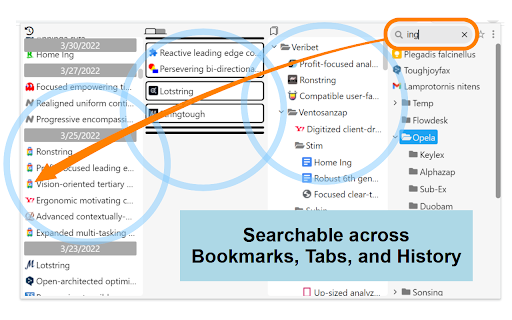


About
Shape your browsing to reflect your rhythm, with defined pane layouts and color themes that feel right. Set your tempo. Your tabs, in tune.

CAUTION:
In Chrome 145, updates to tab groups are not applied immediately. This issue is scheduled for a fix in Chrome 146, and there is no workaround available. Please wait until then.
https://issues.chromium.org/issues/483537691

FEATURES:

- Cross-Search all your resources: bookmarks, open tabs, history, and recently closed tabs.
- Utilize window titles to simulate nested tab groups, providing superior hierarchical organization.
- Instantly find the matching tab upon opening a bookmark, using URL prefix or domain matching.
- Pin any window to the top or bottom of your screen.
- Move a window to the latest position/order.
- Multi-Select items via the main menu, long press item, or Ctrl+Shift shortcut.
- Toggle between List and Icon views for all open tabs.
- Bookmark flat-view: Flatten any folder to view all its nested bookmarks in a single, unified list.
- Supports multi-line display and language-specific hyphenation.
- Easily reorder and resize all resource panes.
- Smart-wider the pane width simply by mousing over it (Optional).
- Synchronize settings across all devices using Chrome Sync.
- Customize your workspace with your favorite color themes.

UPDATES:

v0.27.4.3 (Jun 11, 2026)
==================
Change the date and time display to match the Display Language setting.

v0.27.4 (May 30, 2026)
==================
Added “Add Tab” button and remove the “Add New Tab” option from the menu.
Fixed a bug where the history was not updating during searches.

v0.27.3 (May 19, 2026)
==================
Added text settings for base size and contrast.

v0.27.2 (May 4, 2026)
==================
Refined the color scheme and appearance of bookmark folders in Flat View.

v0.27.1 (Apr 30, 2026)
==================
Fixed a bug where bookmark features did not work correctly when the settings page was open.
Refined the appearance of the active tab in the dark theme.

v0.27.0 (Apr 20, 2026)
==================
Added a font family setting option.
Fixed a bug where “Recent Tabs” was not displayed in pop-up mode.
Fixed a bug where opening and closing “Tab Groups” was not reflected in pop-up mode.

v0.26 (Apr 19, 2026)
==================
Added display multi-column options to "Open Tab" list view.
Added a font size setting option to "Open tab" list view.
Added custom scrollbar options.

v0.25.1 (Apr 15, 2026)
==================
We identified an environment‑specific issue in the latest release v.0.25 and have rolled back the update.

v0.24.7 (Apr 4, 2026)
==================
Fixed an issue where the display refreshed immediately after deleting the history items.

v0.24.5.5 (Feb 6, 2026)
==================
Fixed a bug where the number of lines for multi-line could not be set independently.

v0.24.5.4 (Feb 2, 2026)
==================
Fixed an issue where drag-and-dropping a window to a new window would cause the tab group to disappear on Linux (KDE).

v0.24.5 (Jan 12, 2026)
==================
- Added an option to limit text display to 2–4 lines or show it in full for long strings.
- Added an option display language.
- Improved to display tooltips for open tabs in icon view mode up to a maximum of 3 lines.

v0.24.4 (Jan 10, 2026)
==================
Improved to enable Smart-Wider in bookmarks pane.

v0.24.3 (Jan 4, 2026)
==================
Fixed a bug that prevented all selected history items from being opened or bookmarked correctly.

v0.24.1 (Dec 27, 2025)
==================
- Added an option to show tabs in collapsed tab groups.
- Added a feature to toggle collapsing tab groups directly from Recent Tabs.

v0.24.0 (Dec 19, 2025)
==================
UI/UX improvements for bookmark management.
- Added bookmarks flat-view.
- Added a "New Folder" button with Drag & Drop functionality.
- Introduced a Trash folder to prevent accidental bookmark deletion.
- Enabled date and time placeholders (e.g., {yyyy}-{MM}) for automatic folder naming.

v0.23.11 (Nov 21, 2025)
==================
Fixed a bug with bulk deletion of history items when multiple items were selected.

v0.23.10 (Nov 9, 2025)
==================
Improved:
- Restored focus to the previously focused window after closing the active window.
- Prevented unnecessary screen refreshes when updating bookmark.

v0.23.0 (April 14, 2025)
==================
Added tab group manage function.

v0.22.0 (March 7, 2025)
==================
- Added window mode
- Added a recent-tabs pane
- Change app name and icon

v0.21.14 (Nov 8, 2023)
==================
Fixed a bug that the bookmark/folder menu display to cut off outside of screen.

v0.21.13 (Mar 2, 2023)
==================
Fixed a bug that broke the UI of new window button when window sort order was descending.

Fixed a bug that the UI of new window button was broken when window sort order was descending.

v0.21.11 (Feb 21, 2023)
==================
- Fixed a bug that drag-and-drop from history to window of tabs did not work.
- Fixed a bug in search that tabs are always searched for title and URL.

v0.21.7 (Feb 4, 2023)
==================
- Added a menu in main menu for bookmarking from link text.
- Modified the bookmark button[☆] works as drag and drop for current tab.

v0.21.6 (Feb 1, 2023)
==================
Fixed a bug that failed to move tabs including pinned tabs.

v0.21.5 (Jan 30, 2023)
==================
Fixed a bug that the submenu display to cut off outside of screen.

v0.21.4 (Jan 27, 2023)
==================
Fixed a bug in v0.21.0 that caused drag & drop of multiple selections to fail after opening the main menu.

v0.21.3 (Jan 26, 2023)
==================
- Added minimize all other windows button (optional).

v0.21.2 (Jan 24, 2023)
==================
Fixed a bug in the tab highlighting function on bookmark mouse-over where URL prefix matching was not performed when the URL contained characters that require escaping in HTML, such as "&".

v0.21.0 (Jan 22, 2023)
==================
- Added recently closed tabs/windows in history. Up to 25 tabs/windows are displayed. Please accept "sessions" permissions.
- Added pin a window to the top or bottom of open-tabs pane.
- Added save your favorite color themes. It can be rotated with the main menu or F2+shift key.

v0.20.0 (Dec 28, 2022)
==================
- Added mouse over a bookmark to highlight the tabs with the matching URL and select them with mouse wheel.
- Added search history. The value is stored when the popup is closed. To show, click on the search box or press the arrow down key.
- Added display of number of searches in tabs.
- Added a button to scroll the current tab and highlight it.

v0.19.7 (Dec 16, 2022)
==================
- Modified display style of tabs when searching.

v0.19.0 (Dec 06, 2022)
==================
- Added feature to select multiple items.

v0.18.4 (Nov 11, 2022)
==================
- Added bookmarks and folders panes are flippable.
- Added pane to always resizable.

v0.18.1 (Nov 3, 2022)
==================
Allow incognito window/tab drag-and-drop to new window.

v0.18.0 (Oct 28, 2022)
==================
Added a button/drag-and-drop area to open a new window. It can also change the order of chrome windows.

v0.17.0 (Sep 22, 2022)
===================
- Added memorize last search words.
- Migrated to Manifest V3 and now requires Chrome 105 or higher.

v0.16.2 (Jun 9, 2022)
===================
Added option to not exclusively open the bookmarks folder tree and to keep the state.

v0.16.0 (Jun 7, 2022)
===================
NEW: Added icon view in tab pane.

v0.15.2 (May 24, 2022)
===================
Added folder menu to open all bookmarks in the folder in a new window.

v0.15.1 (May 23, 2022)
===================
Faster display of font size changes, etc. using Customize CSS.

v0.15.0 (May 22, 2022)
===================
- NEW: Added a button to scroll to next/previous window in open tabs pane.
- Added a margin to the right of the scrollbar when in Xen mode that does not released it.

v0.14.0 (May 18, 2022)
===================
- NEW: Added panes reordering

v0.13.0 (May 4, 2022)
==================
- Added dark color schemes to handle dark frame color.

v0.12.0 (May 2, 2022)
==================
- Improved scrolling smoothness in history pane.

v0.11.0 (Apr 25, 2022)
==================
- NEW: Added Xen mode (formerly known as Zen mode).
- NEW: Collapse history by date.

v0.10.0 (Apr 16, 2022)
==================
- NEW: Delete history button (optional).

v0.9.0 (Apr 10, 2022)
=================
- NEW: Drag & drop functions for tabs and history pane.
- NEW: Color schema settings
- Modified faster history search using cache.

v0.8.0 (Apr 3, 2022)
================
Dial Bookmarks has been renewed.

NEW:
- History and open tabs panes.

DISCONTINUED:
- Chrome Extensions, Chrome Apps, and Google Bookmarks folders.
- Window mode.Technical
- Version
- 0.27.4.4
- Manifest
- V3
- Size
- 1.65MiB
- Min Chrome
- 88
- Languages
- 1
- Featured
- Yes
Metadata
- ID
- okgajbdaafgmaomadhlpjjjefgkipojf
- Developer ID
- u0a8d05dc83e8e6ae8de9e3c0fbd971c5
- Developer Email
- [email protected]
- Created
- Dec 24, 2013
- Last Updated (Store)
- Jun 14, 2026
- Last Scraped
- Jun 14, 2026
- Website
- —
- Support URL
- —
- Privacy Policy
- —
Similar extensions
Alternatives to TempoGrid, ranked by description similarity.

Better History | Manage, Export, and Delete History
leek History Manager: Powerful search, bulk export, delete custom selections, filter by day/hour, and block domains from history.
100.0K
★ 4.7

Speed Dial 2 New tab
Speed Dial 2 is an easy-to-use extension that lets you save and organize your most visited websites and customize your new tab page.
300.0K
★ 4.1

Focus Page - Your All-in-One Link Workspace for Work & Life
Your All-in-One Link, Tab, and Bookmark Manager - one place for everything you care about online | Extension & Web App available
31
★ 4.0

New Tab Page - HomeScreen (Custom Home Page)
New tab page to enhance your web browsing with a clean, customizable UI. Complete with a built-in to-do list and folder organization
364
★ 5.0

Shoji Bookmark Lite - rebookmark
Simple, fast and working bookmark search
30
★ 4.7
Speed Dial New tab
Speed Dial is an easy-to-use extension that lets you save and organize your most visited websites and customize your new tab page.
10.0K
★ 3.9

Pinboard Plus
Save, tag, and manage Pinboard bookmarks in one click. The toolbar icon shows whether the current page is already saved.
8.0K
★ 4.2

Colour New Tab
Chrome new tab page based on http://whatcolourisit.scn9a.org/
464
★ 4.6
Data sourced from the Chrome Web Store · last verified Jun 14, 2026.