
KiCad Parts Importer
Download KiCad 9+ compatible symbols, footprints & 3D from LCSC. Local backend via WebSocket (API URL in Settings).
As of June 2026, KiCad Parts Importer has 27 users and a 5.00/5 rating from 1 reviews in the Productivity category.
Usersup 125.0 percent+125.0%
27
27
Ratingno change0%
5.00
1 reviews
Reviewsno change0%
1
Version
2.0.0
Manifest V3
90-day change · In the last 90 days this extension 1 version update, changed permissions.
History
10 snapshotsTracking since Apr 7, 2026.
View as table
| Date | Users | Rating | Reviews | Version |
|---|---|---|---|---|
| Apr 7, 2026 | 12 | 5.00 | 1 | 1.0.1 |
| Apr 19, 2026 | 13 | 5.00 | 1 | 1.0.1 |
| Apr 24, 2026 | 22 | 5.00 | 1 | 2.0.0 |
| May 1, 2026 | 22 | 5.00 | 1 | 2.0.0 |
| May 8, 2026 | 16 | 5.00 | 1 | 2.0.0 |
| May 12, 2026 | 24 | 5.00 | 1 | 2.0.0 |
| May 18, 2026 | 25 | 5.00 | 1 | 2.0.0 |
| May 25, 2026 | 20 | 5.00 | 1 | 2.0.0 |
| May 31, 2026 | 19 | 5.00 | 1 | 2.0.0 |
| Jun 7, 2026 | 25 | 5.00 | 1 | 2.0.0 |
| Now | 27 | 5.00 | 1 | 2.0.0 |
Changelog
- Apr 19, 2026description
🚀 KiCad Parts Importer (Chrome Extension + required local backend)

KiCad Parts Importer adds download/import buttons to LCSC product pages and saves
KiCad symbols, footprints, and 3D models directly into your chosen KiCad library.

✅ What it does
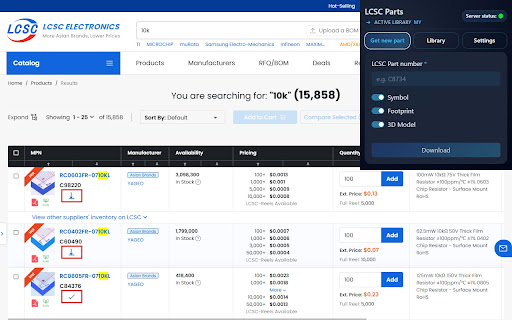
• 🖱️ One-click import buttons on LCSC.com product pages (and lists, if supported)
• 🧩 Builds KiCad Symbol + Footprint + 3D Model via the local backend
• 📁 Saves into your existing KiCad library structure (no reformatting)
• 🔒 Fully local: no accounts, no analytics, no tracking, no data collection

💡 Why engineers use it
• ⚡ Speeds up symbol/footprint/3D model creation dramatically
• 🔁 Stop recreating parts: import, review, tweak, move on
• 🧱 Keeps libraries consistent and production-ready
• 🛡️ You stay in control: everything runs on your machine

🛠️ How it works
1) Install the Chrome extension
2) Download and run the KiCadPartsImporter Backend (required)
3) Create or select a KiCad library in the extension
4) Open an LCSC product page
5) Click Import → the part appears in your KiCad library instantly ✅

💸 Plans & pricing
• 🆓 Free
• 🚫 No limits, no accounts
• 🌍 Open source

📦 Backend (required):
https://github.com/theautomatist/KiCad-Parts-Importer/releases

🔗 Project page:
https://github.com/theautomatist/KiCad-Parts-Importer
🚀 KiCad Parts Importer (Chrome Extension + required local backend)

⚠️ Important:
This extension only works together with the required local backend.
The backend is essential because it handles KiCad library file processing, symbol/footprint generation, and 3D model handling locally on your machine.

KiCad Parts Importer adds import buttons to LCSC product pages and saves
KiCad symbols, footprints, and 3D models directly into your chosen KiCad library.

✅ What it does
• 🖱️ Adds import buttons to LCSC product pages
• 🧩 Creates KiCad Symbol + Footprint + 3D Model via the required local backend
• 📁 Saves into your existing KiCad library structure
• 🧪 Supports EasyEDA-based and template-based import flows
• 👀 Includes previews and improved import guidance
• 🔒 Fully local: no accounts, no analytics, no tracking, no data collection

💡 Why engineers use it
• ⚡ Speeds up symbol/footprint/3D model creation
• 🔁 Reduces repetitive library work
• 🧱 Helps keep KiCad libraries consistent
• 🛡️ Everything runs on your own machine

🛠️ How it works
1) Install the Chrome extension
2) Download and run the KiCad Parts Importer backend (required)
3) Create or select a KiCad library in the extension
4) Open an LCSC product page
5) Click Import → the part is added to your KiCad library

💸 Plans & pricing
• 🆓 Free
• 🚫 No limits, no accounts
• 🌍 Open source

📦 Backend (required):
https://github.com/theautomatist/KiCad-Parts-Importer/releases

🔗 Project page:
https://github.com/theautomatist/KiCad-Parts-Importer
- Apr 19, 2026short_description
Download KiCad symbols, footprints & 3D models from LCSC in one click.
Download KiCad 9+ compatible symbols, footprints & 3D from LCSC. Local backend via WebSocket (API URL in Settings).
- Apr 19, 2026host_permissions
http://localhost:8087/*, https://www.lcsc.com/*
http://localhost:8087/*, https://www.lcsc.com/*, https://lcsc.com/*, https://*.lcsc.com/*, https://*.lcsiglobal.com/*, https://*.szlcsc.com/*
- Apr 19, 2026permissions
storage, notifications
storage
Permissions & access
- Permissions
- storage
- Host access
- http://localhost:8087/*, https://www.lcsc.com/*, https://lcsc.com/*, https://*.lcsc.com/*, https://*.lcsiglobal.com/*, https://*.szlcsc.com/*
Screenshots
About
🚀 KiCad Parts Importer (Chrome Extension + required local backend)

⚠️ Important:
This extension only works together with the required local backend.
The backend is essential because it handles KiCad library file processing, symbol/footprint generation, and 3D model handling locally on your machine.

KiCad Parts Importer adds import buttons to LCSC product pages and saves
KiCad symbols, footprints, and 3D models directly into your chosen KiCad library.

✅ What it does
• 🖱️ Adds import buttons to LCSC product pages
• 🧩 Creates KiCad Symbol + Footprint + 3D Model via the required local backend
• 📁 Saves into your existing KiCad library structure
• 🧪 Supports EasyEDA-based and template-based import flows
• 👀 Includes previews and improved import guidance
• 🔒 Fully local: no accounts, no analytics, no tracking, no data collection

💡 Why engineers use it
• ⚡ Speeds up symbol/footprint/3D model creation
• 🔁 Reduces repetitive library work
• 🧱 Helps keep KiCad libraries consistent
• 🛡️ Everything runs on your own machine

🛠️ How it works
1) Install the Chrome extension
2) Download and run the KiCad Parts Importer backend (required)
3) Create or select a KiCad library in the extension
4) Open an LCSC product page
5) Click Import → the part is added to your KiCad library

💸 Plans & pricing
• 🆓 Free
• 🚫 No limits, no accounts
• 🌍 Open source

📦 Backend (required):
https://github.com/theautomatist/KiCad-Parts-Importer/releases

🔗 Project page:
https://github.com/theautomatist/KiCad-Parts-Importer
Technical
- Version
- 2.0.0
- Manifest
- V3
- Size
- 640KiB
- Min Chrome
- 88
- Languages
- 1
- Featured
- No
Metadata
- ID
- ojkpgmndjlkghmaccanfophkcngdkpmi
- Developer ID
- u608ba39e81dce327a897ececd70f3fbd
- Developer Email
- [email protected]
- Created
- Jan 13, 2026
- Last Updated (Store)
- Apr 17, 2026
- Last Scraped
- Jun 7, 2026
- Website
- —
Similar extensions
Alternatives to KiCad Parts Importer, ranked by description similarity.

KiCad Parts
Extract electronic component data from any supplier website with AI-powered accuracy. Save directly to your local KiCad library.
31
★ 4.3

Easy ECAD Downloader
Export KiCad symbol, footprint, and 3D model files from EasyEDA and supported SamacSys distributor product pages.
183

SnapMagic
A new experience to help make your design a snap. Focus on design with ready-to-use PCB footprints and schematic symbols
5.0K
★ 4.7

Partbase - Supplier Article Lookup
Extract article numbers from supplier websites (Ludwig Meister, Flixpart, Landefeld) on Partbase.
4
★ 5.0

Order Parts
An extension to order parts across multiple websites.
18
★ 5.0

Keplr Extension
Save and organize your internet resources
364
★ 5.0

CAD SCOUT 3Dfindit
Finds matching 3D CAD, CAE and BIM data for free download on any website that shows components.
4.0K
★ 5.0

CARRT
Intelligently rename McMaster-Carr CAD downloads with AI-powered pricing extraction
5
Data sourced from the Chrome Web Store · last verified Jun 7, 2026.