
TODO Fridge
A simple TODO app that organizes tasks by urgency across four zones.
As of June 2026, TODO Fridge has 16 users in the Productivity category.
Usersno change0%
16
16
Ratingno change0%
—
— reviews
Reviewsno change0%
—
Version
1.2.0
Manifest V3
90-day change · In the last 90 days this extension 1 version update.
History
4 snapshotsTracking since May 18, 2026.
View as table
| Date | Users | Rating | Reviews | Version |
|---|---|---|---|---|
| May 18, 2026 | — | — | — | 1.0.0 |
| May 24, 2026 | — | — | — | 1.0.0 |
| May 31, 2026 | 12 | — | — | 1.0.0 |
| Jun 6, 2026 | 15 | — | — | 1.2.0 |
| Now | 16 | — | — | 1.2.0 |
Changelog
- May 31, 2026description
■ TODO Fridge — Manage tasks by their "temperature"

Do you ever feel paralyzed by a growing pile of tasks, unable to decide what to tackle first?

TODO Fridge is a Chrome side-panel TODO app that organizes your tasks using a temperature metaphor — from "hot, do it now" items down to "frozen, maybe someday" ones.

────────────────
■ Four Zones
────────────────

🍳 Frying Pan  — Hot tasks that need attention right now
🧊 Fridge      — Tasks coming up soon
❄️ Freezer     — Tasks you want to push off a bit
🏔 Alaska      — On hold, maybe someday

Just drag and drop tasks between zones to intuitively organize them by urgency.

────────────────
■ Key Features
────────────────

✓ Always-accessible side panel — Open with one click while you browse
✓ Drag & drop — Move tasks between zones or tabs instantly
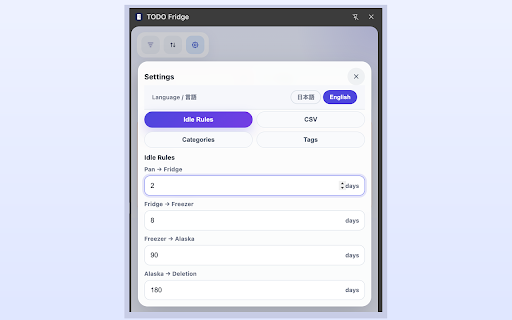
✓ Auto-cooling rules — Tasks gradually cool down based on how long they sit
✓ Categories & tags — Organize tasks however you like
✓ Search, filter, and sort — By due date, age, or manual order
✓ CSV backup — Export and import your tasks (Shift-JIS / UTF-8 supported)
✓ Chrome sync — Tasks automatically sync across your devices
✓ Japanese / English — Switch anytime from settings
✓ Completely free, no ads, no account required

────────────────
■ Perfect For
────────────────

・Anyone who's tried other TODO apps but couldn't stick with them
・People who struggle with prioritizing and end up with overwhelming task lists
・Anyone looking for a simple, lightweight TODO tool
・Browser users who want to jot down tasks without switching apps

────────────────
■ Privacy
────────────────

All data is stored in Chrome's local storage and never sent to external servers. No account registration required.
■ TODO Fridge — Manage tasks by their "temperature"

Do you ever feel paralyzed by a growing pile of tasks, unable to decide what to tackle first?

TODO Fridge is a Chrome side-panel TODO app that organizes your tasks using a temperature metaphor — from "hot, do it now" items down to "frozen, maybe someday" ones.

────────────────
■ Four Zones
────────────────

🍳 Frying Pan  — Hot tasks that need attention right now
🧊 Fridge      — Tasks coming up soon
❄️ Freezer     — Tasks you want to push off a bit
🏔 Alaska      — On hold, maybe someday

Just drag and drop tasks between zones to intuitively organize them by urgency.

────────────────
■ Key Features
────────────────

✓ Always-accessible side panel — Open with one click while you browse
✓ Drag & drop — Move tasks between zones or tabs instantly
✓ Auto-cooling rules — Tasks gradually cool down based on how long they sit
✓ Categories & tags — Organize tasks however you like
✓ Search, filter, and sort — By due date, age, or manual order
✓ CSV backup — Export and import your tasks (Shift-JIS / UTF-8 supported)
✓ Chrome sync — Tasks automatically sync across your devices
✓ Japanese / English — Switch anytime from settings
✓ Completely free, no ads, no account required

────────────────
■ Perfect For
────────────────

・Anyone who's tried other TODO apps but couldn't stick with them
・People who struggle with prioritizing and end up with overwhelming task lists
・Anyone looking for a simple, lightweight TODO tool
・Browser users who want to jot down tasks without switching apps

────────────────
■ Privacy
────────────────

All data is stored in Chrome's local storage and never sent to external servers. No account registration required.

────────────────
■ Changelog
────────────────
v1.2.0 (May 2026)
・Subtasks can now be viewed and edited from the task edit screen
・Added a due-date move rule (auto-move tasks to a chosen zone N days before the due date)
・Added enable/confirm options to the idle rule (supports auto-move without confirmation)
・Renamed the settings tab to “Auto-Move Rules”
・Refined the settings screen layout for better readability
v1.1.0 (May 2026)
・Added subtasks (manage small steps within a task, up to 50 chars each)
・Added a complete-toggle button on the task detail screen
・Return to the detail view after editing or canceling a task
・Added a description under the Idle Rules settings
・Redesigned the frying pan icon with a more intuitive look
・Due date calendar now opens above the input (no scrolling needed)
・Fixed an issue where trailing newlines in task details were stripped
v1.0.0 (May 2026)
・Initial release
Permissions & access
- Permissions
- storagesidePanel
- Host access
- None declared
Screenshots

About
■ TODO Fridge — Manage tasks by their "temperature"

Do you ever feel paralyzed by a growing pile of tasks, unable to decide what to tackle first?

TODO Fridge is a Chrome side-panel TODO app that organizes your tasks using a temperature metaphor — from "hot, do it now" items down to "frozen, maybe someday" ones.

────────────────
■ Four Zones
────────────────

🍳 Frying Pan  — Hot tasks that need attention right now
🧊 Fridge      — Tasks coming up soon
❄️ Freezer     — Tasks you want to push off a bit
🏔 Alaska      — On hold, maybe someday

Just drag and drop tasks between zones to intuitively organize them by urgency.

────────────────
■ Key Features
────────────────

✓ Always-accessible side panel — Open with one click while you browse
✓ Drag & drop — Move tasks between zones or tabs instantly
✓ Auto-cooling rules — Tasks gradually cool down based on how long they sit
✓ Categories & tags — Organize tasks however you like
✓ Search, filter, and sort — By due date, age, or manual order
✓ CSV backup — Export and import your tasks (Shift-JIS / UTF-8 supported)
✓ Chrome sync — Tasks automatically sync across your devices
✓ Japanese / English — Switch anytime from settings
✓ Completely free, no ads, no account required

────────────────
■ Perfect For
────────────────

・Anyone who's tried other TODO apps but couldn't stick with them
・People who struggle with prioritizing and end up with overwhelming task lists
・Anyone looking for a simple, lightweight TODO tool
・Browser users who want to jot down tasks without switching apps

────────────────
■ Privacy
────────────────

All data is stored in Chrome's local storage and never sent to external servers. No account registration required.

────────────────
■ Changelog
────────────────
v1.2.0 (May 2026)
・Subtasks can now be viewed and edited from the task edit screen
・Added a due-date move rule (auto-move tasks to a chosen zone N days before the due date)
・Added enable/confirm options to the idle rule (supports auto-move without confirmation)
・Renamed the settings tab to “Auto-Move Rules”
・Refined the settings screen layout for better readability
v1.1.0 (May 2026)
・Added subtasks (manage small steps within a task, up to 50 chars each)
・Added a complete-toggle button on the task detail screen
・Return to the detail view after editing or canceling a task
・Added a description under the Idle Rules settings
・Redesigned the frying pan icon with a more intuitive look
・Due date calendar now opens above the input (no scrolling needed)
・Fixed an issue where trailing newlines in task details were stripped
v1.0.0 (May 2026)
・Initial release
Technical
- Version
- 1.2.0
- Manifest
- V3
- Size
- 138KiB
- Min Chrome
- 88
- Languages
- 2
- Featured
- No
Metadata
- ID
- ojcgcmmjfnookgemlkifilkifpijnobk
- Developer ID
- u38f44e34efe6b33c6c1925c33c105ffa
- Developer Email
- [email protected]
- Created
- May 17, 2026
- Last Updated (Store)
- May 29, 2026
- Last Scraped
- Jun 6, 2026
- Website
- —
- Support URL
- —
- Privacy Policy
- —
Data sourced from the Chrome Web Store · last verified Jun 6, 2026.