
Waifu Focus
Boost productivity with waifus, idols, and images of your choice!
As of June 2026, Waifu Focus has 213 users and a 4.78/5 rating from 9 reviews in the Workflow & Planning category.
Usersup 11.5 percent+11.5%
213
213
Ratingno change0%
4.78
9 reviews
Reviewsno change0%
9
Version
3.5
Manifest V3
History
8 snapshotsTracking since Apr 7, 2026.
View as table
| Date | Users | Rating | Reviews | Version |
|---|---|---|---|---|
| Apr 7, 2026 | 191 | 4.78 | 9 | 3.5 |
| Apr 19, 2026 | 194 | 4.78 | 9 | 3.5 |
| Apr 24, 2026 | 196 | 4.78 | 9 | 3.5 |
| May 5, 2026 | 197 | 4.78 | 9 | 3.5 |
| May 11, 2026 | 203 | 4.78 | 9 | 3.5 |
| May 20, 2026 | 195 | 4.78 | 9 | 3.5 |
| May 30, 2026 | 213 | 4.78 | 9 | 3.5 |
| Jun 8, 2026 | 199 | 4.78 | 9 | 3.5 |
| Now | 213 | 4.78 | 9 | 3.5 |
Permissions & access
- Permissions
- tabsstoragewebNavigation
- Host access
- None declared
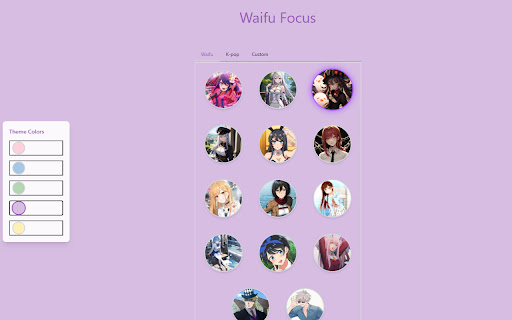
Screenshots


About
Block unwanted sites, motivate yourself, and boost productivity with anime waifus!

Many other site-blocking extensions charge steep subscriptions for use, and others can be turned off with just a click.

With Waifu Focus, you won't WANT to uninstall the extension, because that would mean being unable to see your waifus, thus boosting your productivity!

Features:
- Block Websites: Easily add websites to your block list and ensure they cannot be accessed during your specified times.
- Block Entire Domains or Specific URL Paths: Choose to block entire domains or target specific URL paths for more granular control over your browsing experience.
- Create a custom Blocking Schedule, deciding when and what days of the week you want blocked!
- Custom Anime-themed Block Pages: Blocked pages are replaced with custom images and messages from your favorite waifu, making the experience less frustrating and more enjoyable.
- Easy to Use: Simple interface for managing your list of blocked websites.
- Dynamic Blocking: Update your block list on-the-fly with immediate effect across all tabs.
- Privacy Focused: All data is stored locally, and no personal information is sent or shared.
- Selectable Color Theme: Choose from a variety of color themes to personalize your blocking experience.
- K-Pop Member Selection: Pick which K-Pop members of your selected group are displayed on the blocked pages.
- Custom Image Upload: Upload your own images via the UI to replace the default ones on the blocked pages.

How to Use:
1. Click on the Waifu Focus icon in your Chrome toolbar to open the popup.
2. Enter the URL of the website you wish to block in the input field and click `Add`.
3. To remove a site from the block list, click the `X` next to the site's URL in the list.

Support:
For any issues or support, please file an issue through the GitHub repository.

Source code: https://github.com/C0derTang/waifu-focus

(Image credit goes to the original artists and photographers)
Technical
- Version
- 3.5
- Manifest
- V3
- Size
- 24.42MiB
- Min Chrome
- 88
- Languages
- 1
- Featured
- No
Metadata
- ID
- oilebkjfhbkbmablbmhellicongmgbml
- Developer ID
- u5d05c8f177342063e29a26165fe01d92
- Developer Email
- [email protected]
- Created
- Apr 24, 2024
- Last Updated (Store)
- Jan 21, 2026
- Last Scraped
- Jun 8, 2026
- Website
- —
- Support URL
- —
- Privacy Policy
- —
Similar extensions
Alternatives to Waifu Focus, ranked by description similarity.

Focus Blocker
Block distracting websites to boost productivity while browsing.
—

WebWall – Block Websites & Stay Focused
Block distracting websites and stay focused with WebWall.
7
★ 5.0

Website Blocker
Easily block an unlimited number of websites using this free browser extension.
8.0K
★ 4.8

OptimEyes
Helps you stay focused, optimize your time, and keep moving in the right direction toward your goals.
1

SiteBlocker — Block Distracting Websites & Stay Focused
Block distracting websites and track your screen time. Focus timer, scheduled blocking, browsing insights. Privacy-first.
1.0K
★ 3.9

Porn Blocker - Block Pornography, Adult Content, and NSFW Websites
Block porn, adult content, and NSFW websites. Protect yourself or your family from adult sites with safe search.
3.0K
★ 4.7

WebBarrier: Free Website Blocker
A extentison that blocks any website for free!
775
★ 4.7

Website Blocker - Block Sites, Focus Timer & Parental Controls
Block distracting sites & social media. Pomodoro timer, usage limits, keyword blocking & password-protected parental controls.
459
★ 4.8
Data sourced from the Chrome Web Store · last verified Jun 8, 2026.