
Jarvis - Your Smart ChatGPT AI Assistant
Browse Smarter with Jarvis ChatGPT AI Extension! Select content & Get Relevant Information, Summarize, Write Replies & Much more!
As of May 2026, Jarvis - Your Smart ChatGPT AI Assistant has 5,000 users and a 4.54/5 rating from 13 reviews in the Productivity category.
Usersdown 16.7 percent−16.7%
5.0K
5,000
Ratingno change0%
4.54
13 reviews
Reviewsno change0%
13
Version
0.0.0.20
Manifest V3
90-day change · In the last 90 days this extension lost 1.0K users.
History
2 snapshotsTracking since Apr 29, 2026.
View as table
| Date | Users | Rating | Reviews | Version |
|---|---|---|---|---|
| Apr 29, 2026 | 6.0K | 4.54 | 13 | 0.0.0.20 |
| May 26, 2026 | 6.0K | 4.54 | 13 | 0.0.0.20 |
| Now | 5.0K | 4.54 | 13 | 0.0.0.20 |
Permissions & access
- Permissions
- identityidentity.emailtabsstorage
- Host access
- None declared
Screenshots



About
Introducing Jarvis - Your Smart AI Assistant powered by ChatGPT that is going to revolutionize the way you interact with online content!

🚀 GETTING STARTED
Launch Jarvis by using any of the following option:
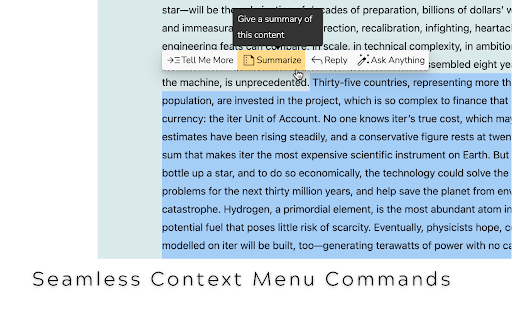
1️⃣ Simply Select Any Online Text Content, which brings up the Jarvis custom menu to choose from.
2️⃣ Or, Press Ctrl+J to start chatting with Jarvis.

KEY BENEFITS
⭐ FREE access to the power of ChatGPT!
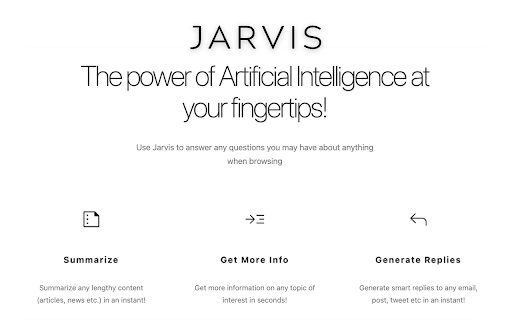
⭐ Summarize selected articles and other long-form content.
⭐ Get More Information about any topic of interest.
⭐ Create replies to emails, social media posts, and anything else, saving you time and enhancing productivity.
⭐ Ask any question and get instant answers, making it really easy to find the information you need.

HOW JARVIS WORKS
  ➡️ Simply Select Any Online Content, which brings up the Jarvis custom menu.
  ➡️ Choose any Command from Menu (Summarize, Get More Info, Generate Reply, etc)
  ➡️ Jarvis pops up with relevant answer. Continue to chat with Jarvis if needed.

FAQs
  ➡️ Is Jarvis Free?
  Yes! There is a free version of Jarvis.

  ➡️ Can I turn off Jarvis for selected websites?
  Absolutely! Just click the Jarvis extension from the Chrome extensions list and select the 'Disable Jarvis for this Website' checkbox setting.

📧 CONTACT US
Please feel free to contact us at [email protected] or https://jarvis.smartupai.com/

🙏 THANK YOU!
Jarvis is designed to be user-friendly and intuitive. Its seamless integration as a Chrome extension means you can effortlessly access its capabilities while you browse. Say goodbye to switching between tabs or opening additional apps. Jarvis becomes your trusted co-pilot, always ready to assist and enhance your online journey.

We believe that Jarvis has the potential to revolutionize the way people interact with the web, and we're eager for your help and feedback.

Thank you so much for your support!
Technical
- Version
- 0.0.0.20
- Manifest
- V3
- Size
- 125KiB
- Min Chrome
- 88
- Languages
- 1
- Featured
- Yes
Metadata
- ID
- oihpodnimjebpjcdfhipjfmpmcbmedoe
- Developer ID
- u35c216c12d9caa850b997e0ed8b2a12d
- Developer Email
- [email protected]
- Created
- Jun 5, 2023
- Last Updated (Store)
- Nov 15, 2023
- Last Scraped
- May 26, 2026
- Website
- smartupai.com
- Support URL
- https://jarvis.smartupai.com/#contact
- Privacy Policy
- https://jarvis.smartupai.com/privacy/
Similar extensions
Alternatives to Jarvis - Your Smart ChatGPT AI Assistant, ranked by description similarity.
Jarvis AI Assistant — AI Copilot for Your Browser
All-in-one AI copilot. Write, translate, summarize, check grammar, and automate tasks with 30+ AI models.
10.0K
★ 4.7

Page Jarvis
Select text, press Ctrl+Shift+L, and use Page Jarvis for polished reading and writing help directly on the page.
3

ChatGPT Smart Search
ChatGPT Smart Search extension uses ChatGPT's API to create a simple but powerful search tool
11

ChromeGPT for ChatGPT
The easiest way to use ChatGPT.
889
★ 5.0

ChromeAiAgent
AI assistant for browser automation with natural language commands and intelligent web page interaction.
8

PagePilot AI
Chrome's Smart Assistant 🚀 Powered by ChatGPT & Google Gemini
149
★ 5.0

AskGPT
Unlock the Speed of GPT Anywhere Online: Experience the quickest and most efficient way to harness the power of GPT across the web.
53

AI assistant
Use AI Assistant Chrome Extension for ai coding assistant and ai chat online productivity with smart, instant help in your browser.
688
★ 5.0
Data sourced from the Chrome Web Store · last verified May 26, 2026.