
TabCost Pro
Track the real cost of your inactive tabs. Bilingual extension (English/Spanish).
As of June 2026, TabCost Pro has — users in the Workflow & Planning category.
Usersno change0%
—
—
Ratingno change0%
—
— reviews
Reviewsno change0%
—
Version
1.5.6
Manifest V3
90-day change · In the last 90 days this extension 1 version update.
History
2 snapshotsTracking since May 27, 2026.
Not enough history yet for this metric — the chart fills in as we collect more snapshots.
View as table
| Date | Users | Rating | Reviews | Version |
|---|---|---|---|---|
| May 27, 2026 | — | — | — | 1.5.3 |
| Jun 3, 2026 | — | — | — | 1.5.3 |
| Now | — | — | — | 1.5.6 |
Changelog
- Jun 3, 2026description
TabCost shows you what you're investing without realizing it.

Every minute a tab sits idle (distraction, forgotten search, old tool), a small cost accumulates based on your hourly rate. It's not a real bill – it's a mirror for your attention.

---

✅ Free version (everyone)
• See your daily accumulated cost in the popup
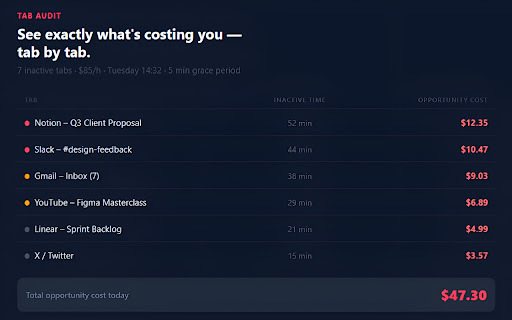
• Audit inactive tabs – see each tab's minutes and cost
• Close all inactive tabs with one button
• Set your hourly rate and currency (USD/EUR)
• Switch between English and Spanish
• Dark mode included

🚀 Pro version – one-time $5 / €5
• Ignore work domains (Notion, Gmail, Slack, Figma…) – only distractions count
• Auto-close idle tabs after X minutes
• 365-day history with charts – spot your patterns
• CSV export of history and current inactive tabs list
• Adjust grace minutes (1–30) and impact % (10–50)
• Daily reset button (↺) to start fresh
• Smart notifications (set your own threshold)
• Priority support

---

Two ways freelancers use TabCost:

🔹 Distraction control – news, social media, shopping tabs that steal your focus. See exactly how much time you lose.

🔹 Operational cost – track time spent on web tools (Leonardo AI, Remove BG, GitHub) and add that cost to your fixed-price invoices. Real data for better pricing.

---

How it works

1. Install the extension (free).
2. Enter your hourly rate (e.g. $50/h).
3. TabCost starts counting inactive tabs automatically.
4. Upgrade to Pro anytime from the popup.

---

Privacy

Everything stays in your browser. No servers, no analytics. Only license verification contacts Gumroad once.

---

FAQ

Why doesn't it count anything? → Set your hourly rate in the popup first (it starts at $0).

Can I use it offline? → Yes, 100%.

Is my data sent to any server? → No. Only the Pro license check once.

How to activate Pro? → Paste the license key you receive by email into the popup.

Refund? → 30-day money-back guarantee. Email [email protected].

---

© 2026 TabCost – Built for freelancers who value their time.
TabCost shows you what you're investing without realizing it.

Every minute a tab sits idle (distraction, forgotten search, old tool), a small cost accumulates based on your hourly rate. It's not a real bill – it's a mirror for your attention.

---

✅ Free version (everyone)
• See your daily accumulated cost in the popup
• Audit inactive tabs – see each tab's minutes and cost
• Close all inactive tabs with one button
• Set your hourly rate and currency (USD/EUR)
• Switch between English and Spanish
• Dark mode included

🚀 Pro version – one-time $5 / €5
• Ignore work domains (Notion, Gmail, Slack, Figma…) – only distractions count
• Auto-close idle tabs after X minutes
• 365-day history with charts – spot your patterns
• CSV export of history and current inactive tabs list
• Adjust grace minutes (1–30) and impact % (10–50)
• Daily reset button (↺) to start fresh
• Smart notifications (set your own threshold)
• Priority support

---

Two ways freelancers use TabCost:

🔹 Distraction control – news, social media, shopping tabs that steal your focus. See exactly how much time you lose.

🔹 Operational cost – Operational cost – see how much time you spend on web tools (Leonardo AI, Remove BG, GitHub) based on idle tabs, and use that insight to adjust your fixed-price invoices.

---

How it works

1. Install the extension (free).
2. Enter your hourly rate (e.g. $50/h).
3. TabCost starts counting inactive tabs automatically.
4. Upgrade to Pro anytime from the popup.

---

Privacy

Everything stays in your browser. No servers, no analytics. Only license verification contacts Gumroad once.

---

FAQ

Why doesn't it count anything? → Set your hourly rate in the popup first (it starts at $0).

Can I use it offline? → Yes, 100%.

Is my data sent to any server? → No. Only the Pro license check once.

How to activate Pro? → Paste the license key you receive by email into the popup.

Refund? → 30-day money-back guarantee. Email [email protected].

---

© 2026 TabCost – Built for freelancers who value their time.
- Jun 3, 2026category
productivity/tools
productivity/workflow
Permissions & access
- Permissions
- storagetabsalarmsnotifications
- Host access
- https://api.gumroad.com/*
Screenshots



About
TabCost shows you what you're investing without realizing it.

Every minute a tab sits idle (distraction, forgotten search, old tool), a small cost accumulates based on your hourly rate. It's not a real bill – it's a mirror for your attention.

---

✅ Free version (everyone)
• See your daily accumulated cost in the popup
• Audit inactive tabs – see each tab's minutes and cost
• Close all inactive tabs with one button
• Set your hourly rate and currency (USD/EUR)
• Switch between English and Spanish
• Dark mode included

🚀 Pro version – one-time $5 / €5
• Ignore work domains (Notion, Gmail, Slack, Figma…) – only distractions count
• Auto-close idle tabs after X minutes
• 365-day history with charts – spot your patterns
• CSV export of history and current inactive tabs list
• Adjust grace minutes (1–30) and impact % (10–50)
• Daily reset button (↺) to start fresh
• Smart notifications (set your own threshold)
• Priority support

---

Two ways freelancers use TabCost:

🔹 Distraction control – news, social media, shopping tabs that steal your focus. See exactly how much time you lose.

🔹 Operational cost – Operational cost – see how much time you spend on web tools (Leonardo AI, Remove BG, GitHub) based on idle tabs, and use that insight to adjust your fixed-price invoices.

---

How it works

1. Install the extension (free).
2. Enter your hourly rate (e.g. $50/h).
3. TabCost starts counting inactive tabs automatically.
4. Upgrade to Pro anytime from the popup.

---

Privacy

Everything stays in your browser. No servers, no analytics. Only license verification contacts Gumroad once.

---

FAQ

Why doesn't it count anything? → Set your hourly rate in the popup first (it starts at $0).

Can I use it offline? → Yes, 100%.

Is my data sent to any server? → No. Only the Pro license check once.

How to activate Pro? → Paste the license key you receive by email into the popup.

Refund? → 30-day money-back guarantee. Email [email protected].

---

© 2026 TabCost – Built for freelancers who value their time.
Technical
- Version
- 1.5.6
- Manifest
- V3
- Size
- 62.15KiB
- Min Chrome
- 88
- Languages
- 1
- Featured
- No
Metadata
- ID
- oifegknejkfiibmfapdfcgemclgmmghm
- Developer ID
- uc919d06c6a1881f28694d55479c59f3b
- Developer Email
- [email protected]
- Created
- May 26, 2026
- Last Updated (Store)
- May 30, 2026
- Last Scraped
- Jun 8, 2026
- Website
- —
Data sourced from the Chrome Web Store · last verified Jun 8, 2026.