
PromptRight
Right-click to prompt AI platforms with selected text
As of May 2026, PromptRight has 13 users and a 5.00/5 rating from 5 reviews in the Productivity category.
Usersno change0%
13
13
Ratingno change0%
5.00
5 reviews
Reviewsno change0%
5
Version
1.0
Manifest V3
History
2 snapshotsTracking since Apr 29, 2026.
View as table
| Date | Users | Rating | Reviews | Version |
|---|---|---|---|---|
| Apr 29, 2026 | 13 | 5.00 | 5 | 1.0 |
| May 26, 2026 | 11 | 5.00 | 5 | 1.0 |
| Now | 13 | 5.00 | 5 | 1.0 |
Permissions & access
- Permissions
- contextMenusstorage
- Host access
- None declared
Screenshots

About
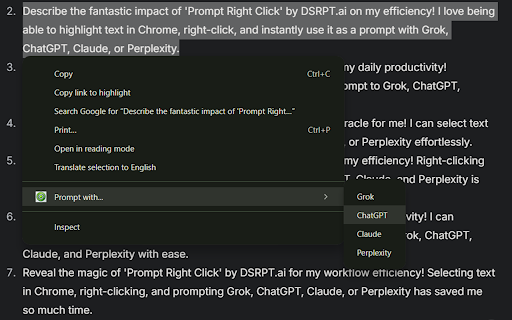
This lightweight Chrome extension transforms the way you interact with text on the web. Simply highlight any text, right-click, and instantly send it as a prompt to your favorite AI platforms like Grok, ChatGPT, Claude, or Perplexity. No more copying, pasting, or switching tabs - get answers, insights, or creative ideas in seconds!

Here’s why it’s such a game-changer for your efficiency:

Instant Access to AI Power: No need to copy-paste or switch tabs to use an AI. Just a right-click, and you’re ready to engage with a model like ChatGPT or Claude. This direct interaction eliminates distractions and keeps your workflow smooth.

Contextual Prompts: Highlighting text means you’re sending precisely the information you need to the AI. It’s tailored, focused, and relevant, which can help the models generate more accurate and useful responses in real-time.

Multi-model Flexibility: You’re not tied to one AI engine. With the ability to choose between Grok, ChatGPT, Claude, or Perplexity, you can leverage the strengths of each model depending on the task at hand. Whether it’s conversational, detailed analysis, or creative writing, you've got options!

Increased Productivity: Since you can interact with AI seamlessly, you can quickly brainstorm, clarify doubts, draft emails, or even get summaries, all without leaving the page you're working on. This hands-on, on-the-fly assistance allows you to stay in "the zone" and maximize productivity.

Reduced Friction: The friction between reading, thinking, and seeking help is minimized. You're no longer fumbling through tabs, entering text, or navigating complex interfaces. The simplicity of just right-clicking makes it feel like AI is an integral part of your browser.
Technical
- Version
- 1.0
- Manifest
- V3
- Size
- 10.93KiB
- Min Chrome
- 88
- Languages
- 1
- Featured
- No
Metadata
- ID
- oibclafleeghnjppnejedbcepfocdkdm
- Developer ID
- ud1445ae0ac62d12a82d0dad8269ffe76
- Developer Email
- [email protected]
- Created
- Mar 21, 2025
- Last Updated (Store)
- Mar 21, 2025
- Last Scraped
- May 26, 2026
- Website
- —
- Support URL
- https://DrivenByJoy.com/contact
- Privacy Policy
- —
Similar extensions
Alternatives to PromptRight, ranked by description similarity.

Promptify
Enhance your prompt with a single click.
3
★ 5.0

pastePrompt
Select text to instantly query AI. Launch searches in ChatGPT/Perplexity. Add custom prompts to speed up research via shortcuts.
9

AI Prompt Optimizer
Unleash AI power! Optimize prompts for ChatGPT, Claude, Grok, Gemini & more. Boost conversations instantly.
849
★ 3.0

AI Prompt Manager
A browser extension to manage and insert AI prompts using shortcuts.
7
★ 5.0

Highlight2Prompt
Highlight any text → choose a prompt (Explain, Expand, Fact Check, or custom) → send it to your favorite AI
6

Promptability AI
Smart Prompt Generator with Floating Widget for AI models
8
★ 5.0

Extension-OS: Your AI Partner
AI at Your Fingertips, Anytime, Anywhere.
103
★ 4.0

RightClick AI
RightClick AI - Enhance your browsing with AI-powered context menu options.
766
★ 4.4
Data sourced from the Chrome Web Store · last verified May 26, 2026.