
ExtSentry Guard
Detects and warns about known malicious browser extensions using the ExtSentry IOC feed.
As of June 2026, ExtSentry Guard has 15 users and a 5.00/5 rating from 1 reviews in the Productivity category.
Usersno change0%
15
15
Ratingno change0%
5.00
1 reviews
Reviewsno change0%
1
Version
1.0.0
Manifest V3
History
9 snapshotsTracking since Apr 11, 2026.
View as table
| Date | Users | Rating | Reviews | Version |
|---|---|---|---|---|
| Apr 11, 2026 | — | — | — | 1.0.0 |
| Apr 21, 2026 | — | — | — | 1.0.0 |
| Apr 25, 2026 | 9 | 5.00 | 1 | 1.0.0 |
| May 9, 2026 | 9 | 5.00 | 1 | 1.0.0 |
| May 14, 2026 | 12 | 5.00 | 1 | 1.0.0 |
| May 20, 2026 | 11 | 5.00 | 1 | 1.0.0 |
| May 26, 2026 | 13 | 5.00 | 1 | 1.0.0 |
| Jun 2, 2026 | 16 | 5.00 | 1 | 1.0.0 |
| Jun 8, 2026 | 17 | 5.00 | 1 | 1.0.0 |
| Now | 15 | 5.00 | 1 | 1.0.0 |
Permissions & access
- Permissions
- managementalarmsstoragenotifications
- Host access
- https://*/*
Screenshots


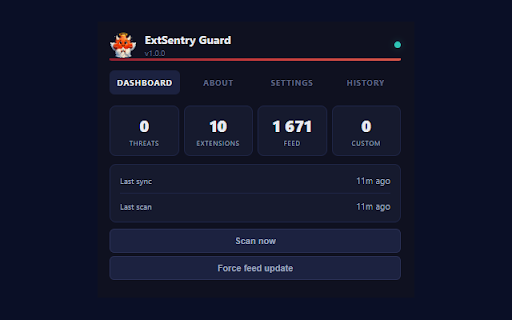
About
ExtSentry Guard protects your browser by detecting known malicious extensions in real time.
It automatically fetches the latest threat intelligence feed from the ExtSentry community project - a curated list of browser extension IDs identified as malware, phishing tools, data stealers, ad injectors, credential harvesters, and other dangerous or deceptive extensions.
How it works:
When you install ExtSentry Guard, it downloads the blocklist and scans every extension currently installed in your browser. If any match is found, a full-page warning appears with details about the threat - the extension name, its permissions, and why it was flagged. The warning keeps appearing every few minutes until the malicious extension is removed.
ExtSentry Guard also watches for new installations. If you install a flagged extension, the warning triggers immediately. Detected threats are automatically disabled by default so they cannot run while you decide what to do.
Key features:

Automatic feed sync: fetches the latest blocklist every 30 minutes, only downloading when the list has changed (uses ETag/Last-Modified caching for efficiency).
Instant scanning: scans on browser startup, after every feed update, and immediately when any new extension is installed.
Auto-disable: malicious extensions are automatically disabled the moment they are detected, before you even see the warning.
Persistent warnings: a full-page alert with extension details, permissions analysis, and one-click uninstall/disable buttons. Warnings repeat until all threats are removed - they cannot be silently ignored.
Uninstall prompting: the extension prompts you to fully uninstall threats. If you dismiss the Chrome confirmation dialog, it detects this and keeps nudging you until the extension is actually removed.
Detection history: every detection is logged with timestamps and extension IDs so you can review past incidents.
Custom blocklist: add your own extension IDs to monitor alongside the community feed. Import/export supported.
Custom feed URLs: add additional feed sources beyond the default ExtSentry feed. Any URL returning one extension ID per line works.
Whitelist: mark false positives as trusted to exclude them from future scans.
Force feed update: manually trigger a fresh feed download at any time from the dashboard, bypassing the cache.
Test mode: run a simulated warning using a random installed extension to verify the warning system works correctly. The test is clearly labeled and does not affect real protection.
Badge indicator: the toolbar icon shows a red badge count when active threats are detected.

What the feed covers:
The ExtSentry threat feed is maintained by the security community and sourced from mthcht/awesome-lists on GitHub. It includes extensions categorized as malicious, phishing, deceptive, offensive, greyware, and more - covering malware, compromised extensions, scams, PUPs (potentially unwanted programs), cryptominers, rogue proxy/VPN tools, credential stealers, and defense evasion tools.
Privacy:
ExtSentry Guard runs entirely locally. It does not collect, transmit, or store any personal data. The only network request it makes is fetching the public blocklist text files from GitHub (or any custom feed URLs you configure). No telemetry, no analytics, no tracking.
Open source:
The extension source code is available at github.com/ExtSentry/ExtSentry-Guard
The threat feed repository is at github.com/ExtSentry/ExtSentry.github.io
Author: github.com/mthcht
Technical
- Version
- 1.0.0
- Manifest
- V3
- Size
- 60.2KiB
- Min Chrome
- 88
- Languages
- 1
- Featured
- No
Metadata
- ID
- oiapejoklmgleheehkpgnpgmpibmoppm
- Developer ID
- u9909a1834df19f1744e7c02f8cfa8f20
- Developer Email
- [email protected]
- Created
- Apr 10, 2026
- Last Updated (Store)
- Apr 10, 2026
- Last Scraped
- Jun 8, 2026
- Website
- —
- Support URL
- —
- Privacy Policy
- —
Data sourced from the Chrome Web Store · last verified Jun 8, 2026.