
Downloads Button
Quick Button to Chrome Downloads
As of May 2026, Downloads Button has 3,000 users and a 4.50/5 rating from 4 reviews in the Workflow & Planning category.
Usersno change0%
3.0K
3,000
Ratingno change0%
4.50
4 reviews
Reviewsno change0%
4
Version
2.0.0.0
Manifest V3
History
1 snapshotsTracking since Apr 29, 2026.
View as table
| Date | Users | Rating | Reviews | Version |
|---|---|---|---|---|
| Apr 29, 2026 | 3.0K | 4.50 | 4 | 2.0.0.0 |
| Now | 3.0K | 4.50 | 4 | 2.0.0.0 |
Permissions & access
- Permissions
- contextMenusstorageactiveTab
- Host access
- None declared
Screenshots


About
DESCRIPTION:

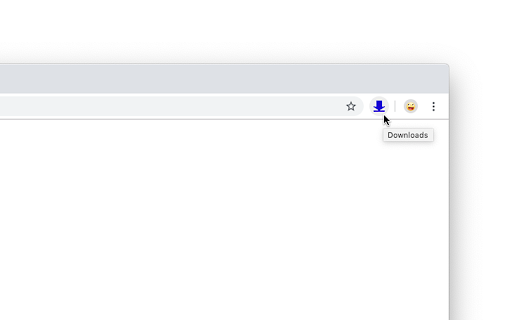
This extension will simply add a "Downloads" button to the toolbar. When clicked, it will open the Chrome downloads page (the list of your downloads). That’s all it does, it is not a downloader nor some fancy download manager. It’s just a customizable button.

OPTIONS:

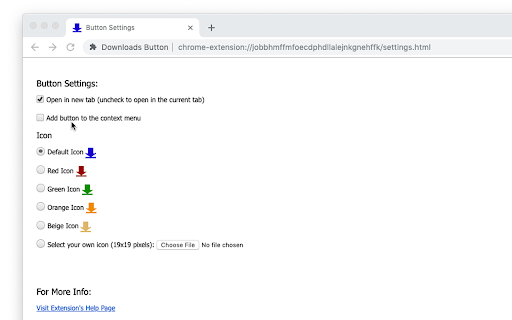
•	Select different icon (useful to make it "fit" your Chrome theme).
•	Add your own icon if you want to.
•	Add the download button to the context (right-click) menu
•	Set it to open the downloads list in new tab or in the current tab

To change the settings -- right-click on the extension icon and select "Options".

PERMISSIONS:

This extension needs only the "contextMenus" permission -- this is solely for the option to add the "Downloads" menu item to the context menu
Technical
- Version
- 2.0.0.0
- Manifest
- V3
- Size
- 22.96KiB
- Min Chrome
- 88
- Languages
- 1
- Featured
- Yes
Metadata
- ID
- ohogkbgckjfhmgmfbdabalmggjmjdjmk
- Developer ID
- u6ba4dcaf9004dfc3a3c881b6a8c74628
- Developer Email
- [email protected]
- Created
- Nov 7, 2019
- Last Updated (Store)
- Jan 18, 2025
- Last Scraped
- May 26, 2026
- Website
- https://openaddons.com/
- Support URL
- https://openaddons.com/downloads-button/
- Privacy Policy
- https://openaddons.com/privacy
Similar extensions
Alternatives to Downloads Button, ranked by description similarity.
Download Button
Quick access to Chrome downloads page with a single click. Adds convenient toolbar button and context menu.
10.0K
★ 4.6
Download Now Button
The Download Now Button is a plugin that allows you to open downloads tabs quickly with only one click.
65
★ 4.7

My Downloads Button - Open Browser Downloads
One-click button to open your Web Browser download page. Simple and convenient way to Find your downloaded files quickly.
1.0K
★ 5.0

Extensions button
Opens Extensions tab in single click. Simple. Options available to change icon and add/remove context menu item
1.0K
★ 4.8

Download with FlashGet™
Optionally send your downloading jobs to the well-known FlashGet™ download manager
9.0K
★ 3.5

Disable Download Shelf
Disables the download bar at bottom of window
2.0K
★ 4.5
Ultra Button
A button for everything.
6.0K
★ 4.6

Bookmarks Button
Opens Bookmarks tab in single click from toolbar and context menu. Options available to change icon, use custom icon, etc
6.0K
★ 4.5
Data sourced from the Chrome Web Store · last verified May 26, 2026.