
ReplayTact - Form Automation Tester
A Chrome extension for automating and testing web forms with Faker.js and replaying user actions efficiently.
As of June 2026, ReplayTact - Form Automation Tester has 22 users in the Productivity category.
Usersdown 4.3 percent−4.3%
22
22
Ratingno change0%
—
— reviews
Reviewsno change0%
—
Version
0.0.8
Manifest V3
History
3 snapshotsTracking since Apr 20, 2026.
View as table
| Date | Users | Rating | Reviews | Version |
|---|---|---|---|---|
| Apr 20, 2026 | 23 | — | — | 0.0.8 |
| May 5, 2026 | 27 | — | — | 0.0.8 |
| Jun 4, 2026 | 23 | — | — | 0.0.8 |
| Now | 22 | — | — | 0.0.8 |
Permissions & access
- Permissions
- storagecontextMenusunlimitedStoragedebugger
- Host access
- https://*/*
Screenshots


About
GitHub: https://github.com/WtecHtec/ReplayTact
### **插件用途**
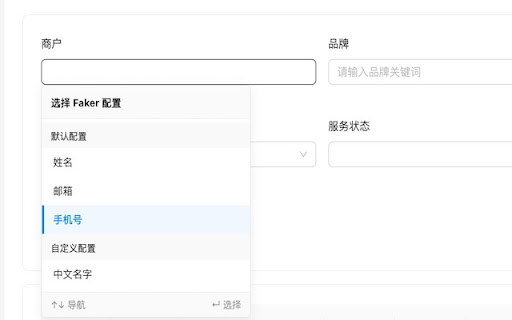
ReplayTact 是一款专为开发者和测试人员设计的 Chrome 扩展,旨在简化和加速 Web 表单的自动化测试流程。通过 ReplayTact,您可以轻松实现以下功能:
- 自动填写和测试网页表单。
- 使用 `Faker.js` 动态生成测试数据,模拟多种输入场景。
- 重放用户操作,快速验证表单交互逻辑。

---

### **用户为何应该安装 ReplayTact**

1. **节省时间**
   - 自动化表单填写和操作重放,减少手动测试的时间成本。
   - 一键生成测试数据,无需手动输入。

2. **提高测试覆盖率**
   - 支持动态数据生成,模拟多种输入场景(如随机用户名、邮箱、地址等)。
   - 验证表单的边界条件和异常处理。

3. **易用性**
   - 直观的界面,快速上手,无需复杂配置。
   - 支持可视化操作流程,轻松管理测试用例。

4. **高效的回归测试**
   - 通过操作重放功能,模拟真实用户行为,快速进行回归测试。

---

### **核心功能**

1. **动态数据生成**
   - 集成 `Faker.js`,支持生成随机用户名、邮箱、地址、日期等多种数据类型。
   - 支持自定义数据模板,例如 `${faker.name.firstName()}-测试`。

2. **操作自动化**
   - 自动化表单填写、点击、键盘事件等操作。
   - 支持复杂的操作链路,轻松管理多步骤测试流程。

3. **操作重放**
   - 记录并重放用户操作,快速验证表单交互逻辑。
   - 支持多次重放,确保测试结果一致性。

4. **可视化测试流程**
   - 使用直观的界面管理测试用例和操作流程。
   - 支持节点式操作流程设计,轻松调整测试逻辑。

---

### **适用场景**

- **开发阶段**:快速验证表单交互逻辑,发现潜在问题。
- **测试阶段**:生成多种测试数据,覆盖更多测试场景。
- **回归测试**:通过操作重放功能,验证代码改动是否影响现有功能。

---

### **安装方法**

1. 打开 Chrome 浏览器,进入 [Chrome 网上应用店](https://chrome.google.com/webstore)。
2. 搜索 **ReplayTact - Form Automation Tester**。
3. 点击 **添加到 Chrome** 按钮,完成安装。

---

### **联系我们**
如果您在使用过程中有任何问题或建议,请通过以下方式联系我们:
- **Email**: [email protected]
- **GitHub**: [ReplayTact 项目主页](https://github.com/WtecHtec)

---

####

In a modern and efficient working environment, we are often faced with the challenge of dealing with large amounts of repetitive data and performing tedious tasks. In order to improve work efficiency and reduce unnecessary labor, we can adopt two main strategies: one is to cache the repetitive data that you don’t want to remember for quick access, and the other is to automate the process and automate the repetitive and unwanted work.
Usage:
1. Right-click the mouse and select: ReplayTact
2. Replay Text: Define the copy template
3. Replay Action: Define the process automation
How to use?:
"window": "Ctrl+H",
"mac": "Command+H"
Technical
- Version
- 0.0.8
- Manifest
- V3
- Size
- 1.8MiB
- Min Chrome
- 88
- Languages
- 1
- Featured
- No
Metadata
- ID
- ohkipcncfnmjoeneihmglaadloddopkg
- Developer ID
- u72cb22cf8dfc1e98908f50a267208bda
- Developer Email
- [email protected]
- Created
- Jun 30, 2024
- Last Updated (Store)
- Apr 26, 2025
- Last Scraped
- Jun 4, 2026
- Website
- —
- Support URL
- —
- Privacy Policy
- —
Similar extensions
Alternatives to ReplayTact - Form Automation Tester, ranked by description similarity.

Action Replay
Automate browser interactions by recording and replaying user actions.
5.0K
★ 4.4

定时网页自动化
每天指定时间打开指定网页,并自动执行点击和输入操作。
141
★ 4.3

Automatic Clicker
Enable this chrome extension to simplify your tasks and automate repetitive clicking easily.
1.0K
★ 4.7

Tessana Test Recorder
Chrome Extension Description:
Turn your website interactions into automated end-to-end tests effortlessly with our AI-powered…
4
★ 5.0

BetikAsistan - Web Automation Tool
Define, save, load, and run custom automation scripts on any website.
89
★ 5.0

WebReplay Recorder
Record and replay web interactions with editable timeline
4

Autoclicker
Automate clicking at specified coordinates with configurable intervals
815
★ 3.6

Copy Records Before Saving
Copies form records to clipboard before saving
7
Data sourced from the Chrome Web Store · last verified Jun 4, 2026.