
Capo: get your ﹤𝚑𝚎𝚊𝚍﹥ in order
Visualize the optimal ordering of ﹤𝚑𝚎𝚊𝚍﹥ elements on any web page
As of June 2026, Capo: get your ﹤𝚑𝚎𝚊𝚍﹥ in order has 3,000 users and a 4.75/5 rating from 4 reviews in the Developer Tools category.
Usersno change0%
3.0K
3,000
Ratingno change0%
4.75
4 reviews
Reviewsno change0%
4
Version
2.1.0
Manifest V3
History
1 snapshotsTracking since Apr 18, 2026.
View as table
| Date | Users | Rating | Reviews | Version |
|---|---|---|---|---|
| Apr 18, 2026 | 3.0K | 4.75 | 4 | 2.1.0 |
| Now | 3.0K | 4.75 | 4 | 2.1.0 |
Permissions & access
- Permissions
- scriptingactiveTabstorage
- Host access
- None declared
Screenshots

About
Capo is a tool to help web developers understand the how optimal the ordering of <head> elements are. Inefficient ordering can impede the browser and lead to slower user-perceived performance.

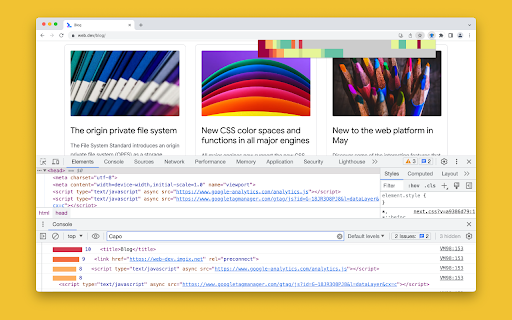
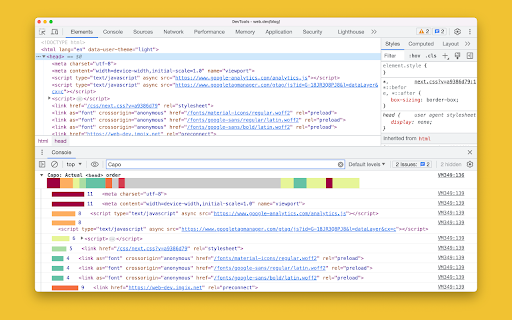
To use, click the extension icon to preview the <head> element visualization, which also triggers additional debugging info to be logged to the console. Also, click any item in the preview to see its additional info in the console.

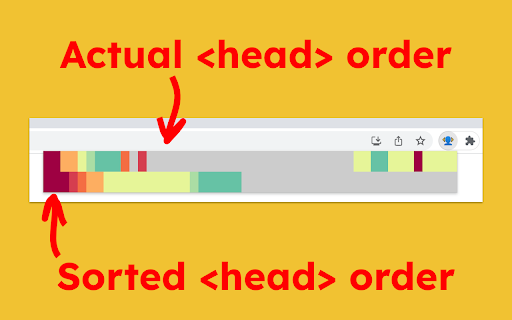
The top row of colors corresponds to the actual ordering of <head> elements, from red to blue in descending order of urgency, with grey being least urgent. The bottom row of colors corresponds to the sorted <head> elements, if everything were to be ordered by urgency. You can eyeball the differences between these two rows to get a sense for how well optimized the <head> is and which elements are out of place.
Technical
- Version
- 2.1.0
- Manifest
- V3
- Size
- 38.84KiB
- Min Chrome
- 88
- Languages
- 1
- Featured
- Yes
Metadata
- ID
- ohabpnaccigjhkkebjofhpmebofgpbeb
- Developer ID
- ucc205048c09d7cd3b51167d49e333968
- Developer Email
- [email protected]
- Created
- Jun 19, 2023
- Last Updated (Store)
- Feb 24, 2026
- Last Scraped
- Jun 7, 2026
- Website
- rviscomi.dev
- Support URL
- https://github.com/rviscomi/capo.js/issues
- Privacy Policy
- —
Similar extensions
Alternatives to Capo: get your ﹤𝚑𝚎𝚊𝚍﹥ in order, ranked by description similarity.

Tab Order Checker
Visualize keyboard tab order for accessibility (keyboard and screen reader users).
34

Compass SEO
HTML Tag Checker for SEO and Development. Analyze title, meta tags, headings, social tags, images, links and scripts easily.
2

CSS Debugger
DevTools-like CSS debugger with Box Model tooltip
37

Webpage Load Time
Shows how long the current page took to load.
57

ChromaScope
Herhangi bir web sayfasındaki yazı tiplerini, CSS renklerini ve baskın renk paletini anında analiz edin ve kopyalayın.
3

Designer's Little Helper
Developer & designer toolkit: Grid, CSS Inspector, Color Picker, Contrast Checker, Responsive Testing & more.
20

by Crawford Squarespace Code Inspector
A tool that acts as a code inspector, displaying real-time CSS properties.
30

CSS Spacing Inspector
Hover to see margin, padding, and gap overlays with pixel values
53
Data sourced from the Chrome Web Store · last verified Jun 7, 2026.