
Image Describer
Image Describer uses AI to describe content and images on the web for people who are blind or have low-vision.
As of June 2026, Image Describer has 1,000 users and a 4.28/5 rating from 18 reviews in the Accessibility category.
Usersdown 50.0 percent−50.0%
1.0K
1,000
Ratingno change0%
4.28
18 reviews
Reviewsno change0%
18
Version
1.8.0
Manifest V3
90-day change · In the last 90 days this extension lost 1.0K users.
History
3 snapshotsTracking since Apr 22, 2026.
View as table
| Date | Users | Rating | Reviews | Version |
|---|---|---|---|---|
| Apr 22, 2026 | 2.0K | 4.28 | 18 | 1.8.0 |
| May 12, 2026 | 2.0K | 4.28 | 18 | 1.8.0 |
| Jun 7, 2026 | 2.0K | 4.28 | 18 | 1.8.0 |
| Now | 1.0K | 4.28 | 18 | 1.8.0 |
Permissions & access
- Permissions
- contextMenussidePanelscriptingttsidentitystoragecommandsactiveTabclipboardWrite
- Host access
- None declared
Screenshots
About
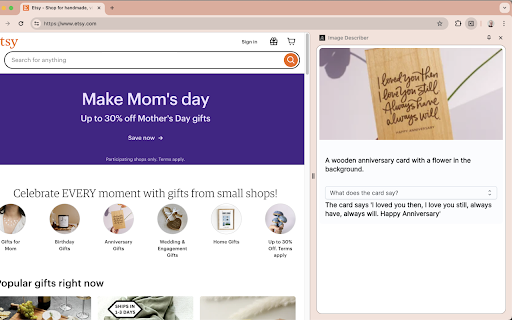
To describe content, use the context menu on a specific image, or the Extension keyboard shortcut Alt+Shift+I to describe the full tab contents. The description can be copied to your clipboard through an menu item in the context menu, or through the extension popup or Chrome side panel drawer.

You can also change the voice or toggle muting using the Extension Options page at chrome-extension://ogoddjgogmlndofcpkljmmdobjpfdolf/options.html

To access the side panel without the mouse, on Mac press Command + Option + Down arrow. On Windows, press F6.
Technical
- Version
- 1.8.0
- Manifest
- V3
- Size
- 178KiB
- Min Chrome
- 88
- Languages
- 1
- Featured
- No
Metadata
- ID
- ogoddjgogmlndofcpkljmmdobjpfdolf
- Developer ID
- u19624e941324b2f5ba6df938e0b55e2c
- Developer Email
- [email protected]
- Created
- Nov 17, 2023
- Last Updated (Store)
- Dec 25, 2024
- Last Scraped
- Jun 7, 2026
- Website
- —
- Support URL
- —
- Privacy Policy
- https://accesslint.com/privacy
Similar extensions
Alternatives to Image Describer, ranked by description similarity.

AltSpeakify 🔊
No alt text? No problem - just AltSpeakify it! This extension helps those who are visually impaired better navigate the web.
—

transcribr: real-time live transcriptions
Real-time tab audio transcription with live captions powered by Deepgram
33

EasyMute
Get a list of all the noisy tabs in chrome and mute with just one click.
21
★ 5.0

Long Descriptions in Context Menu
Right-click on anything with a "longdesc" or "aria-describedat" attribute to access its long description.
40.0K
★ 4.3

Browsing Assistant
Translating websites, reading aloud and transcribing audio — making the internet more accessible using only a single extension.
8
★ 5.0

SmartCaption AI
Generating image captions that are more accurate and relevant to the content of the webpage, particularly for news articles.
6

Speak
Extension to speak selected text using TTS.
—

Simple Screen Reader
Reads Highlighted text to MP3
338
★ 1.7
Data sourced from the Chrome Web Store · last verified Jun 7, 2026.