
Tab Session Saver — Daypack: Save, Restore, Schedule
Save sets of tabs as named sessions. Restore in one click, a hotkey, or on schedule. Workspace organizer for daily routines.
As of June 2026, Tab Session Saver — Daypack: Save, Restore, Schedule has 3 users in the Workflow & Planning category.
Usersno change0%
3
3
Ratingno change0%
—
— reviews
Reviewsno change0%
—
Version
1.0.0
Manifest V3
History
4 snapshotsTracking since May 12, 2026.
View as table
| Date | Users | Rating | Reviews | Version |
|---|---|---|---|---|
| May 12, 2026 | — | — | — | 1.0.0 |
| May 17, 2026 | — | — | — | 1.0.0 |
| Jun 6, 2026 | 5 | — | — | 1.0.0 |
| Jun 19, 2026 | — | — | — | 1.0.0 |
| Now | 3 | — | — | 1.0.0 |
Permissions & access
- Permissions
- storagetabstabGroupsalarmswindows
- Host access
- None declared
Screenshots

About
Save sets of tabs as named sessions. Restore in one click, with a hotkey, or on a schedule. Workspace organizer for daily routines.

WHAT IT DOES

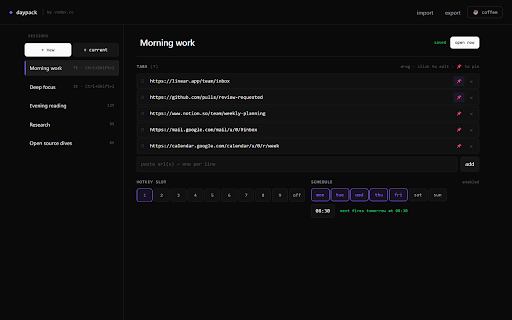
• Save current — snapshots every tab in the current Chrome window (pinned state and tab groups preserved).
• New empty — starts a blank session you fill in by hand (paste URLs one per line).
• Open — clicking a session in the popup opens it in a new window (default) or replaces the current window's tabs.

THREE WAYS TO TRIGGER A SESSION

• Click in the popup — fastest.
• Hotkey — assign a session to slot 1–9, then press Ctrl+Shift+1..3 (or bind any slot to your own combo at chrome://extensions/shortcuts).
• Schedule — pick weekdays and a time. The session fires once at the next matching minute, then re-arms.

USE CASES

• Work / Home — open your Linear + GitHub + Notion set when you sit down at the desk; a different set in the evening.
• Focus modes — a "Deep work" session with just your IDE and docs, a "Research" session with 8 tabs of reading.
• Recurring rituals — schedule "Monday standup prep" to open at 08:55 Mon–Fri automatically.

PRIVACY

• Everything lives in chrome.storage.sync — sessions follow your Chrome profile across machines.
• No analytics. No remote config. No account required.
• Open-source, MIT-spirit side-project.

PERMISSIONS

• tabs — read open tab URLs to snapshot a session; open new tabs when restoring one.
• tabGroups — preserve tab group title and color inside saved sessions.
• storage — persist sessions.
• alarms — fire scheduled sessions.
• windows — open a saved session in a new window.

EXTRAS

• Import / Export — sessions serialize to JSON. Back them up, move them between profiles, share a set.
• Drag to reorder URLs inside a session.
• Pin individual tabs in a session.

Free, forever. If it saves you tab-juggling time, there's an optional ☕ coffee link in the popup — completely optional.

Made by vsdev — https://vsdev.cc/daypack
Technical
- Version
- 1.0.0
- Manifest
- V3
- Size
- 30.02KiB
- Min Chrome
- 88
- Languages
- 1
- Featured
- No
Metadata
- ID
- ogmadgmghajdpkpneplgaahecenihgcf
- Developer ID
- u92533db4728de845d4088fcfb26976e6
- Developer Email
- [email protected]
- Created
- May 11, 2026
- Last Updated (Store)
- May 11, 2026
- Last Scraped
- Jun 19, 2026
- Website
- —
- Support URL
- —
- Privacy Policy
- https://vsdev.cc/legal/privacy
Data sourced from the Chrome Web Store · last verified Jun 19, 2026.