
CronoHub
Track time on GitHub issues. Register worked hours directly in comments with automatic formatting. By Gopenux AI.
As of June 2026, CronoHub has 1 users in the Productivity category.
Usersno change0%
1
1
Ratingno change0%
—
— reviews
Reviewsno change0%
—
Version
1.3.1
Manifest V3
History
6 snapshotsTracking since Apr 17, 2026.
View as table
| Date | Users | Rating | Reviews | Version |
|---|---|---|---|---|
| Apr 17, 2026 | 1 | — | — | 1.3.1 |
| Apr 24, 2026 | — | — | — | 1.3.1 |
| May 1, 2026 | 1 | — | — | 1.3.1 |
| May 9, 2026 | — | — | — | 1.3.1 |
| May 17, 2026 | 1 | — | — | 1.3.1 |
| Jun 5, 2026 | — | — | — | 1.3.1 |
| Now | 1 | — | — | 1.3.1 |
Permissions & access
- Permissions
- storage
- Host access
- https://github.com/*, https://api.github.com/*
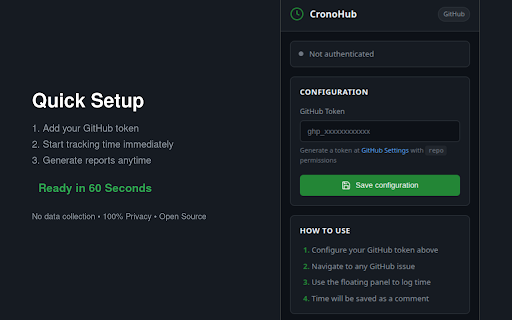
Screenshots


About
CronoHub is an open-source, privacy-first Chrome extension that adds professional time tracking directly inside GitHub Issues and GitHub Projects—so you can log hours where the work happens, keep a clean record in the issue timeline, and generate team reports in seconds.

Project website: https://cronohub.gopenux.com/
Built by: Gopenux Lab SAS (Gopenux) — https://gopenux.com/

────────────────────────────────────────
What CronoHub does
────────────────────────────────────────
⏱ Track time on GitHub issues (without leaving GitHub)
• A floating panel appears automatically on every GitHub issue.
• Enter hours in one click, add an optional short note, and save.
• CronoHub formats your entry as a professional GitHub comment—so time logs stay attached to the issue history (perfect for async teams, audits, and transparency).

📌 Works across GitHub’s interface (Issues + Projects)
CronoHub is built to behave nicely across GitHub’s classic issues experience and GitHub Projects. As you navigate, it detects context changes and keeps the tracking UI available where you need it.

📊 Generate instant reports (solo or multi-user)
• Select one or multiple collaborators with a smart selector.
• Filter by date range (up to 90 days) to match your sprint, month, or billing cycle.
• Get a clear breakdown with clickable navigation back to the underlying GitHub issues—so you can verify context instantly.

────────────────────────────────────────
Why GitHub users install CronoHub
────────────────────────────────────────
✅ Stay in flow
If your work already lives in GitHub, time tracking shouldn’t require a second app. CronoHub removes context switching and keeps effort logs in the same place as your tasks, discussions, and decisions.

✅ Replace messy spreadsheets with traceable records
Manual spreadsheets are slow, error-prone, and hard to validate. CronoHub turns each time entry into a structured issue comment, giving you a consistent, reviewable log tied to real work.

✅ Privacy-first by design
CronoHub is designed to avoid the typical “time tracker tradeoff” where you get reports at the cost of sharing sensitive data with a third-party service.
• Local-only storage
• No external servers
• Zero data collection
• Your GitHub token stays in your browser, and requests go directly to GitHub

✅ Built to trust (and built to last)
CronoHub is MIT licensed and open source—so you can audit it, self-host your workflow, or extend it. It’s also built on modern Chrome extension standards (Manifest V3) with security-minded engineering.

✅ Fast setup + fast reports
You can be tracking in minutes, and reports are optimized to be quick and efficient—even when aggregating multiple contributors across many issues.

────────────────────────────────────────
How to use (practical examples)
────────────────────────────────────────
Example 1 — Solo developer tracking a feature
1) Install CronoHub.
2) Add your GitHub Personal Access Token once (one-time configuration).
3) Open an issue like “Fix rate-limit retry logic”.
4) Use the floating CronoHub panel:
   • Time: 1.5h
   • Note: “Added backoff + tests for edge cases”
5) Save → CronoHub posts a clean comment with your logged time.
Result: Your effort is documented right where the work happened.

Example 2 — Team lead generating a weekly report in minutes
1) Open CronoHub reporting.
2) Pick your team members.
3) Set the date range (e.g., Monday–Friday).
4) Generate the report.
5) Click any entry to jump straight to the relevant issue for context.
Result: No more chasing updates—your report is traceable and shareable.

Example 3 — Agency / client billing without a third-party tracker
1) Contributors log time on GitHub issues as they work.
2) At the end of the sprint/month, generate a report for the client.
3) Each line item links back to deliverables (issues) and written context (comments).
Result: Billing is transparent and defensible—without exporting data to external SaaS platforms.

Example 4 — Open-source maintainers tracking maintenance cost
1) Log time on triage, bug fixes, and documentation issues.
2) Generate a monthly report for maintainers/sponsors.
3) Use the linked issues to show real work and outcomes.
Result: Better visibility into maintenance effort and contributor load.

────────────────────────────────────────
Who CronoHub is for
────────────────────────────────────────
• Developers who manage work in GitHub Issues and want lightweight time tracking
• Teams that need sprint/monthly summaries without manual compilation
• Agencies/freelancers who bill per task and need traceability
• Maintainers who want a clear picture of effort across issues

────────────────────────────────────────
Get started
────────────────────────────────────────
Visit https://cronohub.gopenux.com/ to learn more, download the extension, and view the GitHub repository.
If you want accurate time logs and instant reporting without leaving GitHub—and without giving up privacy—CronoHub is built for you.

Built with ❤️ in Colombia by Gopenux Lab SAS.
Technical
- Version
- 1.3.1
- Manifest
- V3
- Size
- 460KiB
- Min Chrome
- 88
- Languages
- 1
- Featured
- No
Metadata
- ID
- ogfaimmdppbfpnlfgilcnplnojcpfpoo
- Developer ID
- ub698f0db9e33e7e31f288efb722bf808
- Developer Email
- [email protected]
- Created
- Jan 25, 2026
- Last Updated (Store)
- Jan 25, 2026
- Last Scraped
- Jun 5, 2026
- Website
- —
- Support URL
- —
- Privacy Policy
- —
Similar extensions
Alternatives to CronoHub, ranked by description similarity.

ZChrono Plugin
Seamlessly integrate ZChrono time tracking into your browser. Track time, manage tasks, and boost productivity with real-time sync.
3

GitHub Time Tracker
Track time spent on GitHub issues
11
★ 5.0

Work Hours Tracker
Use Work Hours Tracker app to increase your productivity and manage projects. Hour tracker for work can also track billable time!
163
★ 5.0

Work Hours Calculator
Calculate work hours and schedules from timestamps with right-click context menu. Perfect for HR professionals and time tracking.
126
★ 5.0

Chronix
Chrome + Time tracking
2
★ 5.0

ttime Webtime Tracker — Automatic Browser Activity Tracking
Automatic browser activity tracking. See where your webtime goes, spot productivity patterns, and review daily reports — no signup.
3
★ 5.0

HR Toolkit — Attendance & Work Hours Calculator
Calculate work hours, attendance %, overtime & salary. Free HR toolkit for managers. Powered by Timenox.
16

Time Mate: Track Hours You’ve Worked Online
Track work hours and earnings with rest breaks, global currencies, popup auth, and cross-browser sync.
7
Data sourced from the Chrome Web Store · last verified Jun 5, 2026.