
Tab Tools
Export and manage your tabs
As of June 2026, Tab Tools has 39 users in the Workflow & Planning category.
Usersup 14.7 percent+14.7%
39
39
Ratingno change0%
—
— reviews
Reviewsno change0%
—
Version
1.2.1
Manifest V3
History
3 snapshotsTracking since Apr 23, 2026.
View as table
| Date | Users | Rating | Reviews | Version |
|---|---|---|---|---|
| Apr 23, 2026 | 34 | — | — | 1.2.1 |
| May 13, 2026 | 38 | — | — | 1.2.1 |
| Jun 8, 2026 | 37 | — | — | 1.2.1 |
| Now | 39 | — | — | 1.2.1 |
Permissions & access
- Permissions
- activeTabtabstabGroups
- Host access
- None declared
Screenshots

About
Introducing Tab Tools: Elevate Your Browsing Experience! 🌟
Easily Transfer Tabs, even with QR Codes! 🚀

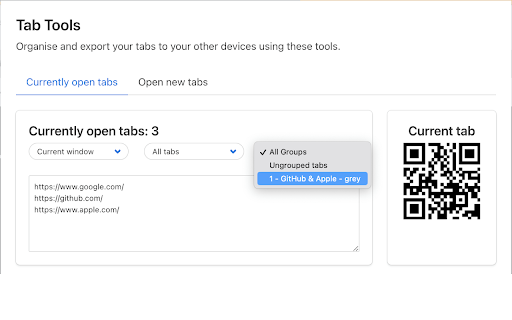
Welcome to a smoother browsing experience with Tab Tools, a revolutionary Google Chrome / Microsoft Edge extension! Now, effortlessly export your current tab via a dynamic QR code and even import and export a list of URLs from all your active tabs! Want more precision? Filter easily by window, pinned status, and tab group to curate your browsing experience to your needs. 🌐


🔗 Export & Share:

• Generate QR codes instantly for your active tab.
• Export lists of URLs from all your tabs.
• Refine your list with filters: window, pinned, and tab group.


🔄 Seamless Importing:

• Reload your tabs effortlessly and organize them in your preferred order, be it random or reverse, all with a simple click!
• Have the flexibility to load your tabs in the current window or launch a new one.


🛠 Importing with Advanced Options:

• Extract URLs seamlessly from any text.
• Opt for delayed loading (lazy load) for optimal browser performance.
• Experience heightened control with our versatile loading options, including random or reverse order and preference for current or new windows.


🌟 How Tab Tools Benefits You:

• Efficiency: Quickly transfer tabs between devices or share them with peers.
• Organization: Manage your tabs better with filtering options and manage tab groups with ease.
• Flexibility: Enjoy customizable loading preferences to suit your browsing style.
• Performance: Optimize your browser’s performance with the lazy load feature.


Why Wait? Enhance Your Browsing Now! 🎉
Unlock a seamless, organized, and efficient browsing experience with Tab Tools! Whether you’re looking to declutter, share, or simply streamline your browsing, Tab Tools is your go-to solution. Install this transformative extension to your Google Chrome / Microsoft Edge and redefine your browsing journey! 🎇
Technical
- Version
- 1.2.1
- Manifest
- V3
- Size
- 185KiB
- Min Chrome
- 88
- Languages
- 1
- Featured
- Yes
Metadata
- ID
- ofmbbbcpnbggpcmpdpkhcelglpchipoo
- Developer ID
- ucfc4683c8cf5ce44016a3b8783932767
- Developer Email
- [email protected]
- Created
- Oct 19, 2022
- Last Updated (Store)
- Sep 25, 2023
- Last Scraped
- Jun 8, 2026
- Website
- toolbox.rocks
- Support URL
- —
- Privacy Policy
- —
Similar extensions
Alternatives to Tab Tools, ranked by description similarity.

Tab Organizer: Productivity Tool
Tab manager and productivity tool for Chrome. Group tabs by domain and rules, save tabs, restore tabs, sort tabs, customize colors.
2.0K
★ 3.5

TabMania
TabMania, manage your chrome Tabs.
24
★ 5.0

Super Vertical Tabs
A vertical tab management extension with grouping, search, and customization features.
4

Powertools - Shortcuts & Utilities
Powerful shortcuts, commands, and tools for your browser like tab duplication, copying URLs, and opening hovered links.
96
★ 5.0

Smart Tab Groups Manager for Chrome
Organize and manage your chrome tabs automatically into smart groups.
21

SmartTabs - Intelligent Tab Manager
Organize and archive browser tabs with productivity analytics. Automatically manage tab clutter and boost productivity.
76
★ 5.0

Tab Manager
This extension allows you to manage and close your tabs.
88
★ 4.0

TabLeaf
A browser extension for visual display of browser bookmarks
1
★ 5.0
Data sourced from the Chrome Web Store · last verified Jun 8, 2026.