
Multiple Search Engines - MSE
Select, right click, search in multiple search engines!
As of June 2026, Multiple Search Engines - MSE has 1,000 users and a 4.14/5 rating from 7 reviews in the Productivity category.
Usersup 3.8 percent+3.8%
1.0K
1,000
Ratingno change0%
4.14
7 reviews
Reviewsno change0%
7
Version
1.2.5
Manifest V3
History
1 snapshotsTracking since Apr 23, 2026.
View as table
| Date | Users | Rating | Reviews | Version |
|---|---|---|---|---|
| Apr 23, 2026 | 963 | 4.14 | 7 | 1.2.5 |
| Now | 1.0K | 4.14 | 7 | 1.2.5 |
Permissions & access
- Permissions
- contextMenusstorage
- Host access
- None declared
Screenshots




About
Update to version 1.2.5 (Fixed bugs, edited imdb search URL and added new search engines).

Following search engines has been added as default:
#Wikipedia English, Español and Norwegian – Knowledge
#Amazon Global and UK – Commerce
#AliExpress Global – Commerce
#Ebay Global – Commerce
#Finn.no – Norwegian Commerce
#Gulesider.no – Norwegian Search tools
#Proff.no – Norwegian Search tools
#IMOB – Movies
#Linkedin – Social
#Facebook – Social
#X - Twitter – Social
#Youtube – Social
#Google Search
#Gmail – Personal and business
#Cisco – Community
#Stackoverflow – Community

This extension provides the user a quick way to search for selected text in multiple search engens. Supports grouping engines, own search URL, search in incognito, dark mode, search everywhere and more.

How to use it?
Right-click on the highlighted text and select (Search "word" for) from the context menu. It’ll open search results in the current tab active, in the new tab or incognito. Based in your settings on the selected search engines.

How to open in new tab?
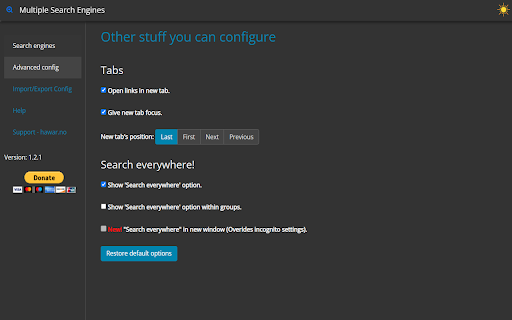
From option page click on "Advanced config", or from context menu (right-click menu) choose last one "Options", will open option page. Then select "Open links in new tab".

How to Search everywhere?
From option page click on "Advanced config", to activate it. You can select all 3 options.
 * Show 'Search everywhere' option.
 * Show 'Search everywhere' option within groups.
 * New! "Search everywhere" in new window (Overrides incognito settings).

How to import or export settings?
From option page click on "Import/Export Config".

How to create a Search URL of your own?
From option page click on "Create own Search URL", to show you step by step how to create it.

How do I edit the Search Engines' list?
From option page click on "Edit the Search Engines", to find out how to edit it.

Super easy to use! If you have any problems, issues, or questions how to use it, feel free to contact me or visit https://hawar.no/2023/02/multiple-search-engines/

Enjoy!
Technical
- Version
- 1.2.5
- Manifest
- V3
- Size
- 297KiB
- Min Chrome
- 88
- Languages
- 1
- Featured
- Yes
Metadata
- ID
- oenahigafdpmlmaenjgiedobgooekkmp
- Developer ID
- u9eb3af452f99480a0569c3ddb219a6d4
- Developer Email
- [email protected]
- Created
- Feb 16, 2023
- Last Updated (Store)
- Oct 31, 2023
- Last Scraped
- Jun 8, 2026
- Website
- —
- Privacy Policy
- —
Similar extensions
Alternatives to Multiple Search Engines - MSE, ranked by description similarity.

Search It All
Search across multiple search engines with one click - no retyping needed
936
★ 3.9

Simple = Select + Search
Right-click text to search on multiple engines.
20.0K
★ 4.4

Context Menu Search
Use the right-click menu to search for selected text in different search engines
100.0K
★ 4.5

Context Search
Searches the selected text using a search engine or AI prompt from your custom list of search engines and AI prompts.
70
★ 5.0

Multi Search Engine
Search with multiple search engines simultaneously
132
★ 3.0

MultiSearch
This extension will search the specified keyword on all major search engines
44
★ 5.0

All in one web searcher
Search anything on the internet easily by typing into ONE unified search box
3.0K
★ 4.5

Selection Search
Search for the selected text in search engines
40.0K
★ 4.7
Data sourced from the Chrome Web Store · last verified Jun 8, 2026.