Advanced Font Settings
Demonstrates the chrome.fontSettings API by allowing users to modify the style of displayed fonts on web pages.
As of May 2026, Advanced Font Settings has — users in the Developer Tools category.
Usersno change0%
—
—
Ratingno change0%
—
— reviews
Reviewsno change0%
—
Version
1.71
Manifest V3
Permissions & access
- Permissions
- fontSettings
- Host access
- None declared
Screenshots
About
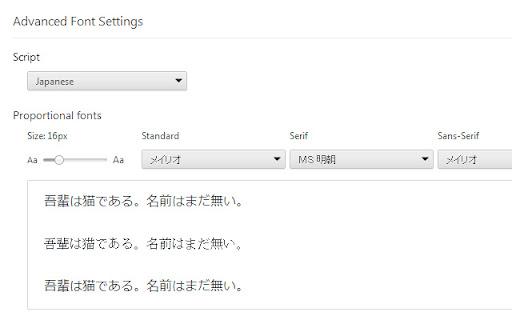
Customize per-script font settings.
This extension allows you to customize font settings for different language scripts. For example, you can set the default font for Simplified Chinese content to be different than the font for Japanese content. The settings are per-script (as specified in ISO 15924) rather than per-language. For example, there is a single setting for Cyrillic script rather than separate ones for Russian, Ukrainian, etc.

Chrome will use the font settings controlled by this extension when BOTH of the following are true:
1) The web page has declared the language of the content (e.g., by using the HTML lang attribute); and
2) The web page has not specified a font to use.

To use this extension, add it to Chrome and then go to chrome://extensions and click on the "Options" link for this extension.
Technical
- Version
- 1.71
- Manifest
- V3
- Size
- 40.0KiB
- Min Chrome
- 88
- Languages
- 1
- Featured
- No
Metadata
- ID
- oednaencdpkhfheiljildmbomabohhil
- Developer ID
- u04aecb427a1734e9fb217c498cfd8156
- Developer Email
- [email protected]
- Created
- Jan 5, 2024
- Last Updated (Store)
- Jun 3, 2024
- Last Scraped
- May 21, 2026
- Website
- —
- Support URL
- https://webgameshbet.us/
- Privacy Policy
- —
Similar extensions
Alternatives to Advanced Font Settings, ranked by description similarity.
Advanced Font Settings
Demonstrates the chrome.fontSettings API by allowing users to modify the style of displayed fonts on web pages.
54

DevTools Font Changer
Font changer for chrome devtools.
1.0K
★ 4.3

A+ FontSize Changer Lite
Extension that lets the user change the font text size, font type, font color and background color on a page.
138
★ 1.0

Google Fonts Preview
Test any Google Font to see how your website looks before you update your files.
116

ChromeJSInjector
Injecting Tool for injecting inline & external JavaScript, internal & external CSS into any website.
162
★ 5.0

Native Script Caller
Custom MENU to execute user Javascript and arbitary local PC programs, and display custom pages
57

Font Changer
Change the font on any site.
274
★ 4.0

Font Forge
Font Forge: Customize website fonts.
12
Data sourced from the Chrome Web Store · last verified May 21, 2026.