
Google Ads Keyword Match Types
Generate and compare Broad, Phrase, and Exact match keywords for Google Ads, streamline setup and save time
As of June 2026, Google Ads Keyword Match Types has 66 users in the Productivity category.
Usersup 65.0 percent+65.0%
66
66
Ratingno change0%
—
— reviews
Reviewsno change0%
—
Version
1.0.0
Manifest V3
History
7 snapshotsTracking since Apr 1, 2026.
View as table
| Date | Users | Rating | Reviews | Version |
|---|---|---|---|---|
| Apr 1, 2026 | 40 | — | — | 1.0.0 |
| Apr 21, 2026 | 38 | — | — | 1.0.0 |
| May 6, 2026 | 46 | — | — | 1.0.0 |
| May 18, 2026 | 54 | — | — | 1.0.0 |
| May 24, 2026 | 61 | — | — | 1.0.0 |
| May 31, 2026 | 68 | — | — | 1.0.0 |
| Jun 6, 2026 | 64 | — | — | 1.0.0 |
| Now | 66 | — | — | 1.0.0 |
Permissions & access
- Permissions
- activeTabnotifications
- Host access
- *://ads.google.com/*, <all_urls>
Screenshots


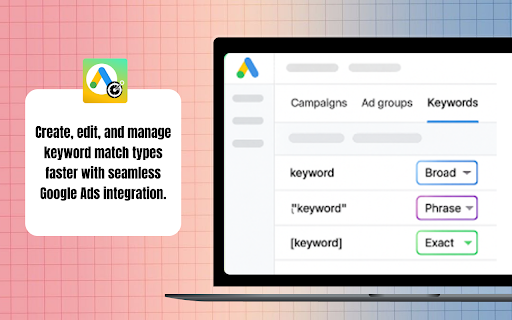
About
Tired of manually editing search terms? The Google Ads Keyword Match Types Chrome extension helps you quickly generate, modify, and apply Exact, Phrase, and Broad match keywords directly from your Google Ads account. With bulk editing, you can streamline the process, saving both time and effort while reducing errors.

Whether you’re a marketer, PPC manager, or small business owner searching for smarter tools, this extension makes campaign setup and optimization faster and more efficient.


Key Features

Match Type Generator
Quickly create Exact, Phrase, and Broad match variations for your keywords.

Bulk Editing
Update match types for multiple search terms at once to speed up campaign setup.

Seamless Integration
Works directly within Google Ads for hassle-free keyword management.

One-Click Copy
Copy updated keyword lists instantly and paste them into your campaigns.


How to Use

Step 1: Install the Extension
Go to the Chrome Web Store and install the Google Ads Keyword Match Types extension. Once installed, it will appear in your browser toolbar.

Step 2: Open Google Ads
Log in to your account and navigate to the Search Terms Report to view matched search terms from your campaigns.

Step 3: Launch the Extension
Click the extension icon to open the tool while reviewing your search terms.

Step 4: Choose Match Type
Select your preferred match type — Exact, Phrase, or Broad — for the keywords you want to optimize.

Step 5: Bulk Apply Changes
Apply match type changes to all selected terms before adding them to your campaigns.

Step 6: Copy & Add
Copy the updated keyword list and add it directly into your Google Ads campaigns.


Why It Is Useful

This extension saves hours of manual work and helps prevent mistakes when managing large keyword lists. It ensures your keywords are structured correctly, improving both efficiency and ad performance.


Who It Is Useful For

Ideal for digital marketers, PPC managers, agencies, freelancers, and small business owners who want to optimize Google Ads campaigns faster without wasting time on repetitive keyword formatting.
Technical
- Version
- 1.0.0
- Manifest
- V3
- Size
- 34.27KiB
- Min Chrome
- 88
- Languages
- 1
- Featured
- No
Metadata
- ID
- odegalnknchhdepngpdjmcfebgmfgkbm
- Developer ID
- u7e5150cb7eb2d685d4aa8e41e3db0c20
- Developer Email
- [email protected]
- Created
- Sep 7, 2025
- Last Updated (Store)
- May 12, 2026
- Last Scraped
- Jun 6, 2026
- Website
- —
- Support URL
- —
Similar extensions
Alternatives to Google Ads Keyword Match Types, ranked by description similarity.

Keyword Match Type Tool
Boost Google Ads performance with MatchCraft, optimize keyword match type, improve targeting, and maximize campaign ROI effortlessly
55
★ 5.0

Google Ads Phrase Exact Broad Formatter
Convert keywords to Broad, Phrase, or Exact match types for Google Ads. Removes existing formatting automatically.
5

RocketMatch – Google Ads Keyword Formatter
Streamline Google Ads Search Term management: auto-format keywords, highlight on-page, capture selections, bulk edit & manage terms.
19
★ 5.0

Google Ads Keyword Optimization Tool
AI-powered tool to help you eliminate junk keywords, review search terms, build keyword lists, and apply match types fast.
380
★ 5.0

Keyword Match Type Converter
Convert keyword lists into different match types.
215
★ 5.0

Quantum PPC — Google Ads Power Tools
Boost your Google Ads workflow. Switch match types in 1 click, manage negative keywords via n-grams, and analyze search terms faster
9
★ 5.0

PPC Toolbox
Essential tools for PPC experts: translate queries, scrape PASF, extract SERP ads, and build UTM links in seconds
420
★ 5.0

MirachSEM — PPC tools
Automate keyword editing for PPC campaigns.
657
★ 4.8
Data sourced from the Chrome Web Store · last verified Jun 6, 2026.