
TextLens for LinkedIn – Likes & smart comment automation
Automate LinkedIn engagement with AI-generated comments and smart post liking. Save time, stay authentic, and grow faster.
As of June 2026, TextLens for LinkedIn – Likes & smart comment automation has — users in the Productivity category.
Usersno change0%
—
—
Ratingno change0%
—
— reviews
Reviewsno change0%
—
Version
1.0.1
Manifest V3
History
4 snapshotsTracking since Apr 18, 2026.
View as table
| Date | Users | Rating | Reviews | Version |
|---|---|---|---|---|
| Apr 18, 2026 | — | — | — | 1.0.1 |
| Apr 28, 2026 | 3 | — | — | 1.0.1 |
| May 7, 2026 | 1 | — | — | 1.0.1 |
| May 15, 2026 | 2 | — | — | 1.0.1 |
| Now | — | — | — | 1.0.1 |
Permissions & access
- Permissions
- storage
- Host access
- https://www.linkedin.com/*, http://localhost:5001/*
Screenshots


About
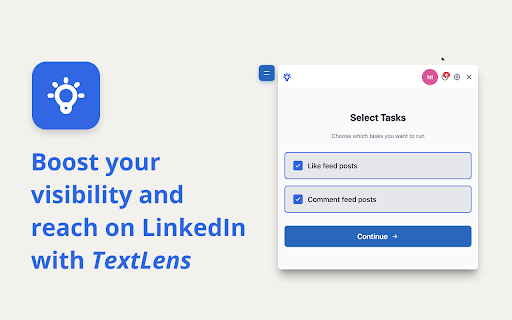
TextLens is a LinkedIn automation extension designed for professionals who want to increase engagement without spending hours manually liking and commenting.

It works directly inside LinkedIn, helping you interact with posts in a relevant, human-like way using AI-assisted automation.

Key Features:

AI-Powered Comment Generation:
- Generate context-aware comments for LinkedIn posts
- Choose auto-posting or review before publishing
- Regenerate comments or guide the AI with custom prompts
Smart Auto Likes:
- Automatically like posts based on your criteria
- Filter by post age and engagement level
- Designed to keep interactions natural
Intelligent Post Discovery:
- Automatically scrolls your LinkedIn feed
- Detects posts that match your rules
- Keeps track of processed and visible posts
Integrated Control Panel:
- Run tasks from a single in-page interface
- See real-time progress and results
- Review posts and generated comments before action

Who TextLens Is For:
- Founders and solopreneurs
- Recruiters and hiring managers
- Sales and growth professionals
- Content creators and personal brand builders

Safety and Transparency 🔐
TextLens is built to keep you in control. You decide what gets posted, when actions run, and how AI-generated content is used.

How It Works:
1. Install the TextLens extension
2. Open LinkedIn
3. Configure your engagement tasks

Let TextLens assist while you focus on higher-value work!
Technical
- Version
- 1.0.1
- Manifest
- V3
- Size
- 152KiB
- Min Chrome
- 88
- Languages
- 1
- Featured
- No
Metadata
- ID
- oddelihfgddjpihojifgdkagobkcbbfg
- Developer ID
- u54aae91ce722e79d796669ae6d577bec
- Developer Email
- [email protected]
- Created
- Dec 16, 2025
- Last Updated (Store)
- Dec 16, 2025
- Last Scraped
- Jun 3, 2026
- Website
- textlens.app
- Support URL
- https://textlens.app/support
- Privacy Policy
- https://textlens.app/privacy
Similar extensions
Alternatives to TextLens for LinkedIn – Likes & smart comment automation, ranked by description similarity.

Engage Smarter – LinkedIn AI Assistant
Boost LinkedIn visibility with AI-powered comments and replies that save time and grow your network.
29

AI-Powered LinkedIn Comment Assistant
Write natural, human-sounding LinkedIn comments using AI. Built for professionals and creators
2
★ 5.0

LinkMate - Automate Linkedin Comments
Easily Skyrocket your Linkedin with the Power of AI
670
★ 5.0

Linky AI Assistant
A Chrome extension that enhances LinkedIn with AI-powered features.
5

LinkedInsight
Reads a LinkedIn post and generates insightful comments in your chosen style & language.
1

LinkedIn Magic Commenter
Generate AI-powered LinkedIn comments and auto-insert them into the comment box.
3

SmartCommenter – Linkedin Comment Generator Extension
Write natural Linkedin comments faster using a simple comment generator extension built for creators and founders
78
★ 5.0

LinkedIn AI Comments
Generate AI-powered comments for LinkedIn posts based on your professional profile
23
★ 5.0
Data sourced from the Chrome Web Store · last verified Jun 3, 2026.