
DOM Extractor
Select elements or areas and copy their DOM structure and CSS to ask AI models for help.
As of June 2026, DOM Extractor has 80 users in the Developer Tools category.
Usersup 166.7 percent+166.7%
80
80
Ratingno change0%
—
— reviews
Reviewsno change0%
—
Version
1.0.0
Manifest V3
History
6 snapshotsTracking since Apr 18, 2026.
View as table
| Date | Users | Rating | Reviews | Version |
|---|---|---|---|---|
| Apr 18, 2026 | 30 | — | — | 1.0.0 |
| Apr 28, 2026 | 42 | — | — | 1.0.0 |
| May 7, 2026 | 40 | — | — | 1.0.0 |
| May 15, 2026 | 47 | — | — | 1.0.0 |
| May 28, 2026 | 53 | — | — | 1.0.0 |
| Jun 8, 2026 | 75 | — | — | 1.0.0 |
| Now | 80 | — | — | 1.0.0 |
Permissions & access
- Permissions
- activeTabstoragescripting
- Host access
- None declared
Screenshots


About
DOM Extractor makes debugging and redesigning web elements dramatically easier by letting you select any element or region on a page and instantly copy its complete DOM structure and CSS styles in a format ready to share with AI assistants like Claude, ChatGPT, or Gemini.

The extension captures not just the element you click, but intelligently includes its ancestor DOM elements to preserve the full context that affects rendering. This means when you're troubleshooting why a button won't center or a dropdown menu breaks on mobile, you're sharing the complete picture rather than an isolated fragment that lacks critical inherited styles or positioning context.

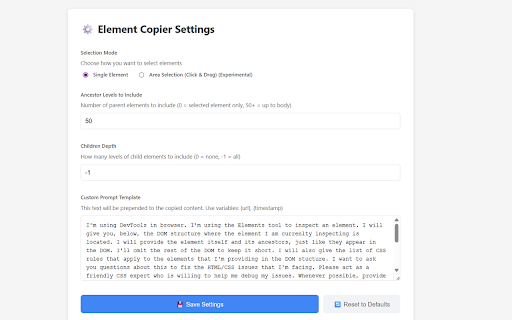
You get automatic extraction of computed styles as they actually appear in the browser, not just the CSS rules written in your stylesheet. This distinction matters because cascade, inheritance, and browser defaults all influence final rendering. The extension also offers customization options to control extraction depth and which properties to include, so you can keep the output focused rather than drowning your AI assistant in thousands of lines of auto-generated framework styles.

Install DOM Extractor if you regularly ask AI for help fixing layouts, understanding why styles aren't applying, recreating components from existing sites, or explaining complex DOM structures. Instead of manually inspecting elements, copying CSS rules one property at a time, and typing out HTML structure, you get everything in one click. This transforms a tedious five-minute process into something instantaneous, and the structured output makes it trivially easy for AI models to understand exactly what you're working with and provide actionable solutions.
Technical
- Version
- 1.0.0
- Manifest
- V3
- Size
- 55.75KiB
- Min Chrome
- 88
- Languages
- 1
- Featured
- No
Metadata
- ID
- ocohigleddhodphhgellbepbjbmakmpk
- Developer ID
- u7f6143700f6e6d2085d1839c1a618d5b
- Developer Email
- [email protected]
- Created
- Nov 11, 2025
- Last Updated (Store)
- Nov 11, 2025
- Last Scraped
- Jun 8, 2026
- Website
- —
- Support URL
- —
- Privacy Policy
- —
Similar extensions
Alternatives to DOM Extractor, ranked by description similarity.

DOMExtractor
Extract DOM elements with CSS styles from any website. For developers & designers. Export as HTML, CSS, React or Vue components.
24
★ 5.0

DOM Snap — AI-Ready DOM Extractor
v1.1.02: Pro History + Interactive Picker + Markdown Export. Optimized for AI snap-fast DOM extractions with Shadow DOM support.
43
★ 4.0

DOMinator
Enhance developer experience with DOM visualization, analysis, and AI-powered suggestions
—

Extractify
Extract HTML and CSS from selected elements.
20

HTML/CSS Extractor
Extract HTML & CSS from any element with live preview, smart selector simplification, and syntax-highlighted editor
115
★ 5.0

DOM Stripper & Markdown Extractor
Extracts pure HTML, Markdown, or Headers from any webpage. Strips JS frameworks & noise for perfect AI analysis and Technical SEO.
33
★ 5.0

UI Context
Select any element on any website and copy its context for your coding agent
5
★ 5.0

DOMTree Explorer+
Explore, inspect, and annotate the DOM tree of any web page.
136
★ 1.0
Data sourced from the Chrome Web Store · last verified Jun 8, 2026.