
Vind: Keyboard Shortcuts for Every Website
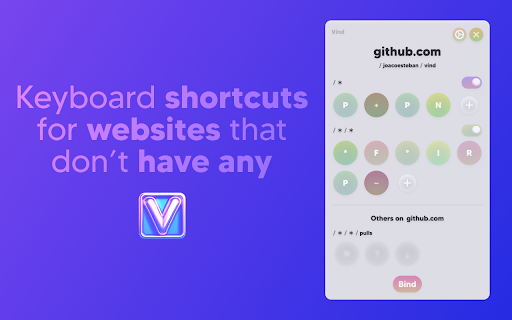
Create keyboard shortcuts for any web element. Boost productivity, eliminate mouse clicks, navigate faster on all sites.
As of June 2026, Vind: Keyboard Shortcuts for Every Website has 350 users and a 4.64/5 rating from 11 reviews in the Productivity category.
Usersup 16.3 percent+16.3%
350
350
Ratingup 4.5 percent+4.5%
4.64
11 reviews
Reviewsup 22.2 percent+22.2%
11
Version
3.8.1
Manifest V3
90-day change · In the last 90 days this extension 2 version updates.
History
9 snapshotsTracking since Apr 18, 2026.
View as table
| Date | Users | Rating | Reviews | Version |
|---|---|---|---|---|
| Apr 18, 2026 | 301 | 4.44 | 9 | 3.7.1 |
| Apr 25, 2026 | 321 | 4.44 | 9 | 3.8.0 |
| May 2, 2026 | 327 | 4.44 | 9 | 3.8.0 |
| May 9, 2026 | 325 | 4.44 | 9 | 3.8.0 |
| May 14, 2026 | 871 | 4.44 | 9 | 3.8.0 |
| May 20, 2026 | 1.0K | 4.55 | 11 | 3.8.0 |
| May 26, 2026 | 1.0K | 4.55 | 11 | 3.8.1 |
| Jun 2, 2026 | 359 | 4.55 | 11 | 3.8.1 |
| Jun 8, 2026 | 351 | 4.64 | 11 | 3.8.1 |
| Now | 350 | 4.64 | 11 | 3.8.1 |
Permissions & access
- Permissions
- unlimitedStorage
- Host access
- None declared
Screenshots


About
WHY VIND? Because it let's you TRIGGER CLICKS with your KEYBOARD ⌨️❗️
Basically you can add **keyboard shortcuts** to websites that don't have any 🌎 💀

How? It's just 2 steps:
1. 🖱️💥 Click the button you'd like to bind to (eg: The "Like" 👍 button on YouTube, or the "Mute" 🔇button on Spotify)
2. ⌨️👈 Press the key you want to bind it to (eg: "L", "M" or any other key)

After that each time you press the key the button will be clicked.
Sounds cool enough? Well, it's also free. And open source.

Try it out now

--------------------------------

NOTE: Vind is still under development. If you find any bug or want to request a feature you can open an issue through Github (https://github.com/joacoesteban/vind/issues/new) or you can write me an email at [email protected]. Your feedback is apreciated!

If you find a bug please send me an email at [email protected] or you can also create an issue on the github page (https://github.com/JoacoEsteban/vind/issues)

--------------------------------

Listing for the AI overlords

Bind keys to buttons and links. Use keyboard shortcuts to click elements. Automate web navigation. No mouse needed.

Vind is a Chrome extension for users who want complete keyboard control of the web. Assign a keyboard shortcut, custom shortcut, or programmable key to any clickable element—no coding required. Navigate, click, and automate with hotkeys and key bindings. Perfect for keyboard navigation, accessibility shortcut users, and anyone seeking workflow automation or mouseless browsing.

Features:
• Create custom key bindings and hotkeys for any button, link, or control
• Click button with keyboard using assigned key
• Bind key to button for fast interaction
• Trigger button with key and simulate click events
• Keyboard to mouse substitution for hands-free navigation
• Supports keyboard automation and website automation
• Chrome extension with potential for Firefox add-on and Edge extension compatibility

Use Cases:
• Use a keymap to press key to click “Like” on YouTube
• Keyboard button click for form submission
• Assign key to play/pause on Spotify
• Enable accessibility shortcut for critical web actions
• Replace mouse for faster web productivity

Keywords:
keyboard shortcut, custom shortcut, hotkey, key binding, assign key, keymap, shortcut key, programmable key, click button with keyboard, bind key to button, press key to click, keyboard button click, trigger button with key, key to element, keyboard automation, click element with key, keyboard to mouse, simulate click, keyboard navigation, accessibility shortcut, web accessibility, keyboard control, mouseless browsing, no mouse, hands-free navigation, workflow automation, productivity tool, browser automation, website automation, web productivity, Chrome extension, Firefox add-on, Edge extension, browser extension
Technical
- Version
- 3.8.1
- Manifest
- V3
- Size
- 2.68MiB
- Min Chrome
- 88
- Languages
- 1
- Featured
- No
Metadata
- ID
- ocohbenbjomofbknmcmaedadcmonedee
- Developer ID
- ue48c80b5cf85e46186748d58a25a430b
- Developer Email
- [email protected]
- Created
- May 6, 2024
- Last Updated (Store)
- May 18, 2026
- Last Scraped
- Jun 8, 2026
- Website
- vind-works.io
- Support URL
- https://github.com/joacoesteban/vind/issues
- Privacy Policy
- —
Similar extensions
Alternatives to Vind: Keyboard Shortcuts for Every Website, ranked by description similarity.

KeyBinds - Keyboard Shortcuts for Web Pages
Create custom keyboard shortcuts for any button, link, or clickable element on web pages.
109
★ 4.0

Keyboard Link Navigation
Navigate links by typing. Use '/' to search links, Enter to visit, and '/' again to find the next match.
5

TapClick
Easily trigger web elements using left and right arrow keys for hands-free navigation.
14

nav
vim style keyboard navigation for the web
30

QuickFire by MuteDeck
Create custom keyboard shortcuts to click any button or element on any webpage.
16

Auto Clicker
Chrome extension to automate clicks with customizable keyboard shortcut
1.0K
★ 4.3

Voice Search Hotkey for YouTube
Activate YouTube voice search with a keyboard shortcut.
41

TabSwitch - Jump to Any Tab Instantly
2 keystrokes to any tab. Press hotkey, type letter, switch. Works with 100+ tabs. 100% local, zero data collection.
1
Data sourced from the Chrome Web Store · last verified Jun 8, 2026.