
Page2Leads
Page2Leads makes it easy to capture leads from any webpage. You can easily convert email addresses into valuable business contacts.
As of May 2026, Page2Leads has 22 users and a 4.80/5 rating from 10 reviews in the Workflow & Planning category.
Usersdown 8.3 percent−8.3%
22
22
Ratingdown 0.6 percent−0.6%
4.80
10 reviews
Reviewsdown 16.7 percent−16.7%
10
Version
1.0.3
Manifest V3
History
2 snapshotsTracking since Apr 24, 2026.
View as table
| Date | Users | Rating | Reviews | Version |
|---|---|---|---|---|
| Apr 24, 2026 | 24 | 4.83 | 12 | 1.0.3 |
| May 21, 2026 | 21 | 4.80 | 10 | 1.0.3 |
| Now | 22 | 4.80 | 10 | 1.0.3 |
Permissions & access
- Permissions
- storagetabscookies
- Host access
- *://app.page2leads.net/, *://page2leads.net, *://localhost/
Screenshots



About
FEATURES
★ Lead Generation
Page2Leads allows you to easily convert emails to leads and save them in multiple export options
✔️ Export leads as CSV files
✔️ Export leads as text files
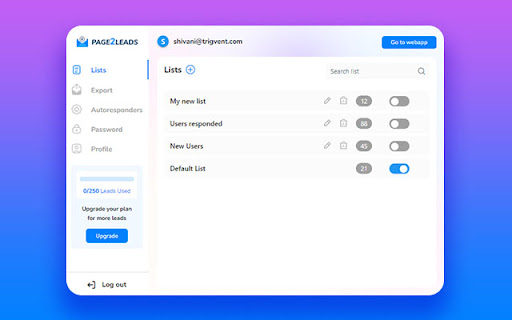
✔️ Organize leads easily by adding to Lists
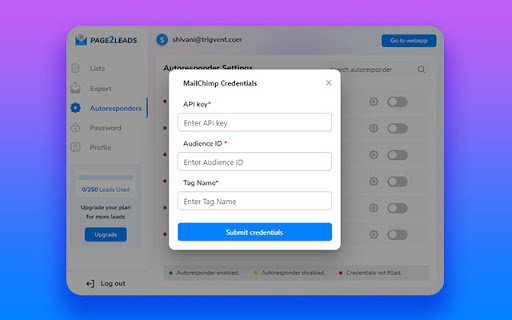
✔️ Add leads to multiple autoresponders & CRMs

★ Integrate your email marketing software & CRMs
Page2Leads supports 20+ autoresponders and CRMs. With this feature, you can enrich leads and enhance your marketing strategies using the tools you're already using.

★ Create organized lists of leads
Page2Leads makes it simple to build a lead list from captured emails. You can easily save the generated leads into specific lists.

★ Save time, money & get results
Now, you don't need to use a virtual assistant or copy-paste emails from website into your email service provider anymore.

GET STARTED
The extension requires an account you can create immediately after the installation. It also offers a lifetime free plan that allows you to export unlimited leads as text or CSV files. Additionally, this service enables you to add up to 250 leads per month to multiple autoresponders or lists.

By installing the extension, you agree to Page2Leads's Privacy Policy (https://page2leads.net/privacy-policy).

HOW IT WORKS
★ Install the Page2Leads Chrome extension and sign in.
★ Browse the web to get email leads.
★ Click on the red button on the bottom left side of your browser screen, to view leads.
★ Choose any export option to save emails as leads.
Technical
- Version
- 1.0.3
- Manifest
- V3
- Size
- 3.1MiB
- Min Chrome
- 88
- Languages
- 1
- Featured
- Yes
Metadata
- ID
- ocililpelmegfnnocbbflblmnbmbahpg
- Developer ID
- uf6c6dbf646ed89c9d5b1714a477bb3a1
- Developer Email
- [email protected]
- Created
- Feb 4, 2021
- Last Updated (Store)
- Jul 17, 2023
- Last Scraped
- May 21, 2026
- Website
- page2leads.net
- Support URL
- —
- Privacy Policy
- —
Similar extensions
Alternatives to Page2Leads, ranked by description similarity.

Scrape Emails & Map Extractor - BulkEasyLeads
Paste a list of URLs into our extension. We'll find the emails for you automatically.
230
★ 5.0

OnePageCRM Lead Clipper
Capture leads from any webpage in just one click!
4.0K
★ 4.4

Tocoleads - Prospect from anywhere
Collect leads from multiple sources for Tocoleads
15

AeroLeads.com - Free B2B Phone Number & Email Finder
Find business email address, personal emails and phone numbers
20.0K
★ 4.5

Email Scraper
Use Email Scraper Chrome extension to extract email addresses from a website. Your online email extractor as lead scraping tool.
272
★ 5.0

Leads Snap
Simplify lead management with this Chrome extension. Save and organize leads with ease, capturing URLs, notes, and content while…
6

PageLeads – Ad Library & Page Lead Extractor
Collect and manage leads directly from Facebook Pages and Ad Library
8

Email Extractor Pro
Beautiful, privacy-friendly email extractor for any site. Scan pages, preview results, and copy emails with one click.
25
Data sourced from the Chrome Web Store · last verified May 21, 2026.