
Twitter Fast Reply
Save and use reply drafts for keywords and phrases in X (Twitter).
As of May 2026, Twitter Fast Reply has 5 users in the Productivity category.
Usersup 66.7 percent+66.7%
5
5
Ratingno change0%
—
— reviews
Reviewsno change0%
—
Version
0.3
Manifest V3
History
4 snapshotsTracking since Apr 21, 2026.
View as table
| Date | Users | Rating | Reviews | Version |
|---|---|---|---|---|
| Apr 21, 2026 | 3 | — | — | 0.3 |
| May 6, 2026 | — | — | — | 0.3 |
| May 18, 2026 | 6 | — | — | 0.3 |
| May 31, 2026 | 7 | — | — | 0.3 |
| Now | 5 | — | — | 0.3 |
Permissions & access
- Permissions
- storage
- Host access
- None declared
Screenshots

About
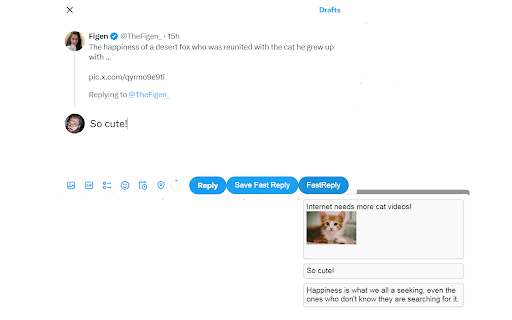
This extension adds to the UI of X (Twitter) an option to save reply drafts for specific keywords or phrases.

When a key the user saved a draft with appears in a tweet that the user is replying to (or in a tweet the user is quoting), "Fast Reply" button is added next to the Reply button. Button inserts the draft, or drafts, if there were multiple matches.

Saving a draft happens in the same reply div (Editor Container). When you start writing a reply, Save Fast Reply button appears. When you are done writing the draft, you can select a key for the draft from the tweet you are replying to. If you don't, you will be prompted to enter the key upon clicking the Save Fast Reply button.

You can manage your saved drafts in the extensions popup.

Changes in the version 0.3:

* Added settings. You now have more control over how Twitter Fast Reply appears in X user interface.

Changes in the version 0.2:

* You can now trigger your saved replies directly from your main feed — not just in reply boxes.

* Drafts are no longer just for replies! Use your saved messages as templates for regular tweets.

* Alphabetical order for the draft lists.

Changes in the version 0.1.1:

* Draft can now include pictures.

* If the draft database returns more than one match, you can now select one of them. You can do this when you hover mouse over the Fast Reply button.
You can also insert all matching drafts by clicking the Fast Reply button.

Known bugs:
When the draft contains more images than one, sometimes not all the images will be inserted with the draft, because of the timing issues with the scripts that are part of Twitter UI. Select the draft again, and all the images should be inserted.
Technical
- Version
- 0.3
- Manifest
- V3
- Size
- 20.73KiB
- Min Chrome
- 88
- Languages
- 1
- Featured
- No
Metadata
- ID
- obokcofnelmmbjhlfemmgoikoinlimge
- Developer ID
- u096181ec0acfb13360ed06700202731b
- Developer Email
- [email protected]
- Created
- Aug 2, 2024
- Last Updated (Store)
- Jun 10, 2025
- Last Scraped
- May 31, 2026
- Website
- —
- Support URL
- —
- Privacy Policy
- —
Similar extensions
Alternatives to Twitter Fast Reply, ranked by description similarity.

X Reply Drafter (Suggestions Only)
Reads visible tweets on x.com and requests suggested replies from a local backend. Does not auto-post.
—

FrensX
Crypto engagement for X — AI replies, points & rewards, community raids, SOL-powered promotion.
4

Redarply - Reddit AI Assistant
Smart Reddit insights with intent detection and copy-ready replies
2

Twitter Master
AI assistant and automation side panel for X/Twitter: replies, content creation, follow, unfollow, monitoring, and analytics.
2
★ 5.0

X-Reply | AI to reply
X-Reply is a tool help you to use AI to reply on all platform
187
★ 1.0

WordRobin
Write the best tweets & replies with AI
—

Tweet Thread Saver
Save X/Twitter threads with one click. AI summaries, searchable archive, export to NotebookLM & Markdown. Never lose valuable…
37

XFastr - AI Reply Generator for X
Generate smart AI-powered replies for X (Twitter) posts instantly. Save time crafting engaging responses.
3
★ 5.0
Data sourced from the Chrome Web Store · last verified May 31, 2026.