
Turbo Tangerine - LinkedIn Prospecting
Import LinkedIn profiles to your Turbo Tangerine CRM campaigns
As of June 2026, Turbo Tangerine - LinkedIn Prospecting has — users and a 5.00/5 rating from 1 reviews in the Social & Communication category.
Usersno change0%
—
—
Ratingno change0%
5.00
1 reviews
Reviewsno change0%
1
Version
1.0.46
Manifest V3
90-day change · In the last 90 days this extension 1 version update.
History
5 snapshotsTracking since Apr 17, 2026.
View as table
| Date | Users | Rating | Reviews | Version |
|---|---|---|---|---|
| Apr 17, 2026 | 2 | 5.00 | 1 | 1.0.36 |
| Apr 28, 2026 | 2 | 5.00 | 1 | 1.0.46 |
| May 5, 2026 | 2 | 5.00 | 1 | 1.0.46 |
| May 16, 2026 | — | 5.00 | 1 | 1.0.46 |
| May 23, 2026 | 2 | 5.00 | 1 | 1.0.46 |
| Now | — | 5.00 | 1 | 1.0.46 |
Permissions & access
- Permissions
- cookiesstoragescriptingactiveTabtabs
- Host access
- https://*.linkedin.com/*, https://app.turbotangerine.com/*
Screenshots

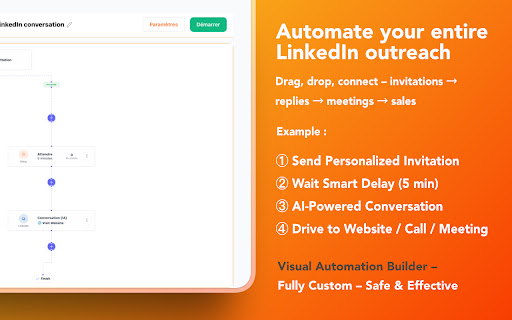


About
🍊 Turbo Tangerine – LinkedIn Prospecting Extension

Turn LinkedIn search results into actionable CRM prospects in just a few clicks.

Turbo Tangerine helps you manually import LinkedIn profiles you are actively viewing into your Turbo Tangerine account, so you can build and manage outreach campaigns faster—without copy-pasting.

✨ Key Features

Smart Profile Import
Import up to 500 profiles directly from LinkedIn People Search results pages.

Live Import Preview
See how many profiles will be imported before confirming.

Campaign & Sequence Selection
Send prospects directly to your existing campaigns and audience lists.

Advanced Exclusion Filters
Avoid duplicates and exclude profiles based on predefined criteria.

On-Page Extraction
Extracts publicly visible profile data from the LinkedIn page you are viewing.

Privacy-First Design
Data is sent only to your Turbo Tangerine account and never shared with third parties.

🚀 How It Works

1. Open a LinkedIn People Search results page
2. Click the Turbo Tangerine extension icon
3. Select a campaign or sequence
4. Choose the number of profiles to import
5. Click **“Send to CRM”**

The extension extracts publicly visible information:

- Name
- Job title
- Location
- Profile URL

Profiles are sent directly to your Turbo Tangerine dashboard, where you can enrich data, launch outreach sequences, and manage your pipeline.

 🔐 Permissions Transparency

Permissions are used strictly to support user-initiated actions:

- Access LinkedIn search pages to read visible profile data
- Maintain the active LinkedIn session during import
- Store your Turbo Tangerine authentication token locally
- Inject the import widget and communicate with your account

No background activity. No third-party tracking.

💡 Requirements

- Active Turbo Tangerine account
- LinkedIn account
- Google Chrome browser

 📈 Ideal For

- Sales teams prospecting on LinkedIn
- Recruiters building talent pipelines
- B2B marketers generating qualified leads
- Anyone who wants to turn LinkedIn searches into CRM prospects efficiently

Start building your next outreach campaign—directly from LinkedIn. 🚀
Technical
- Version
- 1.0.46
- Manifest
- V3
- Size
- 476KiB
- Min Chrome
- 88
- Languages
- 1
- Featured
- No
Metadata
- ID
- obnlimcfommlcanapddlikeanhggpkgm
- Developer ID
- udb745d478af9a057a85402fa690f72fd
- Developer Email
- [email protected]
- Created
- Feb 27, 2026
- Last Updated (Store)
- Apr 7, 2026
- Last Scraped
- Jun 11, 2026
- Website
- turbotangerine.com
- Support URL
- https://turbotangerine.com
- Privacy Policy
- https://turbotangerine.com/en/privacy
Similar extensions
Alternatives to Turbo Tangerine - LinkedIn Prospecting, ranked by description similarity.

ManagePlus LinkedIn Automation
LinkedIn automation by ManagePlus
9
★ 5.0

TACQ AI | Linkedin Prospecting
Ultimate LinkedIn AI Tool for Smart, Elevated Lead Generation! Built for Sales and Recruitment.
378
★ 3.6

intentleads - Engagement based LinkedIn Leads PREVIEW
Analyse the intent on your profile and generate hot leads on autopilot.
37
★ 5.0

Neebify - LinkedIn Automation Tool
Neebify automates LinkedIn outreach, data extraction, and campaign management, boosting productivity and lead generation success.
22
★ 5.0

Leadsourcing - ChatGPT for LinkedIn
Supercharge your prospecting on LinkedIn with ChatGPT. Let Leadsourcing do the heavy lifting. Save time, close deals.
125
★ 5.0

XP-ONE Extension V 0.1
Automate LinkedIn post engagement extraction with precision.
This Chrome extension is designed for growth marketers, sales teams,…
—
★ 5.0

LinkedIn Search Everywhere
Search for highlighted text directly on LinkedIn using the context menu.
18

InPitch: Automate Connects & DMs for LinkedIn
Safely automate lead generation with custom Connects & DMs for LinkedIn. Ideal for entrepreneurs, sales and recruiting.
120
★ 5.0
Data sourced from the Chrome Web Store · last verified Jun 11, 2026.