
Album
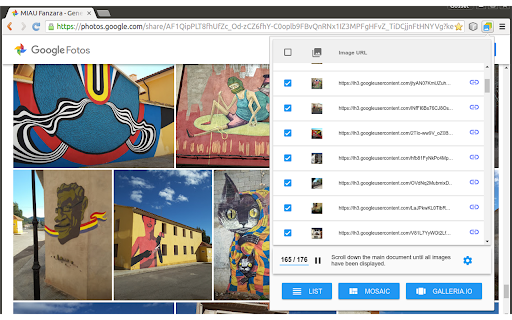
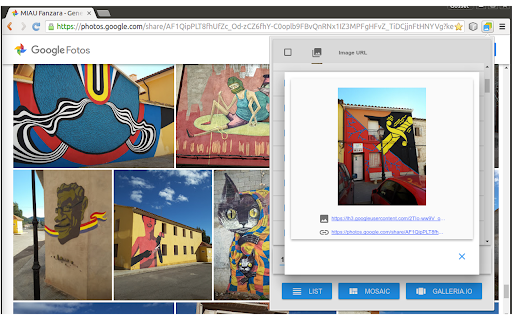
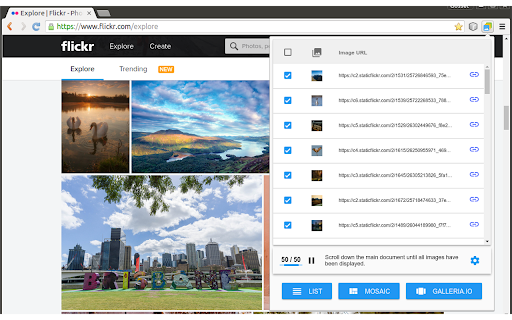
Builds a list with the images present on the current page and exports it as text, mosaic or carousel.
As of May 2026, Album has 2,000 users and a 4.80/5 rating from 15 reviews in the Productivity category.
Usersno change0%
2.0K
2,000
Ratingno change0%
4.80
15 reviews
Reviewsno change0%
15
Version
2.0.5
Manifest V3
History
1 snapshotsTracking since Apr 24, 2026.
View as table
| Date | Users | Rating | Reviews | Version |
|---|---|---|---|---|
| Apr 24, 2026 | 2.0K | 4.80 | 15 | 2.0.5 |
| Now | 2.0K | 4.80 | 15 | 2.0.5 |
Permissions & access
- Permissions
- activeTabnotificationsstoragescripting
- Host access
- None declared
Screenshots

About
This extension detects the images on the current page and shows them in a list that can be exported in three different formats:

- A simple list of absolute URLs pointing at the images.

- An HTML snippet with "img" tags forming a mosaic. Images can also export their original links.

- An HTML snippet that creates a carousel of images powered by Galleria.io (http://galleria.io)

In all cases, the data is copied into the clipboard and can be inserted into any text editor by pressing [Ctrl+V]. Mosaic and carousel snippets can be inserted into documents, blog posts, virtual learning environments and any other application based on HTML content. Before pasting the code into a rich-text editor, be sure to set it in "plain text" mode (usually represented by a button with the symbols "<>" or "html").

This is a free software project. You can contribute to improving this browser extension by reporting issues, translating it to a different language or sending pull requests to https://github.com/projectestac/album. Thanks in advance!

Special thanks to the excellent work done by galleria.io (http://galleria.io), the open source engine beneath the image carousel. In addition to the basic free theme used by Album, they provide also with other nice and featured themes at cheap prices.

Note that Album does not copy images nor any type of files: it just deals with URLs pointing at remote resources. Issues with the images (slow loading, file not found...) are often related to problems with the origin of the images.

IMPORTANT NOTE FOR GOOGLE PHOTOS USERS:
Due to changes in the way Google Photos works, the extension is not able to open some images when activated directly within the application.
To solve this you must follow the following steps:
1) Create a Google Photos album, name it, and add photos to it.
2) Create a link to share the album using the "Share" button on the top right.
3) Copy this public link and open it in a new tab or an incognito Chrome window.
4) In this new tab or window, use the extension as normal.
Technical
- Version
- 2.0.5
- Manifest
- V3
- Size
- 70.24KiB
- Min Chrome
- 88
- Languages
- 3
- Featured
- Yes
Metadata
- ID
- obknigmaekkacdkckfeegcfiefdaeked
- Developer ID
- u7169927b3a90d35f3aca3088977b87f2
- Developer Email
- [email protected]
- Created
- Apr 8, 2016
- Last Updated (Store)
- Apr 10, 2024
- Last Scraped
- May 21, 2026
- Website
- —
- Support URL
- https://github.com/projectestac/album/issues
- Privacy Policy
- —
Similar extensions
Alternatives to Album, ranked by description similarity.

Google Photos Album Batch Downloader
Batch download Google Photos albums, including all photos and videos in the album.
344
★ 5.0

Google Photos Album to PDF photo book
Create photo book or photo collage from Google Photos album and save them as a PDF.
159
★ 4.2

PhotoGrab - Image Downloader
Detect and download all images from any webpage
8

Mitene Album Downloader
Downloads all the images and videos from a Mitene album.
25

Gemini Image Auto-Downloader
Scan & download all AI-generated images from Google Gemini conversations. One click. Original quality. Custom folders.
227
★ 3.0

GalleryMe
Extract and view all images and videos from any webpage
1

Google Photos Clipboard Fix
Copies images from Google Photos as real image data so they paste correctly into blog editors and other apps.
17

Image Grid Creator
Extract images from webpage and create customizable grid layouts
20
Data sourced from the Chrome Web Store · last verified May 21, 2026.