
One Day Planning - Visual Daily Scheduler & PiP Timer
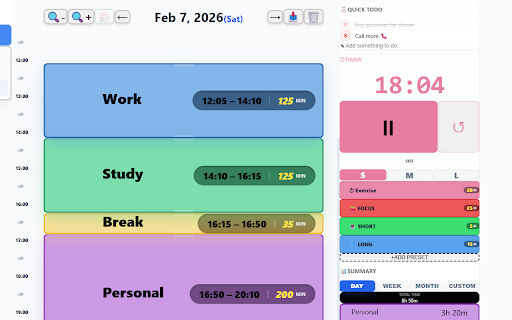
Design your day with drag-and-drop ease. Stay focused with a sleek PiP timer that floats on top. Ultimate visual daily scheduler.
As of June 2026, One Day Planning - Visual Daily Scheduler & PiP Timer has 12 users in the Workflow & Planning category.
Usersup 140.0 percent+140.0%
12
12
Ratingno change0%
—
— reviews
Reviewsno change0%
—
Version
2.4.0
Manifest V3
90-day change · In the last 90 days this extension 2 version updates.
History
10 snapshotsTracking since Apr 4, 2026.
View as table
| Date | Users | Rating | Reviews | Version |
|---|---|---|---|---|
| Apr 4, 2026 | 5 | — | — | 2.2.0 |
| Apr 17, 2026 | 4 | — | — | 2.2.0 |
| Apr 23, 2026 | 4 | — | — | 2.3.1 |
| Apr 28, 2026 | 7 | — | — | 2.4.0 |
| May 5, 2026 | 8 | — | — | 2.4.0 |
| May 11, 2026 | 9 | — | — | 2.4.0 |
| May 16, 2026 | — | — | — | 2.4.0 |
| May 23, 2026 | 9 | — | — | 2.4.0 |
| May 29, 2026 | 10 | — | — | 2.4.0 |
| Jun 11, 2026 | 9 | — | — | 2.4.0 |
| Now | 12 | — | — | 2.4.0 |
Changelog
- Apr 23, 2026description
One Day Planning - Visual Daily Scheduler & PiP Timer

Design your ideal day with drag-and-drop ease and execute it with a professional floating PiP timer.

【WHAT'S NEW IN VERSION 2.3.1】

● Smart Schedule Cleaner (NEW)
You can now select "Clear All Future" from the 🗑️ button. Clear all future tasks at once and reset routine auto-application settings. Redesigning your schedule from a blank slate is now easier than ever.

● Smart Routine Overwrite (NEW)
When saving a routine with an existing name, you can now overwrite the task content while preserving its existing ID and weekday assignments.

● Complete Position & Size Persistence (NEW)
In multi-display environments (such as using a laptop with an external monitor), we've eliminated the phenomenon where windows would jump back to the main screen or reset their size when a timer finishes. Your window stays exactly where and how you placed it.

---

Detailed Description

"Planning your day should be effortless and beautiful."
One Day Planning is a high-end scheduling tool created for professionals and students who value their time and visual environment.

Don't be confined to small popups. Use our expansive, beautiful canvas to map out your entire day.

【Support the Developer】
To help continue development, your warm support would be greatly appreciated:
https://buymeacoffee.com/masayuki

Key Features

● Privacy-First Local Storage
All your data is stored locally within your browser. No external servers, no cloud sync, and no tracking. Your sensitive schedule remains your business alone.

● Intuitive Drag & Drop
Planning is now a puzzle. Add, move, and stretch tasks with simple mouse movements. Effortlessly assemble your daily flow.

● PIP (Picture-in-Picture) Timer
Float your task name and countdown timer on top of other apps. Perfectly synced with the system clock for to-the-second accuracy.

● Background Automation
Set routines for each day of the week, and they'll apply automatically. Even if you close your tabs, the extension keeps working in the background to guide your next task.

Design Philosophy

For a premium UI/UX experience, we've eliminated outdated "black borders" and standardized on a 10px corner radius and generous spacing. It feels like a native part of your OS—refined, interactive, and alive.

Start planning your next productive day with One Day Planning.
One Day Planning - Visual Daily Scheduler & PiP Timer

Design your ideal day with drag-and-drop ease and execute it with a professional floating PiP timer.

【WHAT'S NEW IN VERSION 2.4.0】

● Smart Schedule Cleaner (NEW)
You can now select "Clear All Future" from the 🗑️ button. Clear all future tasks at once and reset routine auto-application settings. Redesigning your schedule from a blank slate is now easier than ever.

● Smart Routine Overwrite (NEW)
When saving a routine with an existing name, you can now overwrite the task content while preserving its existing ID and weekday assignments.

● Complete Position & Size Persistence (NEW)
In multi-display environments (such as using a laptop with an external monitor), we've eliminated the phenomenon where windows would jump back to the main screen or reset their size when a timer finishes. Your window stays exactly where and how you placed it.

---

Detailed Description

"Planning your day should be effortless and beautiful."
One Day Planning is a high-end scheduling tool created for professionals and students who value their time and visual environment.

Don't be confined to small popups. Use our expansive, beautiful canvas to map out your entire day.

【Support the Developer】
To help continue development, your warm support would be greatly appreciated:
https://buymeacoffee.com/masayuki

Key Features

● Privacy-First Local Storage
All your data is stored locally within your browser. No external servers, no cloud sync, and no tracking. Your sensitive schedule remains your business alone.

● Intuitive Drag & Drop
Planning is now a puzzle. Add, move, and stretch tasks with simple mouse movements. Effortlessly assemble your daily flow.

● PIP (Picture-in-Picture) Timer
Float your task name and countdown timer on top of other apps. Perfectly synced with the system clock for to-the-second accuracy.

● Background Automation
Set routines for each day of the week, and they'll apply automatically. Even if you close your tabs, the extension keeps working in the background to guide your next task.

Design Philosophy

For a premium UI/UX experience, we've eliminated outdated "black borders" and standardized on a 10px corner radius and generous spacing. It feels like a native part of your OS—refined, interactive, and alive.

Start planning your next productive day with One Day Planning.
- Apr 17, 2026description
ONE DAY PLANNING - Visual Daily Scheduler & Pomodoro Timer

Design your ideal day with intuitive drag-and-drop and a professional floating timer.

[WHAT'S NEW IN v2.2.0]

● Significant Performance Optimization (Highest Impact)
Achieved a dramatic reduction in CPU usage (down to ~1-2%) through complete component memoization and context-aware timer updates. The app is now incredibly lightweight even when running the timer.

● Reliable Service Worker & Stability
Resolved critical issues with Service Worker registration and initialization. The extension icon and background processes now work reliably after updates.

● Intelligent PiP & Alert Management
PiP windows now handle alerts internally to prevent redundant mini-windows. Added a "Manual Pause Respect" logic in Auto Mode—the timer won't auto-restart if you've intentionally paused it.

● Precision Current-Time Line
The red indicator on the schedule now updates smoothly with second-level accuracy, perfectly synchronized across all zoom levels.

---

DETAILED DESCRIPTION

"Manage your daily schedule more casually and more beautifully."
One Day Planning is a high-end scheduling tool designed for professionals and students who value their time and visual environment.

Forget tiny extension pop-ups. One Day Planning provides a full-screen, beautiful canvas to paint your day.

[SUPPORT THE DEVELOPER]
If you find this tool helpful, please consider supporting the ongoing development:
https://buymeacoffee.com/masayuki

KEY FEATURES

● Do you really want your information to leave your device?
Most tools rely on cloud storage, but that means "entrusting" your precious data to external servers. Your business projects, confidential schedules, and private routines—are they safe out there?
One Day Planning keeps 100% of your data within your browser. No external servers, no cloud syncing, and no tracking. We provide the ultimate peace of mind for professionals who prioritize security and compliance.

● Intuitive Drag & Drop
Planning feels like a game. Add, move, and stretch tasks with smooth mouse movements. Assemble your day like a puzzle.

● Background Automation
Set your routines by day of the week, and they will automatically appear. The extension handles task transitions in the background, keeping you on track even when the browser tab is closed.

● Professional Floating Timer (PiP)
Keep your task name and countdown always visible on top of other apps. Perfectly synchronized with millisecond precision to end exactly at the scheduled :00 second mark.

DESIGN PHILOSOPHY

As a premium UI/UX experience, we've eliminated outdated "black borders" and unified all corners to a consistent 10px radius. The result is a modern, "alive" interface that feels like a native OS feature.

Start planning your next productive day with One Day Planning.
One Day Planning - Visual Daily Scheduler & PiP Timer

Design your ideal day with drag-and-drop ease and execute it with a professional floating PiP timer.

【WHAT'S NEW IN VERSION 2.3.1】

● Smart Schedule Cleaner (NEW)
You can now select "Clear All Future" from the 🗑️ button. Clear all future tasks at once and reset routine auto-application settings. Redesigning your schedule from a blank slate is now easier than ever.

● Smart Routine Overwrite (NEW)
When saving a routine with an existing name, you can now overwrite the task content while preserving its existing ID and weekday assignments.

● Complete Position & Size Persistence (NEW)
In multi-display environments (such as using a laptop with an external monitor), we've eliminated the phenomenon where windows would jump back to the main screen or reset their size when a timer finishes. Your window stays exactly where and how you placed it.

---

Detailed Description

"Planning your day should be effortless and beautiful."
One Day Planning is a high-end scheduling tool created for professionals and students who value their time and visual environment.

Don't be confined to small popups. Use our expansive, beautiful canvas to map out your entire day.

【Support the Developer】
To help continue development, your warm support would be greatly appreciated:
https://buymeacoffee.com/masayuki

Key Features

● Privacy-First Local Storage
All your data is stored locally within your browser. No external servers, no cloud sync, and no tracking. Your sensitive schedule remains your business alone.

● Intuitive Drag & Drop
Planning is now a puzzle. Add, move, and stretch tasks with simple mouse movements. Effortlessly assemble your daily flow.

● PIP (Picture-in-Picture) Timer
Float your task name and countdown timer on top of other apps. Perfectly synced with the system clock for to-the-second accuracy.

● Background Automation
Set routines for each day of the week, and they'll apply automatically. Even if you close your tabs, the extension keeps working in the background to guide your next task.

Design Philosophy

For a premium UI/UX experience, we've eliminated outdated "black borders" and standardized on a 10px corner radius and generous spacing. It feels like a native part of your OS—refined, interactive, and alive.

Start planning your next productive day with One Day Planning.
- Apr 17, 2026short_description
A browser extension to plan your daily schedule with drag-and-drop and execute it with a Pomodoro timer.
Design your day with drag-and-drop ease. Stay focused with a sleek PiP timer that floats on top. Ultimate visual daily scheduler.
- Apr 17, 2026name
One Day Planning - Daily Planner & Timer
One Day Planning - Visual Daily Scheduler & PiP Timer
Permissions & access
- Permissions
- storageactiveTabalarmsnotificationssystem.display
- Host access
- None declared
Screenshots


About
One Day Planning - Visual Daily Scheduler & PiP Timer

Design your ideal day with drag-and-drop ease and execute it with a professional floating PiP timer.

【WHAT'S NEW IN VERSION 2.4.0】

● Smart Schedule Cleaner (NEW)
You can now select "Clear All Future" from the 🗑️ button. Clear all future tasks at once and reset routine auto-application settings. Redesigning your schedule from a blank slate is now easier than ever.

● Smart Routine Overwrite (NEW)
When saving a routine with an existing name, you can now overwrite the task content while preserving its existing ID and weekday assignments.

● Complete Position & Size Persistence (NEW)
In multi-display environments (such as using a laptop with an external monitor), we've eliminated the phenomenon where windows would jump back to the main screen or reset their size when a timer finishes. Your window stays exactly where and how you placed it.

---

Detailed Description

"Planning your day should be effortless and beautiful."
One Day Planning is a high-end scheduling tool created for professionals and students who value their time and visual environment.

Don't be confined to small popups. Use our expansive, beautiful canvas to map out your entire day.

【Support the Developer】
To help continue development, your warm support would be greatly appreciated:
https://buymeacoffee.com/masayuki

Key Features

● Privacy-First Local Storage
All your data is stored locally within your browser. No external servers, no cloud sync, and no tracking. Your sensitive schedule remains your business alone.

● Intuitive Drag & Drop
Planning is now a puzzle. Add, move, and stretch tasks with simple mouse movements. Effortlessly assemble your daily flow.

● PIP (Picture-in-Picture) Timer
Float your task name and countdown timer on top of other apps. Perfectly synced with the system clock for to-the-second accuracy.

● Background Automation
Set routines for each day of the week, and they'll apply automatically. Even if you close your tabs, the extension keeps working in the background to guide your next task.

Design Philosophy

For a premium UI/UX experience, we've eliminated outdated "black borders" and standardized on a 10px corner radius and generous spacing. It feels like a native part of your OS—refined, interactive, and alive.

Start planning your next productive day with One Day Planning.
Technical
- Version
- 2.4.0
- Manifest
- V3
- Size
- 1.08MiB
- Min Chrome
- 88
- Languages
- 2
- Featured
- No
Metadata
- ID
- objojhcgjliaehdbhdpmiilagdcogmod
- Developer ID
- u28bfb667fb09636d6e3e83f084880d52
- Developer Email
- [email protected]
- Created
- Feb 8, 2026
- Last Updated (Store)
- Apr 21, 2026
- Last Scraped
- Jun 11, 2026
- Website
- —
- Support URL
- —
- Privacy Policy
- http://otp-arh.pages.dev
Similar extensions
Alternatives to One Day Planning - Visual Daily Scheduler & PiP Timer, ranked by description similarity.

Daily Planner
Manage daily tasks with a beautiful calendar. Add tasks with date/time, view on monthly calendar, and mark as completed.
60
★ 5.0

Daily Moment - Focus & Plan
Daily Moment - Focus, Deep Work & Pomodoro Timer
64
★ 5.0

Pomodoro Timer
Use an aesthetic Pomodoro Timer app online based on time management methods as a work, study, and break timer in a Chrome extension.
379
★ 5.0

Daily Planner
Stay organized with this Daily Planner app — an easy-to-use online planner and to-do list for perfect daily agenda planning.
769
★ 4.7

Timer, Alarm ,Countdown and Stopwatch for Google Chrome™
A simple Timer, Alarm ,Countdown and Stopwatch for Google Chrome
21

Focus Pomodoro Timer
A beautiful, animated Pomodoro timer to boost productivity with customizable intervals, notifications, and motivational messages.
16
★ 2.0

Timer app
Use Timer app as simple and offline countdown tool. This Chrome extension offers 5 minute timer, 1 hour, and other options.
20.0K
★ 4.9

Orange Calendar
Quick access to your productivity calendar with weather and inspiration.
3
Data sourced from the Chrome Web Store · last verified Jun 11, 2026.