
Snapr
Capture clean website screenshots in one click. Viewport, full page, or element. PNG, JPG, WebP. No account, no cloud.
As of June 2026, Snapr has 8 users in the Workflow & Planning category.
Usersno change0%
8
8
Ratingno change0%
—
— reviews
Reviewsno change0%
—
Version
1.0.0
Manifest V3
History
8 snapshotsTracking since Apr 3, 2026.
View as table
| Date | Users | Rating | Reviews | Version |
|---|---|---|---|---|
| Apr 3, 2026 | — | — | — | 1.0.0 |
| Apr 17, 2026 | — | — | — | 1.0.0 |
| Apr 24, 2026 | 41 | — | — | 1.0.0 |
| May 2, 2026 | — | — | — | 1.0.0 |
| May 8, 2026 | 38 | — | — | 1.0.0 |
| May 13, 2026 | — | — | — | 1.0.0 |
| May 19, 2026 | 37 | — | — | 1.0.0 |
| Jun 7, 2026 | — | — | — | 1.0.0 |
| Now | 8 | — | — | 1.0.0 |
Permissions & access
- Permissions
- activeTabdownloadsstorageoffscreenscriptingwindows
- Host access
- None declared
Screenshots


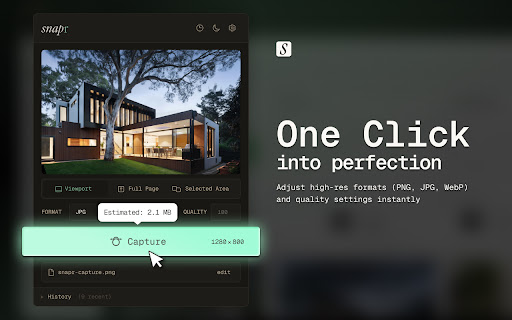

About
Snapr captures clean screenshots of any webpage in one click — no account, no cloud, no fluff.

CAPTURE MODES
▸ Viewport — screenshot exactly what's visible in your browser window
▸ Full Page — scroll and stitch the entire page into one image
▸ Selected Area — drag to capture any region of the page

OUTPUT FORMATS
▸ PNG, JPG, WebP, or PDF
▸ Adjustable quality (1–100) for JPG and WebP
▸ Everything saves directly to your device

FLEXIBLE FILENAME CONTROL
▸ Auto-generated filenames using tokens like {domain}, {path}, {date}, {time}, {mode}
▸ Edit the filename before saving, or set your own default pattern in Settings

CAPTURE HISTORY
▸ Last 20 captures stored locally with thumbnails
▸ Search, browse, and export your history as JSON
▸ Never synced — stays on your machine

KEYBOARD SHORTCUT
▸ macOS: Cmd+Shift+S
▸ Windows/Linux: Alt+Shift+S
▸ Captures the current tab instantly without opening the popup

PRIVACY
No data is collected or transmitted. Everything stays in your browser. No login required.
Technical
- Version
- 1.0.0
- Manifest
- V3
- Size
- 146KiB
- Min Chrome
- 88
- Languages
- 1
- Featured
- No
Metadata
- ID
- obbmbckbeeegfhfjmhhlhadgoiabiigg
- Developer ID
- u06ee4547daa7976531278e92a760c54f
- Developer Email
- [email protected]
- Created
- Apr 2, 2026
- Last Updated (Store)
- Apr 2, 2026
- Last Scraped
- Jun 7, 2026
- Website
- —
- Support URL
- —
- Privacy Policy
- —
Data sourced from the Chrome Web Store · last verified Jun 7, 2026.