
JioCloud - Your Cloud Storage
Seamlessly Manage Files on Chromebook
As of May 2026, JioCloud - Your Cloud Storage has 199 users and a 5.00/5 rating from 5 reviews in the Workflow & Planning category.
Usersup 10.6 percent+10.6%
199
199
Ratingno change0%
5.00
5 reviews
Reviewsno change0%
5
Version
1.0.5
Manifest V3
History
2 snapshotsTracking since Apr 24, 2026.
View as table
| Date | Users | Rating | Reviews | Version |
|---|---|---|---|---|
| Apr 24, 2026 | 180 | 5.00 | 5 | 1.0.5 |
| May 21, 2026 | 182 | 5.00 | 5 | 1.0.5 |
| Now | 199 | 5.00 | 5 | 1.0.5 |
Permissions & access
- Permissions
- storagetabsfileSystemProvideralarmsnotificationsidentityidentity.email
- Host access
- https://*.tejdrive.com/*, https://*.jiocloud.com/*
Screenshots
About
JioCloud is an ultimate app for storing and managing all your photos, videos, documents, audio, contacts, and messages in the cloud. With JioCloud, you can effortlessly back up your content and instantly sync it across all your devices. Access your files from any smartphone, website, desktop app like Chromebook, or even your TV using the JioCloud app.

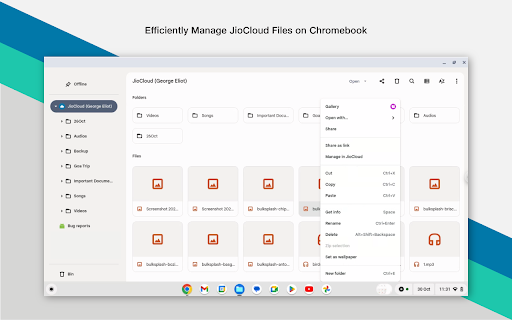
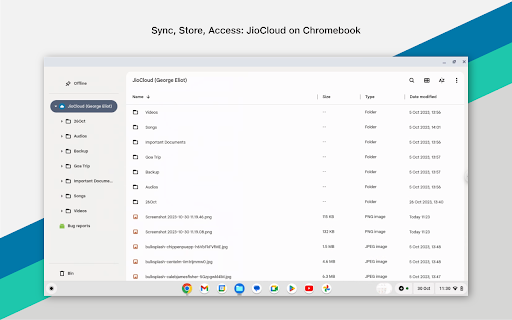
The JioCloud extension for Chromebook simplifies working with JioCloud files on your Chromebook device. You can easily manage, share, and sync all your files directly from the Chromebook's File Manager.

Here's what you can do with the JioCloud extension:

Access your JioCloud files and folders directly from the Chromebook's File Manager.

Seamlessly open, copy, paste, and do other operations on the files in JioCloud directly from your Chromebook.

Effortlessly add multiple files or folders to JioCloud by dragging them into the JioCloud folder. By storing your files on JioCloud, you can access them from anywhere.

We value your feedback and are continuously working to improve your experience. If you have any questions or feedback, please don't hesitate to reach out to us at [email protected].
Technical
- Version
- 1.0.5
- Manifest
- V3
- Size
- 131KiB
- Min Chrome
- 111
- Languages
- 1
- Featured
- No
Metadata
- ID
- oaohahbfgnpmmfjipgnnhbgjabflddhf
- Developer ID
- u71057d52330a9f004e2787a8b8fa3512
- Developer Email
- [email protected]
- Created
- Aug 18, 2023
- Last Updated (Store)
- Jan 30, 2025
- Last Scraped
- May 21, 2026
- Website
- —
- Support URL
- https://www.jiocloud.com/help/general
- Privacy Policy
- https://www.jio.com/en-in/jio-privacy-policy
Similar extensions
Alternatives to JioCloud - Your Cloud Storage, ranked by description similarity.

Move Files from Box to Google Drive
This extension lets you directly transfer files from Box to Google Drive without download and upload.
521
★ 3.7

Transfer OneDrive to Google drive
Transfer files from OneDrive to Google Drive, or Google Drive to OneDrive without downloading and re-uploading.
10.0K
★ 3.6

Transfer Google Photos to another Account
This extension lets you directly transfer photos from one Google Photos to another account with no download and upload.
779

Transfer Google Drive to Onedrive
Transfer files from Google Drive to Onedrive and vice versa. No download and re-upload.
7.0K
★ 5.0

Transfer Dropbox to Google Drive
Directly transfer files from Dropbox to Google Drive and vice versa. No download and re-upload.
30.0K
★ 3.8

IDrive
IDrive is an online backup and cloud storage service for homes and small businesses.
742
★ 4.1

Transfer One Google drive to Another
Transfer files from one Google Drive account to another, or to Dropbox, OneDrive, Box and other cloud drives, vice versa.
2.0K
★ 2.3
Cloud Duplicate Finder
Easily find duplicate photos, songs and all files from the cloud storage
8.0K
★ 3.5
Data sourced from the Chrome Web Store · last verified May 21, 2026.