
Clikr
Turn your phone into a wireless laser pointer and clicker for browser-based slide decks. Free, with one-time-payment Pro features.
As of June 2026, Clikr has 120 users in the Productivity category.
Usersup 93.5 percent+93.5%
120
120
Ratingno change0%
—
— reviews
Reviewsno change0%
—
Version
1.7.1.3
Manifest V3
90-day change · In the last 90 days this extension 4 version updates, changed permissions.
History
11 snapshotsTracking since Apr 4, 2026.
View as table
| Date | Users | Rating | Reviews | Version |
|---|---|---|---|---|
| Apr 4, 2026 | 62 | — | — | 1.4.0.3 |
| Apr 17, 2026 | 59 | — | — | 1.4.0.3 |
| Apr 23, 2026 | 62 | — | — | 1.4.0.3 |
| Apr 28, 2026 | 67 | — | — | 1.5.0.3 |
| May 5, 2026 | 60 | — | — | 1.5.0.3 |
| May 11, 2026 | 65 | — | — | 1.6.1.3 |
| May 16, 2026 | 63 | — | — | 1.6.1.3 |
| May 23, 2026 | 59 | — | — | 1.6.1.3 |
| May 29, 2026 | 77 | — | — | 1.6.1.3 |
| Jun 5, 2026 | 96 | — | — | 1.7.0.3 |
| Jun 11, 2026 | 121 | — | — | 1.7.1.3 |
| Now | 120 | — | — | 1.7.1.3 |
Changelog
- May 5, 2026description
With Web Presenter it's possible to use your mobile phone to point at the screen much like a laser pointer. The "laser" dot will follow the phone's motions. By swiping left or right on the screen it's also possible to switch slides in a presentation.

It has been tested with Google Slides, Mentimeter and Slides.com. Please reach out if you're using another tool and it doesn't work out of the box. For the mobile device it should work fine with at least Firefox and Chrome on Android and Safari on IOS.
Clikr turns your phone into a wireless laser pointer, clicker, drawing tool, and presenter remote for browser-based slide decks (such as Google Slides, PowerPoint Online, Slides.com, Mentimeter, and Keynote in Safari). Hold your phone and point at the screen; a dot follows your motion. Swipe to switch slides.

Note: Clikr recently changed its name from Web Presenter to Clikr.

How it works

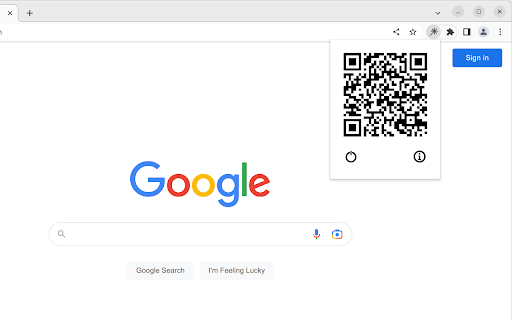
The Clikr extension runs in your desktop browser. The phone side is a plain web page, so there is no app to install on the phone. Pair the two with a QR code, and from then on your phone and desktop talk directly to each other.

Free features (no account required)

- Laser pointer dot that follows your phone's motion
- Switch slides by swiping left or right
- Scroll the active web page by swiping the phone screen
- Reload the active page from the phone
- Pointer calibration so the dot tracks accurately for your screen size and viewing distance

Optional Pro features (one-time payment, no subscription)

- Spotlight mode: darken everything except the area under your pointer
- Magnifying glass: live zoom on a slide region without leaving fullscreen
- Draw mode: annotate over your slides with pen, eraser, and clear-all
- Speaker notes shown on the phone (available in some supported slide tools, e.g. Slides.com)
- Next-slide preview shown on the phone (available in some supported slide tools, e.g. Slides.com)
- Page click: tap on the phone to click links, buttons, or other interactive elements on the slide
- Presentation timer on the phone
- Custom pointer color
- Pointer trail effect

What data the extension reads and sends

- Phone motion, taps, and swipes are sent from your phone directly to your desktop over a direct connection.
- When a Pro user opens the speaker-notes or next-slide-preview panel on the phone, the extension reads the speaker notes and a thumbnail of the next slide from supported slide tools on the active page and sends them over the same direct connection to the paired phone. Nothing about your slides is sent to any server we run.
- Page click sends a click into the active page so a tap on the phone behaves like a click on the slide.

Account

- No account is required to use the free features.
- A sign-in is required only when you purchase Pro, so the unlock can follow you across browsers and devices.

Pricing and refunds

- Pro is a single one-time payment. There is no subscription and no recurring charge.
- Refunds are available within the window described in the Returns policy on the homepage.

Homepage and policies: https://www.clikr.app
- May 5, 2026short_description
Use your mobile phone as a virtual laser pointer and clicker during web presentations.
Turn your phone into a wireless laser pointer and clicker for browser-based slide decks. Free, with one-time-payment Pro features.
- May 5, 2026name
Web Presenter
Clikr
- Apr 23, 2026permissions
alarms, offscreen, storage, scripting
activeTab, alarms, offscreen, storage, scripting
Permissions & access
- Permissions
- activeTabalarmsoffscreenstoragescripting
- Host access
- *://*/*
Screenshots

About
Clikr turns your phone into a wireless laser pointer, clicker, drawing tool, and presenter remote for browser-based slide decks (such as Google Slides, PowerPoint Online, Slides.com, Mentimeter, and Keynote in Safari). Hold your phone and point at the screen; a dot follows your motion. Swipe to switch slides.

Note: Clikr recently changed its name from Web Presenter to Clikr.

How it works

The Clikr extension runs in your desktop browser. The phone side is a plain web page, so there is no app to install on the phone. Pair the two with a QR code, and from then on your phone and desktop talk directly to each other.

Free features (no account required)

- Laser pointer dot that follows your phone's motion
- Switch slides by swiping left or right
- Scroll the active web page by swiping the phone screen
- Reload the active page from the phone
- Pointer calibration so the dot tracks accurately for your screen size and viewing distance

Optional Pro features (one-time payment, no subscription)

- Spotlight mode: darken everything except the area under your pointer
- Magnifying glass: live zoom on a slide region without leaving fullscreen
- Draw mode: annotate over your slides with pen, eraser, and clear-all
- Speaker notes shown on the phone (available in some supported slide tools, e.g. Slides.com)
- Next-slide preview shown on the phone (available in some supported slide tools, e.g. Slides.com)
- Page click: tap on the phone to click links, buttons, or other interactive elements on the slide
- Presentation timer on the phone
- Custom pointer color
- Pointer trail effect

What data the extension reads and sends

- Phone motion, taps, and swipes are sent from your phone directly to your desktop over a direct connection.
- When a Pro user opens the speaker-notes or next-slide-preview panel on the phone, the extension reads the speaker notes and a thumbnail of the next slide from supported slide tools on the active page and sends them over the same direct connection to the paired phone. Nothing about your slides is sent to any server we run.
- Page click sends a click into the active page so a tap on the phone behaves like a click on the slide.

Account

- No account is required to use the free features.
- A sign-in is required only when you purchase Pro, so the unlock can follow you across browsers and devices.

Pricing and refunds

- Pro is a single one-time payment. There is no subscription and no recurring charge.
- Refunds are available within the window described in the Returns policy on the homepage.

Homepage and policies: https://www.clikr.app
Technical
- Version
- 1.7.1.3
- Manifest
- V3
- Size
- 488KiB
- Min Chrome
- 88
- Languages
- 1
- Featured
- No
Metadata
- ID
- oalndbmcbpchbbognlpkdafainaimhdk
- Developer ID
- u2a09431d1f7f9a08f7c42a1b67292709
- Developer Email
- [email protected]
- Created
- Feb 7, 2023
- Last Updated (Store)
- May 30, 2026
- Last Scraped
- Jun 11, 2026
- Website
- —
- Support URL
- —
- Privacy Policy
- https://www.clikr.app/legal/privacy
Similar extensions
Alternatives to Clikr, ranked by description similarity.
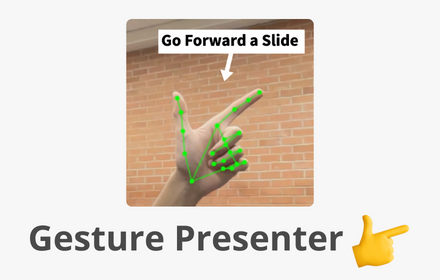
Gesture Presenter - Remote for Slides
Control Slides with just hand gestures!
256
★ 5.0

Web Presentation Clicker (on-stage.click)
Control your slideshow presentation with your phone in the simplest way possible. No app required.
36

Laser Pen
Laser Pen for Presentations
1.0K
★ 4.2
NextSlideApp
NextSlideApp
4

Remotely
Remotely enables collaborative presentations without requiring additional devices or apps.
18
★ 5.0

PowerSlides
Control Google Slides remotely. Pairs with the PowerSlides server to relay slide state and commands to the Even Realities app.
65

Searchlight Remote for Google Slides
Easily turn your smartphone into a Google Slides presentation remote
1.0K
★ 4.2

CueCard Extension
Browser extension for CueCard - syncs speaker notes from Google Slides
11
Data sourced from the Chrome Web Store · last verified Jun 11, 2026.