
Claude Usage Tracker
Track your Claude usage directly in Chrome
As of June 2026, Claude Usage Tracker has — users in the Productivity category.
Usersno change0%
—
—
Ratingno change0%
—
— reviews
Reviewsno change0%
—
Version
2.0.0
Manifest V3
History
1 snapshotsTracking since May 30, 2026.
Not enough history yet for this metric — the chart fills in as we collect more snapshots.
View as table
| Date | Users | Rating | Reviews | Version |
|---|---|---|---|---|
| May 30, 2026 | — | — | — | 2.0.0 |
| Now | — | — | — | 2.0.0 |
Permissions & access
- Permissions
- activeTabstoragenotificationsalarms
- Host access
- https://claude.ai/*
Screenshots

About
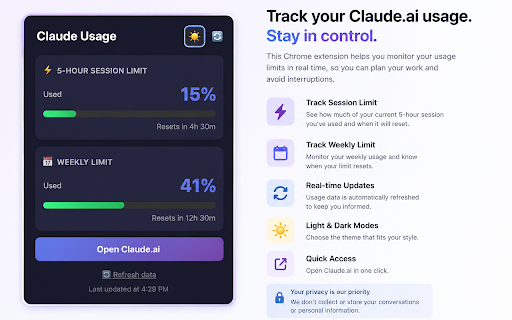
Claude Usage Tracker gives you instant visibility into your Claude AI usage limits — without digging through settings.

✅ WHAT IT DOES
• Shows your current 5-hour session usage and weekly limit at a glance
• Displays a live percentage badge directly on the Chrome toolbar icon
• Color-coded progress bars: green → orange → red as you approach limits
• Shows exact time remaining until your limits reset

🔔 SMART NOTIFICATIONS
• Get notified at 80% usage — before you hit the wall
• Critical alert at 90% so you can wrap up important conversations
• Auto-refreshes every 5 minutes in the background

🌍 MULTILINGUAL
• Automatically detects your language
• Supports English, French, and Spanish

🎨 LIGHT & DARK MODE
• Follows your system preference
• Toggle with one click

🔒 PRIVACY FIRST
• No data ever leaves your browser
• Uses Claude's own internal API with your existing session
• Zero tracking, zero analytics

⚡ ZERO SETUP
• Automatically detects your organization ID on first launch
• No API key required
• Works instantly if you're logged into Claude.ai

---
Perfect for Claude Pro users who want to manage their usage intelligently and never get caught off guard by a rate limit.

=== CATEGORY ===
Productivity

=== TAGS ===
claude, anthropic, AI, usage tracker, rate limit, productivity, claude pro

=== PRICING ===
Free
Technical
- Version
- 2.0.0
- Manifest
- V3
- Size
- 18.74KiB
- Min Chrome
- 88
- Languages
- 1
- Featured
- No
Metadata
- ID
- oajleoicijbbhmbgiieihghjejfebpea
- Developer ID
- u1f9f2a2fb2c859ba5703cf1a7be42114
- Developer Email
- [email protected]
- Created
- May 29, 2026
- Last Updated (Store)
- May 29, 2026
- Last Scraped
- Jun 12, 2026
- Website
- —
Data sourced from the Chrome Web Store · last verified Jun 12, 2026.