
JobPass — Quick Capture
One-click save of LinkedIn profiles, LinkedIn companies, and any company website into your JobPass account.
As of June 2026, JobPass — Quick Capture has — users in the Productivity category.
Usersno change0%
—
—
Ratingno change0%
—
— reviews
Reviewsno change0%
—
Version
1.0.1
Manifest V3
90-day change · In the last 90 days this extension 1 version update.
History
5 snapshotsTracking since May 5, 2026.
View as table
| Date | Users | Rating | Reviews | Version |
|---|---|---|---|---|
| May 5, 2026 | — | — | — | 1.0.0 |
| May 10, 2026 | — | — | — | 1.0.0 |
| May 22, 2026 | 1 | — | — | 1.0.1 |
| Jun 4, 2026 | 2 | — | — | 1.0.1 |
| Jun 10, 2026 | 1 | — | — | 1.0.1 |
| Now | — | — | — | 1.0.1 |
Permissions & access
- Permissions
- activeTabscripting
- Host access
- None declared
Screenshots



About
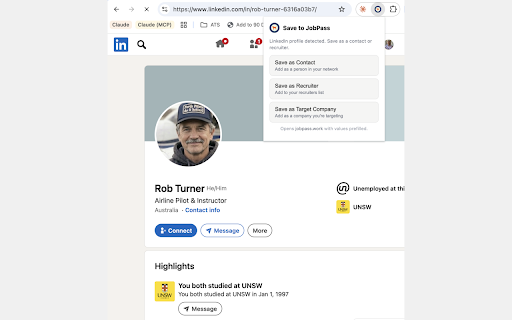
JobPass Quick Capture is the fastest way to grow your job-search network and target-company list while you browse.

While you're on:
• A LinkedIn profile (linkedin.com/in/...) — click the extension to save the person as a Contact (with name, role, company, location, email, phone, LinkedIn URL, and About section) or as a Recruiter.
• A LinkedIn company page (linkedin.com/company/...) — save the company with its name, logo, website, industry, size, headquarters, founded year, and specialties.
• Any other company website — save it as a Target Company with name, website, and favicon as logo.

When you click a button, the extension opens jobpass.work/dashboard in a new tab with the form already filled in. You review and click Save — nothing is sent anywhere until then.

This extension is built for users of JobPass (https://jobpass.work), an account is required to save data.

Privacy / data handling
This extension reads page content only when you click one of its buttons, on the active tab only. It does not run in the background, does not track browsing, does not send data to any server other than jobpass.work (and only as URL parameters when you click), and does not store anything locally.

Full policy: https://jobpass.work/privacy

Permissions justification
activeTab — needed to read the current tab's contents so we can pre-fill the form on jobpass.work. Granted only when the user clicks the extension button.
scripting — needed to run the small extraction function on the active tab so we can pull fields like name, company, and website. Combined with activeTab, this means access is scoped to the page the user explicitly clicks on; no persistent host access is requested.
Technical
- Version
- 1.0.1
- Manifest
- V3
- Size
- 18.75KiB
- Min Chrome
- 88
- Languages
- 1
- Featured
- No
Metadata
- ID
- oaijocdcfakjnokaagdcdgmgacpblcmj
- Developer ID
- uf5f63649c2eedeae3336c2ea03e0f982
- Developer Email
- [email protected]
- Created
- May 4, 2026
- Last Updated (Store)
- May 9, 2026
- Last Scraped
- Jun 10, 2026
- Website
- jobpass.work
- Support URL
- —
- Privacy Policy
- https://jobpass.work/privacy
Data sourced from the Chrome Web Store · last verified Jun 10, 2026.