
Flow Spending Guard
Set a credit budget for Google Flow. Confirm before each generation — works for video and image.
As of June 2026, Flow Spending Guard has 35 users in the Productivity category.
Usersno change0%
35
35
Ratingno change0%
—
— reviews
Reviewsno change0%
—
Version
1.1.3
Manifest V3
90-day change · In the last 90 days this extension 4 version updates.
History
7 snapshotsTracking since May 5, 2026.
View as table
| Date | Users | Rating | Reviews | Version |
|---|---|---|---|---|
| May 5, 2026 | — | — | — | 1.0.1 |
| May 10, 2026 | — | — | — | 1.0.1 |
| May 16, 2026 | 4 | — | — | 1.1.0 |
| May 22, 2026 | 17 | — | — | 1.1.1 |
| May 28, 2026 | 16 | — | — | 1.1.2 |
| Jun 4, 2026 | 31 | — | — | 1.1.2 |
| Jun 10, 2026 | 32 | — | — | 1.1.3 |
| Now | 35 | — | — | 1.1.3 |
Changelog
- May 22, 2026description
Flow Spending Guard helps you manage your Google Flow credit spending with a simple two-step confirmation flow. Works on both video and image generations.

How it works:
- Click the extension icon and choose your comfort limit: 0, 5, 10, 20, 50, 100, or 200 credits.
- When you press the send arrow on Google Flow, the extension checks the credit cost first.
- If the cost is within your limit, the arrow starts pulsing for 7 seconds — press it again to confirm.
- If the cost exceeds your limit, a friendly reminder appears so you can adjust settings or raise your limit.

Visual feedback at a glance:
- "check" circle confirms the cost has been read
- "approve" circle confirms the cost is within your limit
- The send arrow pulses green when ready to confirm
- Red indicators when the cost is over your limit

Works everywhere on Google Flow:
- Video generation pages (Veo models, any duration, any output count)
- Image generation pages (Nano Banana, Imagen, any aspect ratio)
- Edit pages (extending and modifying existing clips)

This is a personal awareness tool. It does not modify Google Flow, does not bypass any features, and does not change how credits work. It simply helps you stay mindful of your own credit spending.

Privacy: This extension does not collect, transmit, or store any personal data. All settings stay in your browser.
Flow Spending Guard helps you manage your Google Flow credit spending with a simple two-step confirmation flow. Works on video, image, character, and extend pages.

How it works:
- Click the extension icon and choose your comfort limit: 0, 5, 10, 20, 50, 100, or 200 credits.
- When you press the send arrow on Google Flow, the extension checks the credit cost first.
- If the cost is within your limit, the arrow starts pulsing for 7 seconds — press it again to confirm.
- If the cost exceeds your limit, a friendly reminder appears so you can adjust settings or raise your limit.

Optional "Allow Extend" toggle:
- The video Extend feature on edit pages costs 5 credits.
- When the toggle is OFF (default), extend is blocked with a helpful reminder.
- When the toggle is ON, extend always works regardless of your main limit. This only affects extend — other generations still respect your limit.

Visual feedback at a glance:
- "check" circle confirms the cost has been read
- "approve" circle confirms the cost is within your limit
- The send arrow pulses green when ready to confirm
- Red indicators when the cost is over your limit

Smart page detection:
- Main project pages (Veo models, any duration, any output count) — reads the cost from the popup
- Image generation pages (Nano Banana, Imagen, any aspect ratio) — reads the cost from the popup
- Character builder page — recognised as free (no popup needed)
- Image edit pages with only Nano Banana — recognised as free
- Video extend pages — fixed cost handling, never clicks model pills that would change the model
- Omni Flash on extend pages — clear message about variable 10-30 credit cost

This is a personal awareness tool. It does not modify Google Flow, does not bypass any features, and does not change how credits work. It simply helps you stay mindful of your own credit spending.

Privacy: This extension does not collect, transmit, or store any personal data. All settings stay in your browser.
- May 16, 2026description
Flow Spending Guard helps you manage your Google Flow credit spending with a simple two-step confirmation flow.

How it works:
- Click the extension icon and choose your comfort limit: 0, 5, 10, 20, 50, 100, or 200 credits.
- When you press the send arrow on Google Flow, the extension checks the credit cost first.
- If the cost is within your limit, the arrow starts pulsing for 7 seconds — press it again to confirm and create the video.
- If the cost exceeds your limit, a friendly reminder appears so you can adjust settings or raise your limit.

Visual feedback at a glance:
- "check" circle confirms the credit cost has been read
- "approve" circle confirms the cost is within your limit
- The send arrow pulses green when ready to confirm
- Red indicators when the cost is over your limit

Works everywhere on Google Flow:
- Main project pages (creating new videos)
- Edit pages (extending and modifying clips)

This is a personal awareness tool. It does not modify Google Flow, does not bypass any features, and does not change how credits work. It simply helps you stay mindful of your own credit spending.

Privacy: This extension does not collect, transmit, or store any personal data. All settings stay in your browser.
Flow Spending Guard helps you manage your Google Flow credit spending with a simple two-step confirmation flow. Works on both video and image generations.

How it works:
- Click the extension icon and choose your comfort limit: 0, 5, 10, 20, 50, 100, or 200 credits.
- When you press the send arrow on Google Flow, the extension checks the credit cost first.
- If the cost is within your limit, the arrow starts pulsing for 7 seconds — press it again to confirm.
- If the cost exceeds your limit, a friendly reminder appears so you can adjust settings or raise your limit.

Visual feedback at a glance:
- "check" circle confirms the cost has been read
- "approve" circle confirms the cost is within your limit
- The send arrow pulses green when ready to confirm
- Red indicators when the cost is over your limit

Works everywhere on Google Flow:
- Video generation pages (Veo models, any duration, any output count)
- Image generation pages (Nano Banana, Imagen, any aspect ratio)
- Edit pages (extending and modifying existing clips)

This is a personal awareness tool. It does not modify Google Flow, does not bypass any features, and does not change how credits work. It simply helps you stay mindful of your own credit spending.

Privacy: This extension does not collect, transmit, or store any personal data. All settings stay in your browser.
- May 16, 2026short_description
Set a credit budget for Google Flow. Confirm before each video — never spend credits by accident.
Set a credit budget for Google Flow. Confirm before each generation — works for video and image.
- May 10, 2026description
Flow Spending Guard helps you manage your Google Flow credit spending with confidence.

How it works:
- Click the extension icon and choose your comfort limit: 0, 5, 10, 20, 50, 100, or 200 credits.
- Before each generation on Google Flow, the extension reads the credit cost shown by Google Flow itself.
- If the cost is within your chosen limit, generation proceeds normally.
- If the cost exceeds your limit, a friendly reminder appears so you can review your settings before continuing.

This is a personal awareness tool. It does not modify Google Flow, does not bypass any features, and does not change how credits work. It simply reads what Google Flow already displays and helps you stay within your own spending preferences.

Perfect for:
- Users on free or limited credit plans who want to avoid surprises
- Teams sharing a credit pool
- Anyone who wants more mindful credit use

Privacy: This extension does not collect, transmit, or store any personal data. All settings stay in your browser.
Flow Spending Guard helps you manage your Google Flow credit spending with a simple two-step confirmation flow.

How it works:
- Click the extension icon and choose your comfort limit: 0, 5, 10, 20, 50, 100, or 200 credits.
- When you press the send arrow on Google Flow, the extension checks the credit cost first.
- If the cost is within your limit, the arrow starts pulsing for 7 seconds — press it again to confirm and create the video.
- If the cost exceeds your limit, a friendly reminder appears so you can adjust settings or raise your limit.

Visual feedback at a glance:
- "check" circle confirms the credit cost has been read
- "approve" circle confirms the cost is within your limit
- The send arrow pulses green when ready to confirm
- Red indicators when the cost is over your limit

Works everywhere on Google Flow:
- Main project pages (creating new videos)
- Edit pages (extending and modifying clips)

This is a personal awareness tool. It does not modify Google Flow, does not bypass any features, and does not change how credits work. It simply helps you stay mindful of your own credit spending.

Privacy: This extension does not collect, transmit, or store any personal data. All settings stay in your browser.
- May 10, 2026short_description
Helps you manage Google Flow credit spending. Set your comfort limit and get a friendly warning before generations that exceed it.
Set a credit budget for Google Flow. Confirm before each video — never spend credits by accident.
Permissions & access
- Permissions
- storagescriptingtabswebNavigation
- Host access
- https://labs.google/*
Screenshots


About
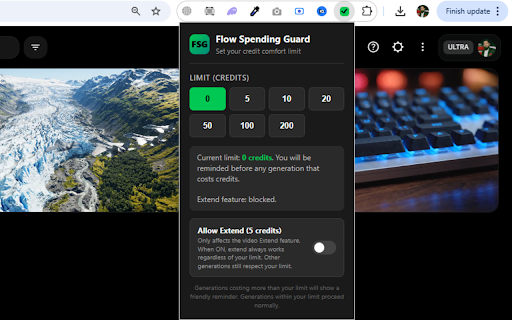
Flow Spending Guard helps you manage your Google Flow credit spending with a simple two-step confirmation flow. Works on video, image, character, and extend pages.

How it works:
- Click the extension icon and choose your comfort limit: 0, 5, 10, 20, 50, 100, or 200 credits.
- When you press the send arrow on Google Flow, the extension checks the credit cost first.
- If the cost is within your limit, the arrow starts pulsing for 7 seconds — press it again to confirm.
- If the cost exceeds your limit, a friendly reminder appears so you can adjust settings or raise your limit.

Optional "Allow Extend" toggle:
- The video Extend feature on edit pages costs 5 credits.
- When the toggle is OFF (default), extend is blocked with a helpful reminder.
- When the toggle is ON, extend always works regardless of your main limit. This only affects extend — other generations still respect your limit.

Visual feedback at a glance:
- "check" circle confirms the cost has been read
- "approve" circle confirms the cost is within your limit
- The send arrow pulses green when ready to confirm
- Red indicators when the cost is over your limit

Smart page detection:
- Main project pages (Veo models, any duration, any output count) — reads the cost from the popup
- Image generation pages (Nano Banana, Imagen, any aspect ratio) — reads the cost from the popup
- Character builder page — recognised as free (no popup needed)
- Image edit pages with only Nano Banana — recognised as free
- Video extend pages — fixed cost handling, never clicks model pills that would change the model
- Omni Flash on extend pages — clear message about variable 10-30 credit cost

This is a personal awareness tool. It does not modify Google Flow, does not bypass any features, and does not change how credits work. It simply helps you stay mindful of your own credit spending.

Privacy: This extension does not collect, transmit, or store any personal data. All settings stay in your browser.
Technical
- Version
- 1.1.3
- Manifest
- V3
- Size
- 48.11KiB
- Min Chrome
- 88
- Languages
- 1
- Featured
- No
Metadata
- ID
- oaicfkfcpagijamgdajpkbfbmpiledgn
- Developer ID
- u709dfdd8b475a85071f9ed6824ba86fa
- Developer Email
- [email protected]
- Created
- May 4, 2026
- Last Updated (Store)
- Jun 2, 2026
- Last Scraped
- Jun 10, 2026
- Website
- —
Data sourced from the Chrome Web Store · last verified Jun 10, 2026.