
Multi Search & Multi Jump
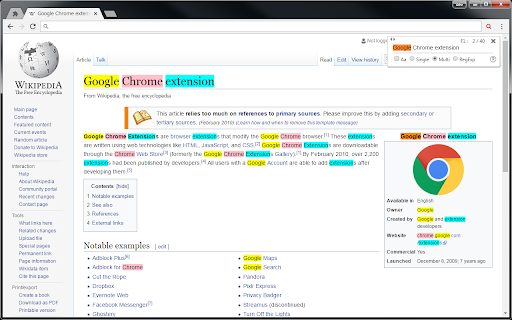
Searches web pages and PDF files, and highlights the text it finds.
As of June 2026, Multi Search & Multi Jump has 6,000 users and a 4.14/5 rating from 50 reviews in the Productivity category.
Usersno change0%
6.0K
6,000
Ratingno change0%
4.14
50 reviews
Reviewsno change0%
50
Version
0.3.2.7
Manifest V3
90-day change · In the last 90 days this extension 4 version updates.
History
6 snapshotsTracking since Apr 1, 2026.
View as table
| Date | Users | Rating | Reviews | Version |
|---|---|---|---|---|
| Apr 1, 2026 | 6.0K | 4.14 | 50 | 0.3.2.0 |
| Apr 6, 2026 | 6.0K | 4.14 | 50 | 0.3.2.0 |
| Apr 17, 2026 | 6.0K | 4.14 | 50 | 0.3.2.1 |
| Apr 27, 2026 | 6.0K | 4.14 | 50 | 0.3.2.1 |
| May 14, 2026 | 6.0K | 4.14 | 50 | 0.3.2.3 |
| Jun 6, 2026 | 6.0K | 4.14 | 50 | 0.3.2.6 |
| Now | 6.0K | 4.14 | 50 | 0.3.2.7 |
Changelog
- Apr 6, 2026short_description
You can jump to the search result for each search word.
Searches web pages and PDF files, and highlights the text it finds.
Permissions & access
- Permissions
- storageactiveTabscripting
- Host access
- https://publg.com/
Screenshots

About
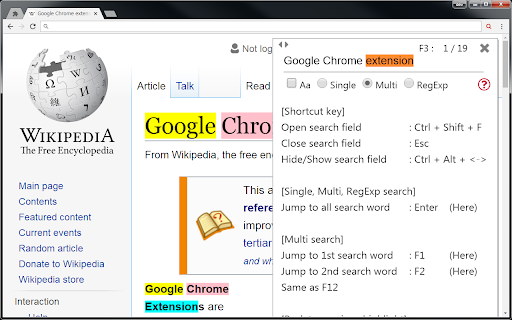
Since the search field does not disappear even if you click on the page, it can be searched continuously.

[About search]
In multi-word search, search words are separated by single-byte spaces.

Pressing the Enter key in the search field jumps to all search results.

When you press the F1 - F12 key, it jumps only to the search term of the number that was pressed.

[About display of search field]
Click the icon or display it with [Ctrl + Shift + F].

* If you display with the character selected, it automatically sets it as the search word.

Use the ESC key to hide the search field (finish a search).

You can make the screen easier to read by using Ctrl + Alt + <- or ->.
Technical
- Version
- 0.3.2.7
- Manifest
- V3
- Size
- 2.04MiB
- Min Chrome
- 88
- Languages
- 7
- Featured
- No
Metadata
- ID
- oahidkobkdbfbknbloljgpjbeaefgapa
- Developer ID
- uf88c4d5792c01a774e2d84900c1c4ded
- Developer Email
- [email protected]
- Created
- Mar 10, 2017
- Last Updated (Store)
- Jun 5, 2026
- Last Scraped
- Jun 23, 2026
- Website
- https://publg.com/
- Support URL
- —
- Privacy Policy
- —
Data sourced from the Chrome Web Store · last verified Jun 23, 2026.