
Dadan - Screen Recording & Annotation Tool
Record your mic, screen and camera with dadan. Share recorded video instantly with a link.
As of June 2026, Dadan - Screen Recording & Annotation Tool has 5,000 users and a 4.72/5 rating from 54 reviews in the Communication category.
Usersup 25.0 percent+25.0%
5.0K
5,000
Ratingup 0.4 percent+0.4%
4.72
54 reviews
Reviewsup 8.0 percent+8.0%
54
Version
5.1.1
Manifest V3
90-day change · In the last 90 days this extension gained 1.0K users, 2 version updates.
History
4 snapshotsTracking since Apr 16, 2026.
View as table
| Date | Users | Rating | Reviews | Version |
|---|---|---|---|---|
| Apr 16, 2026 | 4.0K | 4.70 | 50 | 5.0.7 |
| May 11, 2026 | 4.0K | 4.70 | 50 | 5.0.7 |
| May 28, 2026 | 4.0K | 4.71 | 51 | 5.0.7 |
| Jun 21, 2026 | 4.0K | 4.71 | 52 | 5.0.8 |
| Now | 5.0K | 4.72 | 54 | 5.1.1 |
Changelog
- Jun 21, 2026description
Record your mic, screen and camera with dadan. Share recorded video instantly with a link.

Dadan: Engage, Interact, and Manage Your Video Content
Do you record a lot of videos, but wonder if they are truly effective? Are your viewers engaged? Do they take the right actions after watching your content?

Dadan is your comprehensive platform to manage your entire video workflow. More than just a screen recording tool, Dadan enables you to create high-quality, interactive screen and webcam videos with audio, making every recording meaningful and action-driven.

Key Features
✨ Create and Record ✨
🎥 Record your screen, webcam, or both simultaneously
🖱️ Highlight your mouse to help viewers follow your actions
✍️ Annotate on screen while recording to draw attention to key elements
✂️ Use the built-in online video editor to trim clips, add annotations, update voiceovers, and apply zoom functions

🛠️ Use Cases for Screen Recorder 🛠️
🛍️ Product Demos: Showcase your software or product features clearly and professionally
📘 Onboarding and Training: Guide new employees or users with step-by-step visual instructions
🎧 Customer Support: Explain solutions visually to reduce confusion and support tickets
📢 Project Updates: Share progress and walkthroughs with stakeholders or team members
🎓 Educational Content: Create video lessons, tutorials, or walkthroughs for learners

📅 Meeting Recording 📅
📌 Connect with Google and Outlook calendars to automatically record scheduled meetings
📝 Record and transcribe meetings into downloadable VTT files
🌎 Translate captions into over 100 languages for broader accessibility

🧩 Video Interactions 🧩
🔘 Call-to-action buttons
📊 Polls
❓ Quizzes
✅ True or False questions
💜 Ratings
✍️ Open-ended questions
📝 Custom text messages
🤖 Use AI to automatically generate relevant interactions
📨 Embed forms directly into your videos to capture viewer responses

🎨 Custom Branding 🎨
🖼️ Upload your logo to personalize your videos
🎨 Set your player page color to match your brand identity
🌐 Connect your own custom domain for a seamless viewer experience

🔒 Privacy Controls 🔒
🔑 Protect videos with passwords
⏳ Set link expiry dates and schedule availability
📵 Disable downloads to safeguard content
🚫 Restrict or revoke access at any time by making videos private

📤 Effortless Sharing 📤
📧 Share videos via email or direct link
👥 Create team workspaces for collaboration
🗂️ Organize videos using folders
📺 Build and share playlists or a public video profile

With Dadan, you do not just create videos; you create experiences that engage, inform, and drive action. Start turning your video content into an interactive and productive asset today.
Dadan 2.0: Record, Edit, Analyze, and Share Videos from One Platform

Dadan is more than a screen recorder. It's a complete video platform that helps you create, edit, share, analyze, and generate results from your videos.

Whether you're creating product demos, training content, customer support videos, sales outreach, podcasts, or team updates, Dadan gives you everything you need in one place.

✨ What's New in Dadan 2.0 ✨

🏠 Brand New Dashboard
• Redesigned Home experience with guides, tutorials, and use-case videos
• Cleaner video library with dedicated spaces for recordings, meetings, and archives
• Improved search across file names, transcripts, and tags
• More filters and sorting options
• Drag-and-drop uploads directly into folders
• Clone videos in a click
• Dropbox integration
• Persistent teleprompter scripts and script library

🎬 Advanced Video Editor
• Enhanced timeline editing
• Upload your own video, audio, and image assets
• Stock video, image, music, and sound effect library
• Templates for faster content creation
• Brand Kits for logos, colors, videos, GIFs, and images
• Captions and subtitle editing
• Blur sensitive sections
• Zoom into important moments
• Resize and crop videos
• Entrance and exit animations
• Playback speed controls
• Audio controls

📊 Advanced Viewer Analytics
• Track views, impressions, and watch duration
• Understand viewer engagement and retention
• Monitor CTA clicks and interaction performance
• Analyze video performance across teams and workspaces
• Identify your top-performing content

📅 Interactive CTAs & Lead Generation
• Add customizable Call-to-Action buttons
• Integrate Calendly directly into videos
• Capture leads with forms
• Track CTA performance through analytics
• Customize CTA colors with custom hex values

🎙️ Audio-Only Recording
• Record audio without using your camera
• Download recordings as MP3 or video
• Visual audio waveforms
• Perfect for podcasts, voice notes, and audio content

🖥️ Native Desktop Apps
• Updated Mac and Windows applications
• Improved performance and stability
• Zoom while recording
• Local video support for longer sessions
• Dedicated Mac versions for Intel and Apple Silicon

🎥 Screen & Webcam Recording
• Record your screen, webcam, or both
• Record microphone and system audio
• Highlight your mouse cursor
• Annotate while recording
• Share instantly with a link

📅 Meeting Recording
• Connect Google Calendar and Outlook
• Automatic meeting recording
• AI-generated transcripts, notes, and summaries
• Downloadable captions
• Translate captions into 100+ languages

🧩 Interactive Videos
• Call-to-action buttons
• Polls
• Quizzes
• True or False questions
• Ratings
• Open-ended questions
• Custom text interactions
• AI-generated interactions
• Lead capture forms

🎨 Branding & Customization
• Upload logos
• Custom player branding
• Custom domains
• Personalized viewing experiences

🔒 Privacy & Security
• Password protection
• Expiry dates
• Access controls
• Privacy settings
• GDPR-compliant infrastructure

📤 Sharing & Collaboration
• Share with links or email
• Team workspaces
• Folders and organization tools
• Playlists and public profiles
• Collaboration features

⚡ Faster Video Delivery
• Powered by Bunny.net's global edge network
• Faster streaming worldwide
• Improved performance across regions
• Reliable and secure infrastructure

Dadan helps you do more than create videos.
It helps you understand what happens after you hit send.
Permissions & access
- Permissions
- storagecookiesoffscreentabsdownloadsalarmsscripting
- Host access
- https://*/*, http://*/*, <all_urls>
Screenshots


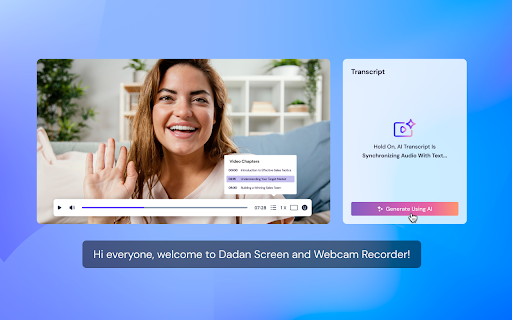


About
Dadan 2.0: Record, Edit, Analyze, and Share Videos from One Platform

Dadan is more than a screen recorder. It's a complete video platform that helps you create, edit, share, analyze, and generate results from your videos.

Whether you're creating product demos, training content, customer support videos, sales outreach, podcasts, or team updates, Dadan gives you everything you need in one place.

✨ What's New in Dadan 2.0 ✨

🏠 Brand New Dashboard
• Redesigned Home experience with guides, tutorials, and use-case videos
• Cleaner video library with dedicated spaces for recordings, meetings, and archives
• Improved search across file names, transcripts, and tags
• More filters and sorting options
• Drag-and-drop uploads directly into folders
• Clone videos in a click
• Dropbox integration
• Persistent teleprompter scripts and script library

🎬 Advanced Video Editor
• Enhanced timeline editing
• Upload your own video, audio, and image assets
• Stock video, image, music, and sound effect library
• Templates for faster content creation
• Brand Kits for logos, colors, videos, GIFs, and images
• Captions and subtitle editing
• Blur sensitive sections
• Zoom into important moments
• Resize and crop videos
• Entrance and exit animations
• Playback speed controls
• Audio controls

📊 Advanced Viewer Analytics
• Track views, impressions, and watch duration
• Understand viewer engagement and retention
• Monitor CTA clicks and interaction performance
• Analyze video performance across teams and workspaces
• Identify your top-performing content

📅 Interactive CTAs & Lead Generation
• Add customizable Call-to-Action buttons
• Integrate Calendly directly into videos
• Capture leads with forms
• Track CTA performance through analytics
• Customize CTA colors with custom hex values

🎙️ Audio-Only Recording
• Record audio without using your camera
• Download recordings as MP3 or video
• Visual audio waveforms
• Perfect for podcasts, voice notes, and audio content

🖥️ Native Desktop Apps
• Updated Mac and Windows applications
• Improved performance and stability
• Zoom while recording
• Local video support for longer sessions
• Dedicated Mac versions for Intel and Apple Silicon

🎥 Screen & Webcam Recording
• Record your screen, webcam, or both
• Record microphone and system audio
• Highlight your mouse cursor
• Annotate while recording
• Share instantly with a link

📅 Meeting Recording
• Connect Google Calendar and Outlook
• Automatic meeting recording
• AI-generated transcripts, notes, and summaries
• Downloadable captions
• Translate captions into 100+ languages

🧩 Interactive Videos
• Call-to-action buttons
• Polls
• Quizzes
• True or False questions
• Ratings
• Open-ended questions
• Custom text interactions
• AI-generated interactions
• Lead capture forms

🎨 Branding & Customization
• Upload logos
• Custom player branding
• Custom domains
• Personalized viewing experiences

🔒 Privacy & Security
• Password protection
• Expiry dates
• Access controls
• Privacy settings
• GDPR-compliant infrastructure

📤 Sharing & Collaboration
• Share with links or email
• Team workspaces
• Folders and organization tools
• Playlists and public profiles
• Collaboration features

⚡ Faster Video Delivery
• Powered by Bunny.net's global edge network
• Faster streaming worldwide
• Improved performance across regions
• Reliable and secure infrastructure

Dadan helps you do more than create videos.
It helps you understand what happens after you hit send.
Technical
- Version
- 5.1.1
- Manifest
- V3
- Size
- 9.31MiB
- Min Chrome
- 88
- Languages
- 1
- Featured
- Yes
Metadata
- ID
- oagkbgolfdnkknkjomnggnhmnlfmgdod
- Developer ID
- ucfb059c6a2caeeabb770ddfc85262da4
- Developer Email
- [email protected]
- Created
- Aug 22, 2021
- Last Updated (Store)
- Jun 17, 2026
- Last Scraped
- Jun 21, 2026
- Website
- dadan.io
- Support URL
- —
- Privacy Policy
- https://dadan.io/privacy-policy/
Similar extensions
Alternatives to Dadan - Screen Recording & Annotation Tool, ranked by description similarity.

GoDAM - Screen Recorder & Annotation Tool
Record your screen, explain clearly using the pen or highlighter tools, store videos directly in your GoDAM workspace.
74
★ 5.0
ScreenPal - Screen Recorder & Video Editor
Record your screen & webcam, take screenshots, edit videos & images - easy & free!
100.0K
★ 4.3

Easy Screen Record
Screen Recorder Extension for Chrome
575
★ 5.0
Gan.AI - Free Screen & Camera Recorder
Record your screen and camera in a single click, and instantly share it with link, all for free
2.0K
★ 4.7

Invido - Webcam & Screen Recorder
Record, share and track your videos
94
★ 4.5

Kommodo Screen Recorder & SOP
Record screen and get a magical SOP with an AI Summary
50.0K
★ 4.7

RecordMate - Smart Screen Recorder
Record your screen with automatic cursor-following zoom effects. Create engaging demos and tutorials.
35

EdithPro - Screen Recorder & Screen Capture
EdithPro - Screen Recorder & Screen Capture
9
★ 5.0
Data sourced from the Chrome Web Store · last verified Jun 21, 2026.