
Time Zone Planner
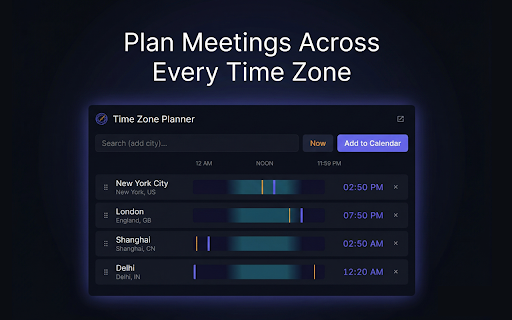
The ultimate time zone converter & meeting planner. Visually sync global clocks, find overlapping hours, and export to Calendar!
As of June 2026, Time Zone Planner has 10 users and a 5.00/5 rating from 2 reviews in the Workflow & Planning category.
Usersno change0%
10
10
Ratingno change0%
5.00
2 reviews
Reviewsno change0%
2
Version
3.0
Manifest V3
90-day change · In the last 90 days this extension 2 version updates.
History
4 snapshotsTracking since Apr 5, 2026.
View as table
| Date | Users | Rating | Reviews | Version |
|---|---|---|---|---|
| Apr 5, 2026 | — | — | — | 1.0 |
| Apr 18, 2026 | — | — | — | 1.0 |
| May 2, 2026 | 8 | 5.00 | 2 | 2.1 |
| Jun 2, 2026 | 9 | 5.00 | 2 | 3.0 |
| Now | 10 | 5.00 | 2 | 3.0 |
Changelog
- May 2, 2026description
Stop asking "what time is it for you?"

Time Zone Planner eliminates time zone math so you can focus on what matters — getting the right people in the same room at the right time. Whether you're scheduling standups with a distributed engineering team, pitching to clients in Tokyo, or calling family across the Atlantic, just open the extension and see every clock at once.

No conversions. No Googling "EST to IST." Just a single, elegant view of the world's time.

✨ Key Features

⏱️ Visual Timeline Scrubbing
Hover across a color-coded day/night timeline and watch every city's clock update in real time. Find the overlapping window where everyone is awake — in seconds, not minutes.

✏️ Editable Clocks
Click any city's time to type in a specific hour. Every other city instantly recalculates. Perfect for working backwards from a fixed meeting slot.

📅 One-Click Google Calendar Export
Found the perfect time? Hit "Add to Calendar" and a pre-filled Google Calendar event opens instantly — complete with synchronized times for every city in the event notes.

🌍 Global City Search
Search and pin cities from every continent. Your list saves and syncs automatically across all your signed-in Chrome browsers via Chrome Sync.

↕️ Drag & Drop Reordering
Arrange your cities by priority, team, or region. Your layout persists exactly as you set it.

🎨 Dual-Theme Design
A refined dark and light theme that adapts to your preference. Click the logo to toggle instantly — your choice is remembered between sessions.

🪟 Floating Pop-Out Window
Pop the extension into a standalone window that floats above your work. Keep global time visible while you write emails, join calls, or browse.

Who Is This For?

→ Remote teams coordinating across time zones
→ Freelancers & consultants booking international client calls
→ Recruiters scheduling interviews across borders
→ Anyone with family, friends, or colleagues on the other side of the world

Time zone math is a solved problem. Install Time Zone Planner and never do it again.
Stop asking "what time is it for you?"

Time Zone Planner is the most elegant, interactive way to coordinate across global clocks. Whether you are a distributed engineering team, an international recruiter, or a digital nomad, this extension eliminates the friction of scheduling across borders.

No conversions. No Googling "EST to IST." Just a single, elegant view of the world's time.

Key Features

Visual Timeline Scrubbing
Hover across a color-coded day/night timeline and watch every city's clock update in real time. Find the overlapping window where everyone is awake — in seconds, not minutes.

Floating Pop-Out Window
Pop the extension into a standalone window that floats above your work. Keep global time visible while you write emails, join calls, or browse.

One-Click Calendar Export
Found the perfect time? Hit "Add to Calendar" and a pre-filled calendar event opens instantly — complete with synchronized times for every city in the event notes. We support Google and Outlook web seamlessly

Global City Search
Search and pin cities from every continent. Your list saves and syncs automatically across all your signed-in Chrome browsers via Chrome Sync.

Power User Customization
-- 24 hour and 12 hour formats
-- Drag and drop reordering
-- Customize city and time zone aliases (ex. "London Office", "Dev Team")
-- Chrome sync keeps your selections across devices

Who Is This For?

→ Remote teams coordinating across time zones
→ Freelancers & consultants booking international client calls
→ Recruiters scheduling interviews across borders
→ Anyone with family, friends, or colleagues on the other side of the world
- May 2, 2026short_description
Plan meetings across time zones. Visual timeline, Google Calendar export & dual-theme design.
The ultimate time zone converter & meeting planner. Visually sync global clocks, find overlapping hours, and export to Calendar!
- Apr 18, 2026description
Time Zone Sync companion for coordinating across global borders. Whether you are scheduling international meetings with remote teams, coordinating with overseas clients, or just catching up with friends across the world, this tool makes time zone math a thing of the past.

With a beautiful, lightning-fast interface, all it takes is a glance to know exactly what time it is everywhere. Simply hover over the interactive timeline to look into the future—or the past—and see the clocks instantly adapt across all your saved cities.

✨ Key Features

🌍 Global City Search
Easily search and add cities from around the world. Your customized list automatically saves and syncs across your signed-in Chrome browsers.

⏱️ Interactive Timeline Scrubbing
A visual, color-coded timeline lets you seamlessly hover and scroll through the hours of the day to find the perfect overlapping meeting time without doing complex mental conversions.

📅 One-Click Google Calendar Export
Found the perfect time? Click "Add to Calendar" to immediately jump into a pre-filled Google Calendar event. Your meeting details and the synchronized times for all your selected cities are automatically injected into the event notes.

↕️ Drag & Drop Reordering
Organize your cities the way you want. Just drag and drop to rearrange your list by priority, region, or personal preference.

💻 A Premium Dark-Mode Aesthetic
Designed with readability and eye comfort in mind, the sleek, modern interface is engineered to get out of your way and look great doing it.

🪟 Floating Pop-Out Mode
Need to keep an eye on international times while working? Pop the interface out into a standalone floating window that stays out of your way.
Stop asking "what time is it for you?"

Time Zone Planner eliminates time zone math so you can focus on what matters — getting the right people in the same room at the right time. Whether you're scheduling standups with a distributed engineering team, pitching to clients in Tokyo, or calling family across the Atlantic, just open the extension and see every clock at once.

No conversions. No Googling "EST to IST." Just a single, elegant view of the world's time.

✨ Key Features

⏱️ Visual Timeline Scrubbing
Hover across a color-coded day/night timeline and watch every city's clock update in real time. Find the overlapping window where everyone is awake — in seconds, not minutes.

✏️ Editable Clocks
Click any city's time to type in a specific hour. Every other city instantly recalculates. Perfect for working backwards from a fixed meeting slot.

📅 One-Click Google Calendar Export
Found the perfect time? Hit "Add to Calendar" and a pre-filled Google Calendar event opens instantly — complete with synchronized times for every city in the event notes.

🌍 Global City Search
Search and pin cities from every continent. Your list saves and syncs automatically across all your signed-in Chrome browsers via Chrome Sync.

↕️ Drag & Drop Reordering
Arrange your cities by priority, team, or region. Your layout persists exactly as you set it.

🎨 Dual-Theme Design
A refined dark and light theme that adapts to your preference. Click the logo to toggle instantly — your choice is remembered between sessions.

🪟 Floating Pop-Out Window
Pop the extension into a standalone window that floats above your work. Keep global time visible while you write emails, join calls, or browse.

Who Is This For?

→ Remote teams coordinating across time zones
→ Freelancers & consultants booking international client calls
→ Recruiters scheduling interviews across borders
→ Anyone with family, friends, or colleagues on the other side of the world

Time zone math is a solved problem. Install Time Zone Planner and never do it again.
- Apr 18, 2026short_description
Coordinate across global timezones smoothly.
Plan meetings across time zones. Visual timeline, Google Calendar export & dual-theme design.
- Apr 18, 2026name
Time Zone Sync
Time Zone Planner
Permissions & access
- Permissions
- storage
- Host access
- None declared
Screenshots


About
Stop asking "what time is it for you?"

Time Zone Planner is the most elegant, interactive way to coordinate across global clocks. Whether you are a distributed engineering team, an international recruiter, or a digital nomad, this extension eliminates the friction of scheduling across borders.

No conversions. No Googling "EST to IST." Just a single, elegant view of the world's time.

Key Features

Visual Timeline Scrubbing
Hover across a color-coded day/night timeline and watch every city's clock update in real time. Find the overlapping window where everyone is awake — in seconds, not minutes.

Floating Pop-Out Window
Pop the extension into a standalone window that floats above your work. Keep global time visible while you write emails, join calls, or browse.

One-Click Calendar Export
Found the perfect time? Hit "Add to Calendar" and a pre-filled calendar event opens instantly — complete with synchronized times for every city in the event notes. We support Google and Outlook web seamlessly

Global City Search
Search and pin cities from every continent. Your list saves and syncs automatically across all your signed-in Chrome browsers via Chrome Sync.

Power User Customization
-- 24 hour and 12 hour formats
-- Drag and drop reordering
-- Customize city and time zone aliases (ex. "London Office", "Dev Team")
-- Chrome sync keeps your selections across devices

Who Is This For?

→ Remote teams coordinating across time zones
→ Freelancers & consultants booking international client calls
→ Recruiters scheduling interviews across borders
→ Anyone with family, friends, or colleagues on the other side of the world
Technical
- Version
- 3.0
- Manifest
- V3
- Size
- 840KiB
- Min Chrome
- 88
- Languages
- 1
- Featured
- No
Metadata
- ID
- npomnlpajgmdlelaiilkhdaabojmjipo
- Developer ID
- u3c36fab36371f5983a90a9dc87f27d5d
- Developer Email
- [email protected]
- Created
- Apr 5, 2026
- Last Updated (Store)
- Apr 28, 2026
- Last Scraped
- Jun 8, 2026
- Website
- —
- Support URL
- —
Data sourced from the Chrome Web Store · last verified Jun 8, 2026.