
Dates & Days Calculator
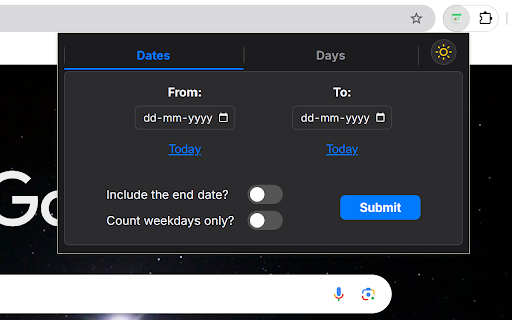
Calculate the duration between two dates or find the date by adding/subtracting days, with an optional weekday-only mode.
As of June 2026, Dates & Days Calculator has 138 users and a 4.00/5 rating from 4 reviews in the Productivity category.
Usersup 13.1 percent+13.1%
138
138
Ratingno change0%
4.00
4 reviews
Reviewsno change0%
4
Version
3.1.0
Manifest V3
90-day change · In the last 90 days this extension 1 version update.
History
9 snapshotsTracking since Apr 1, 2026.
View as table
| Date | Users | Rating | Reviews | Version |
|---|---|---|---|---|
| Apr 1, 2026 | 122 | 4.00 | 4 | 3.0.0 |
| Apr 18, 2026 | 124 | 4.00 | 4 | 3.0.0 |
| Apr 24, 2026 | 127 | 4.00 | 4 | 3.1.0 |
| Apr 30, 2026 | 125 | 4.00 | 4 | 3.1.0 |
| May 7, 2026 | 126 | 4.00 | 4 | 3.1.0 |
| May 12, 2026 | 129 | 4.00 | 4 | 3.1.0 |
| May 24, 2026 | 138 | 4.00 | 4 | 3.1.0 |
| May 31, 2026 | 131 | 4.00 | 4 | 3.1.0 |
| Jun 6, 2026 | 136 | 4.00 | 4 | 3.1.0 |
| Now | 138 | 4.00 | 4 | 3.1.0 |
Changelog
- Apr 18, 2026description
A user-friendly Chrome extension that makes managing dates effortless! Quickly calculate the number of days between two dates or add/subtract days and find the resultant date. With an option to count only workdays, it’s perfect for event planning, managing deadlines, or counting down to your next vacation - all with a sleek and minimalistic interface that also supports dark theme to keep your eyes comfy!


How to Use:

1. Install the Extension: Click "Add to Chrome."
2. Pin It: From the "Extensions" menu, pin the extension for quick access.
3. Launch: Click the icon in your toolbar to open the extension.
4. Input Dates: Enter a start and end date or select "Today" for the current date.
5. Customize Options: Choose additional settings like workdays-only (optional).
6. View Results: Click "Submit" for an instant result!


If you have any suggestions, feel free to email me at: [email protected].
A user-friendly Chrome extension that makes managing dates effortless! Quickly calculate the number of days between two dates or add/subtract days and find the resultant date. With an option to count only workdays, it’s perfect for event planning, managing deadlines, or counting down to your next vacation - all with a sleek and minimalistic interface that also supports dark theme to keep your eyes comfy!

v3.1 - Now with an option to copy your result!


How to Use:

1. Install the Extension: Click "Add to Chrome."
2. Pin It: From the "Extensions" menu, pin the extension for quick access.
3. Launch: Click the icon in your toolbar to open the extension.
4. Input Dates: Enter a start and end date or select "Today" for the current date.
5. Customize Options: Choose additional settings like workdays-only (optional).
6. View Results: Click "Submit" for an instant result!


If you have any suggestions, feel free to email me at: [email protected].
Permissions & access
- Permissions
- storage
- Host access
- None declared
Screenshots



About
A user-friendly Chrome extension that makes managing dates effortless! Quickly calculate the number of days between two dates or add/subtract days and find the resultant date. With an option to count only workdays, it’s perfect for event planning, managing deadlines, or counting down to your next vacation - all with a sleek and minimalistic interface that also supports dark theme to keep your eyes comfy!

v3.1 - Now with an option to copy your result!


How to Use:

1. Install the Extension: Click "Add to Chrome."
2. Pin It: From the "Extensions" menu, pin the extension for quick access.
3. Launch: Click the icon in your toolbar to open the extension.
4. Input Dates: Enter a start and end date or select "Today" for the current date.
5. Customize Options: Choose additional settings like workdays-only (optional).
6. View Results: Click "Submit" for an instant result!


If you have any suggestions, feel free to email me at: [email protected].
Technical
- Version
- 3.1.0
- Manifest
- V3
- Size
- 15.19KiB
- Min Chrome
- 88
- Languages
- 1
- Featured
- No
Metadata
- ID
- npnnjlofhijeaecpihpocodgaelhilkd
- Developer ID
- uec0de1b8ddebb4971e966621613ede26
- Developer Email
- [email protected]
- Created
- Oct 3, 2024
- Last Updated (Store)
- Apr 4, 2026
- Last Scraped
- Jun 6, 2026
- Website
- —
- Support URL
- —
- Privacy Policy
- —
Similar extensions
Alternatives to Dates & Days Calculator, ranked by description similarity.

Date Counter
Calculate the number of days between two dates.
14
★ 5.0

Date Jump
Effortlessly calculate future/past dates. ⚡ Simply input a date & add/subtract days. Ideal for trip planning, deadlines, & more!
14

Date to Date Calculator
Date to Date Calculator.
76

Weeks to Days Converter
Instantly convert weeks to days and days to weeks.
—
Today's Date
Easy-to-use and convenient display of the current full date with support for global and religious calendars, languages, and time…
420
★ 4.0

Date Interval Days Calculator
This extension calculates the number of calendar days and working days between two selected dates.
1

Hours to Days
Convert hours to days by selecting text in a webpage.
1

Time Calculator
Comprehensive time calculations - add, subtract, compare times and dates, work hours, and more
42
★ 5.0
Data sourced from the Chrome Web Store · last verified Jun 6, 2026.